Choose Recruiters only when your job search needs discretion, as it does for most executives and for anyone still employed in a sensitive sector. Choose the public Open to Work frame when you are unemployed, returning after a gap or new to Canada and need visibility quickly. Both settings feed the same recruiter search tools. What differs is who is told, and how much a profile that reads as a hiring decision is worth once someone opens it.
The setting only gets you found. Whether a recruiter acts depends on your headline, your keywords and the resume behind the profile. That is why the decision is worth making deliberately rather than by default.
TL;DR
- All LinkedIn members shows your status to everyone, including people at your current company, and adds the green #OpenToWork photo frame.
- Recruiters only shows your status solely to people using LinkedIn Recruiter, with no frame. LinkedIn takes steps to hide it from recruiters at your current employer but states it cannot guarantee complete privacy.
- Employed, senior or working in a discreet field such as banking or government: Recruiters only is the usual choice. Unemployed, re-entering or newly arrived: the public frame gives the fastest signal.
- You can switch at any time in the Open to Work box on your profile, and the frame disappears as soon as you save.
- Neither setting compensates for a weak headline, thin keywords or an outdated resume.
Table of Contents
- What each setting actually does
- How recruiters use these signals
- How private is Recruiters only?
- Which setting fits which situation
- How to change the setting
- What the setting cannot do
- Where we would start
- Getting the documents ready before you switch it on
- FAQ
- Sources
What each setting actually does
LinkedIn’s Open to Work feature lets you list the job titles, locations, start date and employment types you want. You then pick who sees that information. LinkedIn’s Help Center describes the options as follows.
| Setting | Who can see it | Green photo frame | Main risk |
|---|---|---|---|
| All LinkedIn members | Everyone, including recruiters and colleagues at your current company | Yes | Your employer, clients and competitors can see it |
| Recruiters only | People using LinkedIn Recruiter, the paid tool recruiters use to search candidates | No | Privacy is protected but not guaranteed |
| Visible only to you | No one | No | Does not make you more discoverable; preferences only tailor your job recommendations |
The third option is useful if you want better job suggestions without signalling anything. It does not put you in front of recruiters, so for an active search it is not the setting you are choosing between.
How recruiters use these signals
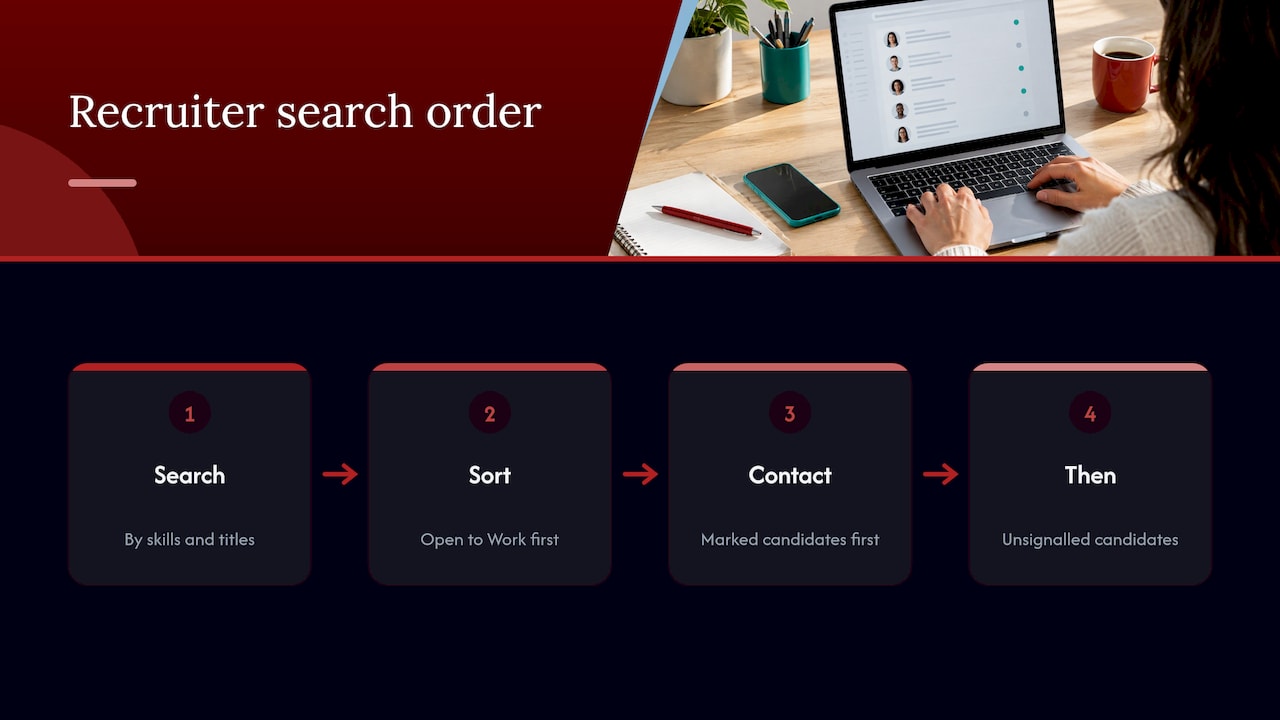
Recruiters search by skills and titles first, then narrow the list. One recruiting manager told Forbes she builds a list from a skills search, sorts for candidates marked Open to Work and contacts them first, and only then moves on to candidates who have not signalled. That is the case for turning the feature on in some form: a marked profile moves up the contact order.
In practice, this means the setting works only if you already appear in the search. If your profile lacks the terms a recruiter types, the status never gets seen. Our guide to placing LinkedIn keywords for jobs covers where those terms belong in your headline, About section and experience entries.
How private is Recruiters only?
LinkedIn is explicit that the setting is not absolute. Its Help Center says it takes steps to prevent Recruiter users at your current company from seeing your shared career interests, but it cannot guarantee complete privacy. Business Insider’s guide to searching quietly repeats the same limit.
The practical conclusion is to choose the setting as if there is a small chance your employer could see it. Three habits reduce that chance:
- Keep your current employer listed accurately on your profile, with the company page selected rather than typed as free text, so LinkedIn can match it.
- Make your preferences specific. A narrow list of target titles reveals less than a broad statement that you are open to anything.
- Do not pair a private setting with public signals that say the opposite, such as a sudden profile rewrite announced in a post or a headline reading “seeking new opportunities.”
An important point for senior candidates: executive searches often run through retained firms and board contacts, where a green frame on a CFO or COO profile can raise questions the candidate never intended to answer. For that reason, discretion is usually the default at that level. Our LinkedIn for executives guide sets out how to build a profile that attracts search firms without announcing a search.
Which setting fits which situation
There is no single correct answer, and a career specialist quoted by Forbes put it plainly: the choice is personal, depending on how comfortable you are declaring a search publicly, and the feature is only one passive part of a job hunt. These are the situations we see most often among the people we write for.
Executives and senior leaders
Use Recruiters only. Your search is likely to be confidential, your board, peers and direct reports can see your profile, and the people most likely to approach you are search professionals who already have access to Recruiter. The profile itself should do the work: a headline that states your scope, such as P&L ownership or the transformation you led, and an About section that reads as a leadership statement.
Professionals still employed
Recruiters only is the sensible starting point, particularly in banking, government and large consulting, where a public signal can be read poorly by colleagues. A Canadian staffing firm’s recruitment manager suggests a hybrid: leave the public banner up for about two weeks to generate early interest, then switch to Recruiters only so you stay discoverable without a permanent signal. That works best when your employer is not likely to look at your profile in those two weeks, which you are best placed to judge.
Returning to work after a gap
The public frame is a reasonable choice. You have no employer to protect, and the frame tells your network and recruiters you are available. Pair it with an About section that explains your direction in a sentence or two, so the gap is framed by what you are targeting next rather than left as an open question. Our guide on refreshing a resume for a mid-career transition addresses how to present that move on the resume itself.
Newcomers to Canada
If you are job hunting openly and not yet employed here, public visibility helps because you are building a Canadian network from scratch. Your profile matters more than the frame: use Canadian job-title conventions, list your location as the Canadian city you are targeting, and describe prior roles in terms a Canadian recruiter recognises. Our LinkedIn profile checklist for Canadian job seekers walks through those details.
Healthcare and public-sector candidates
For nurses and other clinicians, recruiters search by licence, specialty and setting, so those terms need to be explicit on the profile. If you work in a public body or a small clinical community where colleagues know one another, Recruiters only keeps your search quieter. For federal government applications, remember that the application itself is typically made through the government’s own hiring system, so your LinkedIn profile supports your search rather than replaces the formal resume.
How to change the setting
The controls sit on your profile and take under a minute.
- Open your profile and find the Open to Work box near the top.
- Select the edit icon.
- Under visibility, choose All LinkedIn members, Recruiters only or Visible only to you.
- Select Save.
Moving from the public setting to Recruiters only removes the green frame from your photo straight away, and people viewing your profile will not see that anything changed, according to the Altis guide. Deleting the feature outright turns off both the public frame and the recruiter-only visibility, so you cannot keep one while removing the other. We also set out the process step by step in our guide to setting up LinkedIn Open to Work.
LinkedIn may email you to ask whether you are still open to work if you stop responding to recruiter messages, and it can turn the feature off if you do not confirm. If you are mid-search, watch your inbox for that message so your status does not lapse without your noticing.
What the setting cannot do
A status makes you easier to find and easier to contact. It does not make a profile persuasive once it is opened. A recruiter who finds you through a skills search will read three things in seconds: your headline, the first lines of your About section and your most recent role. The same recruiter will then compare the profile with the resume you submit. If the two tell different stories, the status was wasted.
Visibility through activity is a separate lever. Career-development professionals writing for Canada’s career practitioners note that thoughtful commenting can raise visibility and lead to profile views and conversations, and that posting is not always the right starting point for people who are hesitant. For a discreet senior search, a few considered comments on industry posts keep you present without announcing anything.
A workable sequence is:
- Fix the headline and About section first.
- Align the profile’s titles, dates and achievements with your resume.
- Then set Open to Work to the visibility that suits your situation.
- Add light, regular activity such as comments, rather than a burst of posts.
For wording that gets read, see our LinkedIn About section templates.
Where we would start
Our view on Open to Work
The question we hear most is whether the green frame is worth the exposure. Our answer depends on the reader’s position, and we recommend deciding it after the profile and resume are ready, not before. A recruiter who finds you through either setting forms a view in the first few seconds, so the documents carry the decision.
For executives, we treat discretion as the starting position. A search at this level is judged against board-level scrutiny: your scope, your organizational outcomes and your leadership story must be legible without any banner. That is how we approach an executive resume and LinkedIn profile, working directly with your writer through a consultation and revisions so that both documents state the same scope and results.
For those re-entering the market or adapting to the Canadian one, we favour visibility paired with a clear target. A profile that states where you are heading, in the vocabulary Canadian recruiters search with, turns a public signal into conversations.
Our ATS-friendly formatting and industry-informed wording are designed to make sure that the terms a recruiter types in a search are the terms found in your documents.
Professional
Getting the documents ready before you switch it on
If you are about to change your setting, the most useful hour you can spend is on the two documents a recruiter will open next. We write customized resumes, cover letters and LinkedIn profiles, with consultations and multiple revisions, so that your documents and your visibility setting support one another.
Our resume packages are priced as one-off fees: the Early Career Resume is $139, the Next Step Resume is $189, the Advanced Resume is $239 and the Executive Resume is $289. You can compare them on our resume shop page. Our LinkedIn profile optimization service covers the profile side of the same search.
FAQ
Is Recruiters only the same as keeping my job search secret?
No. It limits your status to people using LinkedIn Recruiter, and LinkedIn takes steps to hide it from Recruiter users at your current company. LinkedIn also states it cannot guarantee complete privacy, so choose it knowing a small risk remains.
Does the green Open to Work frame hurt my chances?
Opinions among recruiters differ, and a public signal can feel awkward in some sectors. The frame is a good fit when you are unemployed or openly searching, and Recruiters only is the better fit when you are employed and want discretion. Your profile content decides how you are read once you are found.
Can I use both settings at once?
No, you choose one visibility option at a time. You can, however, start with the public frame and later switch to Recruiters only, and the frame disappears as soon as you save. Deleting Open to Work removes both.
How do I remove the green frame but keep recruiters finding me?
Open the Open to Work box on your profile, select edit, change visibility to Recruiters only and save. Your saved job preferences stay in place, and the frame leaves your photo.
Will a better resume matter if my LinkedIn setting is right?
Yes. The setting helps recruiters find and contact you, but the resume is what they read when they assess you. A profile and resume that carry the same keywords and achievements give the recruiter a consistent picture.
Sources
- LinkedIn Help Center: Let recruiters know you’re Open to Work
- Forbes: One LinkedIn Trick That Enables Recruiters To Find You
- Business Insider: How to Quietly Search for Your Next Job on LinkedIn
- Altis: How to actually use LinkedIn’s Open to Work feature
- CareerWise: Coaching visibility in a LinkedIn-first job market