
The strongest executive resume format right now is a clean, single-column, chronological layout led by a tight executive summary and a core-competencies grid, backed by an ATS-friendly plain-text version for online applications. Before anything else, rebuild the top third of page one: your headline, a three-to-five-line summary, and 6 to 12 core competencies, so they mirror the language of the role you want. Everything else follows from that.
TL;DR:
- The top third of an executive resume should feature a clear headline, a concise summary, and core competencies aligned with the target role’s language.
- Achievements should be written using the Challenge-Action-Result model, quantifying impacts like revenue growth, cost savings, or efficiency improvements.
- A two-page length is standard, with older roles condensed into a summary or included as minimal bullets, and multiple versions prepared for different application formats.
- ATS-friendly formatting requires simple fonts, standard section headers, and avoidance of complex tables or graphics that can be misread by applicant tracking systems.
- Tailoring the top third for each role—including keywords, achievement highlights, and scope adjustments—can be done effectively in under an hour.
Table of Contents
- Executive resume format: anatomy and section-by-section structure
- Which executive resume layout should you actually use?
- How long should an executive resume be?
- Writing achievement bullets that actually get executives hired
- What to show in the top third of your resume
- ATS formatting rules that actually matter for executives
- Executive resume templates you can adapt right now
- Why trust this guidance: Professional Resumes’ approach to executive formatting
- A writer’s checklist for updating an executive resume fast
- How Professional Resumes can help with your executive resume
- Sources
Executive resume format: anatomy and section-by-section structure
A modern executive resume format works the way a well-run board meeting works: the most important information comes first, and everything else supports it. Recruiters and retained search consultants spend seconds, not minutes, deciding whether to keep reading, and the sections below need to earn their placement in that order.
Headline and executive summary
Your headline is a positioning statement, not a job title. “Chief Operating Officer, Manufacturing & Supply Chain” tells a reader more in five words than “Experienced Executive” ever will. Below it, a three-to-five-line executive summary should state your scope (P&L size, team size, industry), your signature strength, and one or two headline outcomes.
A workable micro-template: "COO with P&L ownership up to $180M across three business units. Known for turning around underperforming operations and rebuilding executive teams during private equity ownership transitions.
Core competencies matrix
List 6 to 12 competencies in a compact grid, three or four per row, directly beneath the summary. These should read as leadership domains, not soft skills. Think “Post-Merger Integration,” “Board & Investor Relations,” “Global Supply Chain Redesign,” rather than “Communication” or “Leadership.” Pull the exact phrasing from the job description wherever it’s accurate. This section does double duty: it gives human readers a fast scan and gives ATS keyword matching something concrete to find.
Professional experience
Each role should open with a single context sentence, company size or revenue, industry, and your mandate, before the achievement bullets begin. A reader who doesn’t know that “Company X” was a $400 million industrial distributor with 1,200 employees has no way to judge whether your results were impressive or modest. Follow that sentence with four to six achievement bullets per recent role, tapering to two or three bullets for roles more than ten years old.
- Most recent role: context sentence plus 4 to 6 bullets
- Second and third most recent: context sentence plus 3 to 4 bullets
- Older roles (10+ years back): title, company, dates, and 1 to 2 bullets only
- Roles beyond 15 years: often collapsed into a single “Early Career” line
Board, advisory, publications, and education
These belong near the bottom of page one or the top of page two, sized to their relevance. A sitting board seat or advisory role for a candidate targeting board work deserves its own labelled section near the top. For most operating executives, education and certifications sit last, listed simply: degree, institution, year optional. Publications and speaking engagements only earn space if they reinforce your positioning, thought leadership for a CMO candidate, technical authority for a CTO. Reviewing executive resume writing tips built around this section order helps confirm you’re not burying a strong differentiator on page two.
Which executive resume layout should you actually use?
Layout choice signals experience level before a recruiter reads a single word, so it deserves as much thought as the content itself.
Single-column is the safest default. It parses reliably across every applicant tracking system, reads cleanly on any device, and gives recruiters a familiar top-to-bottom scanning path. For the majority of executive searches, especially anything routed through a corporate careers portal or a retained search firm’s database, single-column is the right call.
Two-column or sidebar layouts have a narrower use case. A sidebar can work well for board candidates or executives with a long list of certifications, affiliations, and technical credentials that would otherwise crowd the narrative sections. Two-column formats are common at senior levels specifically because they let you show breadth without cluttering the main achievement story. The trade-off is real: sidebar content is frequently misread or skipped entirely by ATS parsers, which means anything essential to passing a keyword screen, your title, your core competencies, your industry, should never live in the sidebar alone.
Functional and hybrid formats are a niche tool, not a default. They make sense in one specific situation: an executive pivoting industries or functions, where a strict chronological history would bury transferable leadership skills under an unfamiliar job title. Outside that scenario, a functional format tends to read as evasive to experienced recruiters, who are trained to wonder what a chronology-averse resume is hiding.
For layout specs that preserve executive presence without sacrificing parseability:
- Fonts: Calibri, Garamond, or Georgia at 10.5 to 11.5 points for body text
- Name and headline: 16 to 20 points, bold, no decorative fonts
- Margins: 0.6 to 0.8 inches on all sides, never below 0.5 inches
- Line spacing: single or 1.08, with a clear blank line between roles
- Section headers: bold, slightly larger than body text, consistent capitalization throughout
Pro Tip: If you’re torn between single-column and sidebar, build the single-column version first. It’s easier to add a compact skills sidebar later than to strip parsing-risky elements out of a design you’ve already grown attached to.
Conservative, ATS-friendly layouts with clear hierarchies consistently outperform visually elaborate designs at the executive screening stage, where the reader is scanning for substance, not admiring your design software skills.
How long should an executive resume be?
Two pages is the standard length for a senior leader with significant experience, and an executive resume functions as a strategic marketing document rather than an exhaustive career record, so every line has to earn its place. Extending to three pages is justifiable in specific circumstances such as a very long career with multiple distinct chapters, a candidate targeting a board seat where governance experience needs its own section, or a technical executive whose patents, publications, or clinical trial leadership require an addendum.
If you’re pushing past two pages without one of those justifications, the fix isn’t a smaller font. It’s moving older roles into a condensed “Early Career” summary and cutting bullets that describe responsibilities rather than results.
You need three distinct versions of your resume, not one file doing three jobs:
- A Word or PDF version for human readers. Word remains the most universally compatible format for systems that ingest and forward resumes, while PDF preserves your formatting exactly when a document is being forwarded to a hiring committee or board.
- An ASCII or plain-text version for online application forms. Many corporate portals and ATS platforms ask candidates to paste resume content directly into a text box, and a document full of tables, columns, or special characters will paste in as a garbled mess. Keep a stripped-down version, plain paragraph breaks, simple bullet dashes, no tables, ready for exactly this purpose.
- A short networking summary. One tight paragraph, roughly 100 words, that you can drop into an email introduction or a LinkedIn message to a connector. This isn’t a fourth resume format so much as a distilled version of your executive summary.
On file naming and sending: use a clear, professional file name (“JaneSmith_COO_Resume.pdf”), never “Resume_Final_v3.docx.” Strip personal metadata from document properties before sending. When a job posting doesn’t specify a format, send PDF by default to preserve formatting, but always keep the Word version ready, some corporate systems reject PDFs outright or fail to parse them correctly.
Writing achievement bullets that actually get executives hired
The Challenge-Action-Result model, CAR, is the single most useful bullet-writing habit for a senior leader to adopt: name the business challenge you inherited, describe the action you took, and quantify the result. Executive resumes need to demonstrate strategic impact rather than list duties, and CAR forces that discipline because it’s structurally impossible to write a CAR bullet that only describes a responsibility.
Map every outcome to a business metric your reader already cares about: revenue growth, EBIT or margin improvement, market share, headcount efficiency, customer retention, or time-to-market. Here are conversions from duty-based language to CAR-based, quantified language:
- Before: “Responsible for P&L management of the western division.” → After: “Owned $85M P&L for western division; grew regional margin from 11% to 16% over two fiscal years through vendor renegotiation and SKU rationalization.”
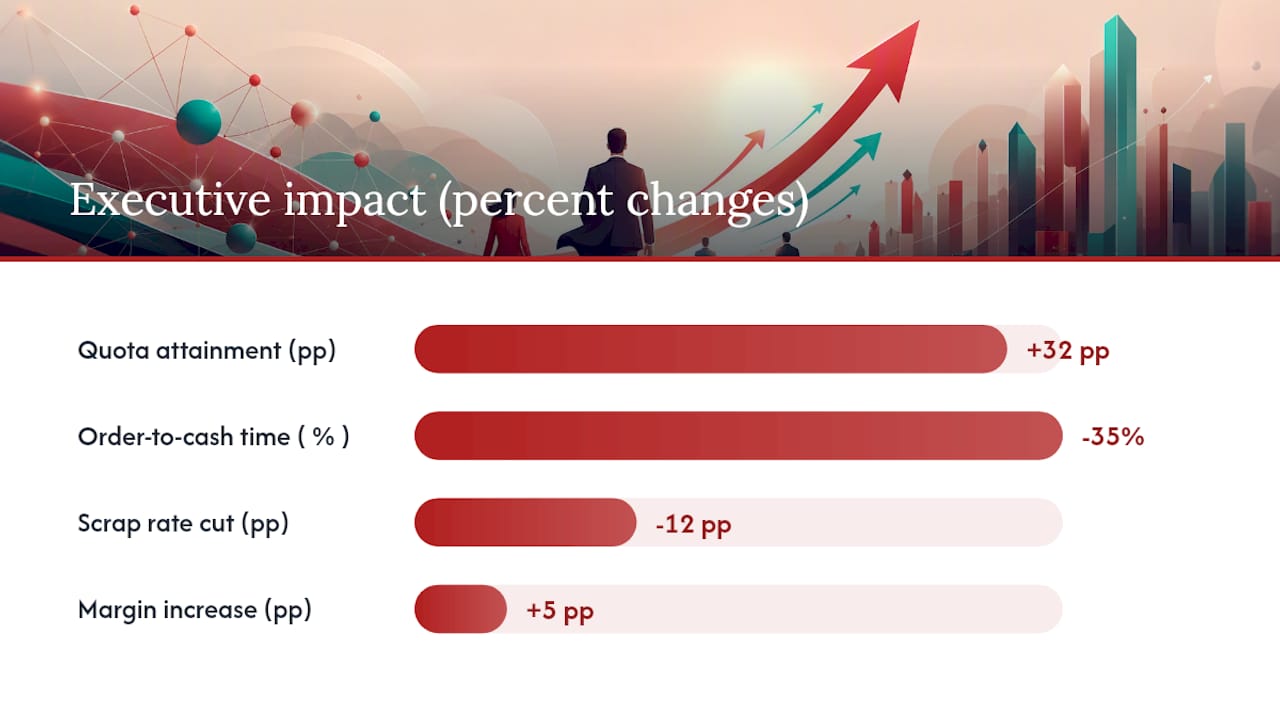
- Before: “Led the sales team.” → After: “Rebuilt underperforming 40-person sales organization after 30% attrition; restored quota attainment from 62% to 94% within three quarters.”
- Before: “Managed the company’s digital transformation.” → After: “Directed enterprise ERP migration across 6 business units; cut order-to-cash cycle time by 35% and eliminated $2.1M in annual reconciliation labour.”
- Before: “Oversaw manufacturing operations.” → After: “Turned around underperforming plant with 18% scrap rate; implemented lean protocols that cut scrap to 6% and avoided a planned $4M capital expansion.”
- Before: “Responsible for hiring and team development.” → After: “Rebuilt executive bench after 4 C-suite departures in 14 months; all 4 replacement hires remained past the two-year mark.”
- Before: “Handled vendor relationships.” → After: “Renegotiated top-5 supplier contracts, reducing input costs by 12% and securing preferential terms during a market-wide shortage.”
- Before: “Improved customer satisfaction.” → After: “Redesigned client escalation process; cut churn among top-20 accounts from 18% to 4% in one year.”
- Before: “Led a merger integration.” → After: “Directed post-merger integration of $220M acquisition; achieved planned synergies six months ahead of schedule.”
Use absolute numbers when you’re allowed to and the number is genuinely impressive; use percentages, ranges, or relative comparisons when confidentiality requires it.
On prioritization: for a career spanning 20-plus years, keep the strongest 3 to 4 bullets per role for anything in the last decade, and be ruthless about cutting bullets that describe process rather than outcome. A bullet that starts with “Participated in” or “Assisted with” rarely survives a serious edit.
What to show in the top third of your resume
If strategic fit isn’t obvious in the top third of page one, much of the rest of the resume goes unread. That single fact should govern how you spend your editing time. Recruiters and retained search consultants scan for a handful of signals almost immediately: your functional title, your industry, the rough size of the P&L or budget you’ve managed, and one or two signature achievements that prove you can do the job being advertised.
Before submitting to a specific role, run through this tailoring checklist:
- Rewrite your headline to echo the exact title or function named in the posting
- Swap in 2 to 3 core competencies that match language pulled directly from the job description
- Move your most relevant achievement bullet to the top of your most recent role
- Adjust your summary’s scope language (P&L size, team size, geography) to match the scale of the target role
- Cut or shrink any competency or bullet irrelevant to this specific search
- Confirm your industry and functional keywords appear at least once in the top third
For a rapid tailoring workflow that fits into a busy executive’s calendar: spend the first 10 minutes reading the job description twice, once for function, once for language. Spend the next 20 minutes editing your headline, summary, and competencies grid. Spend a final 15 to 20 minutes reordering or lightly rewriting your top two role bullets. That’s a complete, credible tailoring pass in under an hour, done from a strong baseline resume rather than a rebuild from scratch.
Pro Tip: Keep a “master” version of your resume with every achievement bullet you’ve ever written, then build each tailored version by selecting from that master document rather than writing new content under deadline pressure.
ATS formatting rules that actually matter for executives
Applicant tracking systems reward structural simplicity, and most of the formatting choices that damage parsing are also the choices that hurt human readability, so getting this right serves both audiences at once.
Keep contact information (name, phone, email, city) in the main body of the document, never in a header or footer. Many ATS platforms simply don’t read header and footer fields, which means a resume with contact details tucked into a document header can arrive at a recruiter’s desk with no way to reach the candidate. Use standard date formats throughout (“January 2021 to March 2026,” not “01/21 to 03/26” or creative alternatives), and keep section headers as plain, conventional labels: “Professional Experience,” not “My Journey” or “Where I’ve Made an Impact.”
Avoid complex tables, text boxes, and multi-column text blocks for anything essential, your title, your competencies, your achievement bullets. These elements frequently get scrambled or dropped entirely during parsing. If you want a sidebar for visual balance, reserve it for genuinely non-essential extras: a list of board memberships, professional association names, or language proficiencies, content that doesn’t need to survive a keyword scan intact.
- Use standard fonts (Calibri, Garamond, Georgia, Arial) rather than decorative or condensed typefaces
- Keep font size at 10.5 points minimum for body text, even under length pressure
- Leave genuine white space between sections rather than compressing margins to fit more content
- Save and submit as Word (.docx) unless the posting specifically requests PDF
- Never embed critical content inside an image, logo, or graphic element
After you build your plain-text version, validate it before submitting: paste the content into a basic text editor (Notepad, TextEdit) and check that section breaks, bullets, and spacing still make sense without any formatting. If sentences run together or bullets vanish, the formatting in your source document is too complex for a clean paste-in. Reviewing ATS-friendly resume practices before your next application round is a fast way to catch these issues before a recruiter does.
Executive resume templates you can adapt right now
Modern templates from sources like Canva or Word’s built-in library can be a reasonable starting point for layout and spacing, but almost none of them are built with executive-level content in mind out of the box. They need adaptation, more white space, a competencies grid, and room for a real executive summary, before they’re ready for a senior search.
Three executive-summary templates for common situations:
Growth-stage leader: “Revenue-focused [title] with a track record of scaling teams and systems through periods of rapid growth. Grew [Company]’s revenue from $40M to $110M over four years while building the commercial infrastructure to support continued expansion. Known for translating ambitious growth targets into operational plans that hold up under scrutiny.”
Turnaround leader: “Operating executive specializing in underperforming business units and organizations facing structural decline. Took over a division with three consecutive years of margin erosion and restored profitability within 14 months through cost discipline, portfolio rationalization, and leadership team reconstruction. Comfortable operating under board-level scrutiny and tight timelines.”
Scale-stage leader: “Experienced [title] focused on building the systems, teams, and governance structures that let a growing company operate like a mature one. Led the infrastructure buildout that supported [Company]’s transition from founder-led operations to institutional-grade reporting ahead of a successful Series C raise.”
A copyable competencies grid example, formatted as three columns:
| P&L Ownership | M&A Integration | Board Reporting |
| Organizational Design | Change Management | Capital Allocation |
| Global Operations | Talent Development | Investor Relations |
Three short experience snippets showing the context-sentence-plus-bullets structure:
COO, mid-market industrial company ($260M revenue, 900 employees): Directed operations across four manufacturing sites during a private equity ownership transition. Led a 22-person leadership restructuring that reduced management layers from six to four. Delivered $6.8M in annual cost savings within the first 18 months.
CFO, technology services firm ($90M revenue, venture-backed): Built the finance function from the ground up ahead of a planned Series C raise. Reduced monthly close time from 18 days to 5. Secured $35M in growth financing on favourable terms by rebuilding investor reporting credibility.
VP Engineering, SaaS platform (200-person engineering organization): Rebuilt engineering leadership after the departure of three directors in one year. Reduced average feature delivery time from 11 weeks to 6.
Keep language market-neutral throughout, avoid country-specific legal claims about employment status, work authorization, or credential equivalency, since those vary by jurisdiction and don’t belong in a resume document itself.
Why trust this guidance: Professional Resumes’ approach to executive formatting
This guidance reflects formatting principles applied for senior-level and C-suite resume preparations. As an author with specialized focus on executive resume strategy, Professional’s approach centres on the same discipline outlined throughout this piece: a scan-first top third, quantified achievement bullets, and a resume built to survive both a retained search consultant’s read and an ATS parse.
The approach emphasizes personalized, consultation-driven resume writing rather than template-filling, with client testimonials highlighting increased interview requests and stronger positioning in executive searches. That approach shows up in how each engagement runs: an in-depth consultation to surface the achievements a busy executive rarely remembers to mention, a working draft built around the section structure covered above, and a revision process that keeps the client’s voice intact while sharpening the strategic framing.
In practice, every executive client often leaves with more than a single static file. The multi-version workflow, including Word or PDF for human readers and a plain-text version for ATS submission, is an important part of delivering finished work.
A writer’s checklist for updating an executive resume fast
When I sit down to refresh a senior leader’s resume under time pressure, I run the same seven-step pass every time, because it catches the errors that actually cost interviews.
- Rewrite the headline and summary to match the target role’s exact language.
- Rebuild the competencies grid with 2 to 3 keywords pulled straight from the posting.
- Identify the single strongest achievement bullet and move it to the top of the most recent role.
- Write or revise three bullets using the CAR structure with a real metric in each.
- Strip out any duty-based language that survived from an earlier draft.
- Generate the plain-text version and paste-test it in a basic text editor.
- Proof every number twice, a wrong metric on an executive resume undermines credibility fast.
The most common mistake I see is an executive resume that reads like a job description of the role they already have, rather than a case for the role they want next.
— Professional
How Professional Resumes can help with your executive resume
The format matters, but execution under deadline pressure is where most executives lose momentum, particularly when a strong opportunity surfaces with a two-week application window. Professional Resumes builds each document around the multi-version workflow covered throughout this guide, so you’re never scrambling to convert a design-heavy resume into something an ATS can actually read.
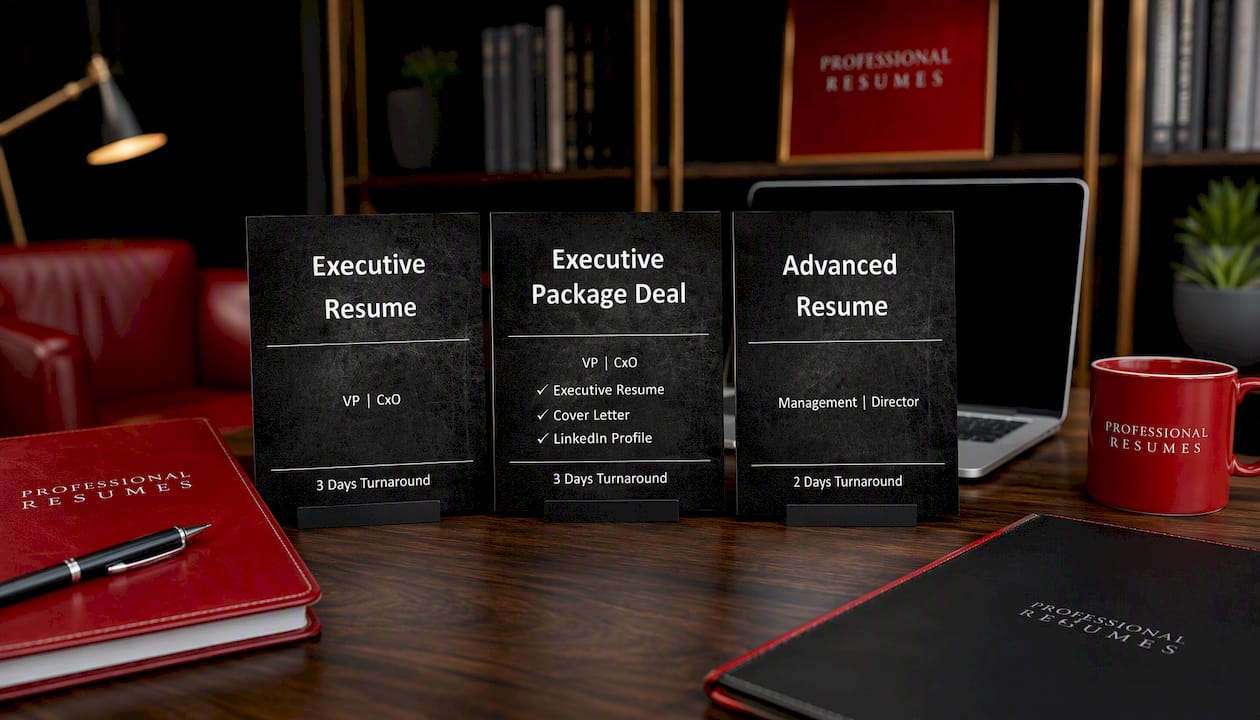
The Executive Resume service fits a leader who needs a single, sharply positioned document, built through direct consultation, for an active search. The Executive Package Deal bundles that resume writing with a matching cover letter and LinkedIn profile optimization, a fit for anyone running a full search rather than responding to one posting. For candidates with complex, multi-chapter careers, board roles, multiple industries, or a long list of credentials to organize, the Advanced Resume package is built to handle that density without losing scan-friendliness.
Every engagement starts with a consultation to surface the achievements and context a resume alone won’t capture, followed by a working draft and a revision process built around your feedback. If your current resume was built for a role three job titles ago, that consultation is the fastest way to find out what needs to change.