
Most job seekers in North America should leave the photo off their resume unless an employer specifically requests one or the role calls for a visual assessment, such as acting or modelling. The main reasons are bias risk in screening and formatting problems in applicant tracking systems. Instead, direct recruiters to your LinkedIn profile, where a professional photo is standard and expected.
TL;DR:
- Follow the job posting or application portal: provide a photo when requested, and research local expectations before applying outside North America.
- Anonymized screening may request a photo only after the first review, so submit it at that stage rather than undermining the process upfront.
- After embedding a requested image, keep the PDF text selectable and copy its contents into a blank document to catch missing or garbled text.
- Choose a current, naturally lit headshot with a neutral background and suitable clothing; refresh it with your resume, or every two to three years.
- Confirm in writing that a photographer’s agreement permits employment use, and get consent from anyone else visible before submitting the image.
Table of Contents
- When a photo may be appropriate on a resume
- Why recruiters often advise against photos: bias, equity and ATS issues
- How to create a professional resume photo when one is required
- Design and template guidance if you decide to include a photo
- How Professional Resumes advises clients about photos and professional image
- When and how to obtain consent for using a photo on a resume
- Impact of resume photos on first impressions and recruiter psychology
- Guidelines for photo updates with career changes or aging
- Examples of effective versus ineffective resume photos
- How to handle resume photos in digital versus printed resumes
- Author perspective: balancing fairness and personal branding
- Services that help with photos, ATS formatting and LinkedIn profiles
- FAQ
- Sources
When a photo may be appropriate on a resume
A handful of roles genuinely call for a photo as part of the application. Acting, modelling, and certain on-camera media positions require employers to assess appearance alongside experience, so a headshot belongs in the package from the outset. Some customer-facing or hospitality roles ask for one too, though this varies by employer rather than by industry as a whole.
The clearest rule is to follow the job ad. If an application form includes an upload field for a photo, or the posting explicitly asks for one, supply it rather than guessing at convention. Omitting a requested photo can read as not following instructions, which matters more than any general preference against including one.
Geography matters as well. While Canada, the US, and the UK generally omit photos unless requested, some European and Asian markets still expect them as a matter of course. If you are applying to a role based outside North America, research the local norm before you build your application package rather than defaulting to the Canadian standard.
When none of these conditions apply and you are still unsure, the safer path is straightforward:
- Check the job posting and application portal for explicit instructions on a photo.
- When uncertain, contact HR directly rather than guessing.
- Default to omitting the photo and listing your LinkedIn URL instead.
- Research destination-country norms before applying internationally.
Why recruiters often advise against photos: bias, equity and ATS issues
The case against resume photos rests on two separate problems: how humans screen applications and how software reads them.
On the human side, a photo introduces cues about race, gender, and age before a reviewer has read a single line about your qualifications. Public-sector guidance in Canada promotes removing identifying information from assessment stages specifically to mitigate this kind of bias, and the Public Service Commission provides tools for evaluating where assessment methods introduce barriers. The logic transfers directly to resume photos: once a reviewer has seen your face, it becomes harder to evaluate the rest of the document on skills alone.
Anonymized résumé trials show that removing identifying details such as names, photos, and dates can improve callback rates for some groups, based on employment-equity research from Employment and Social Development Canada, which points toward fairer shortlisting when identifying information stays out of the first pass.
On the technical side, images embedded in a resume can break the parsing that applicant tracking systems rely on, since most ATS tools are built to extract text, not interpret graphics. A photo that sits in the wrong layer of a PDF, or that the software mistakes for body content, can cause fields to come through blank or garbled.
Two practical points follow from this:
- Leaving the photo off supports fairer human assessment and smoother automated screening at the same time.
- A resume kept fully text-based, as described in our guide to ATS-friendly resumes, avoids the parsing failures that images can trigger.
How to create a professional resume photo when one is required
When a role genuinely calls for a photo, treat it as a deliverable worth getting right rather than a quick selfie crop.
- Frame the shot head-and-shoulders, with your eyes positioned in the upper third of the image and your face centred.
- Keep your expression natural and approachable rather than stiff or overly posed.
- Choose a neutral, uncluttered background so attention stays on you.
- Dress exactly as you would for the interview itself, in solid colours that photograph cleanly.
- Shoot at high resolution, then export a compressed, small-file-size version for the resume.
- Embed the image inside a text-based PDF rather than saving the entire page as a flattened image.
A single well-lit session can cover more than one need. Career advisers recommend investing in one high-quality headshot session and cropping variations for different uses rather than arranging separate shoots for a resume and a LinkedIn profile. Crop one portrait-orientation version for the resume and a square version for LinkedIn from the same source image.
A smartphone photo taken near a window with natural light can work for a casual application. For a role where appearance is part of the assessment, such as on-camera work, a professional photographer is worth the cost.
Pro Tip: Before you submit, copy and paste the text from your finished PDF into a blank document; if any words come through garbled or missing, the file needs reformatting before it reaches an ATS.
Design and template guidance if you decide to include a photo
Placement matters as much as the photo itself once you have decided to include one. A small headshot in the top corner of the page, beside your name and contact details, keeps the layout clean without crowding the content that actually gets you shortlisted. Some industries that still expect photos, particularly in certain European markets, use a separate cover sheet in front of the resume rather than embedding the image in the header.
Whatever placement you choose, the file has to remain machine-readable:
- Keep all text selectable; never flatten the page into a single image file.
- Export as a text-based PDF rather than a scanned or rasterized document.
- Test the finished file in an ATS preview tool, or ask a recruiter to confirm the fields parse correctly.
- Keep the photo modest in size; a large image competes with your qualifications for attention.
- Reserve a larger, more prominent image only for industries where visual presentation is itself part of the job requirement.
If you are starting from a template that includes a photo placeholder, check that the placeholder sits in a text box or frame your word processor can still read as text around it, not as a merged graphic. Templates built for design software sometimes convert the whole header into an image during export, which defeats the purpose of keeping the rest of the document ATS-friendly.
How Professional Resumes advises clients about photos and professional image
Across the consultations we run, our consistent recommendation is to put a polished photo on LinkedIn and to leave it off the resume itself unless a client’s target role or application form specifically calls for one. This keeps the resume focused on achievements and keeps the ATS formatting clean, while LinkedIn carries the visual, personal-branding element recruiters expect to find there.
Our writers work directly with each client through extensive consultation and revisions, applying ATS-aware formatting so that the document itself never becomes the obstacle between a strong candidate and an interview. Where an industry or target role calls for a photo, we factor that into the layout from the start rather than bolting an image onto a finished draft. The goal throughout is a resume and a LinkedIn profile that work together: one text-first and built to pass screening, the other carrying the professional image employers look for once they click through.
When and how to obtain consent for using a photo on a resume
A photo is personal information, and using one in a job application carries a basic expectation of consent, even when the applicant is the subject of the photo.
If you are using a shot taken by a professional photographer, confirm in writing that you hold the right to use the image for employment purposes, since some photography contracts restrict commercial or promotional use. If a photo includes anyone other than you, even in the background, you need their agreement before submitting it as part of a public-facing application.
Some employers pair a photo request with anonymized shortlisting, where the initial screen is done without identifying details and the photo is only requested once you reach a later stage. In that case, the safer approach is to supply the photo only where and when the employer asks for it, rather than attaching it to the initial application and inadvertently reintroducing the bias that the anonymized process was designed to remove.
If you update or reuse a photo across multiple platforms, it is worth confirming the original usage terms still apply, particularly for professional headshots taken through an employer-sponsored program at a previous job, since those images sometimes belong to the organization that commissioned them rather than to you personally.
Impact of resume photos on first impressions and recruiter psychology
A photo changes the order in which a reviewer processes information. Instead of reading your summary or top achievement first, a recruiter’s attention goes to the image, and whatever impression forms there, consciously or not, colours the reading that follows.
This is the core of the recruiter caution around photos: images on résumés can shift focus from qualifications to appearance, and that shift works against the applicant even when the photo itself is perfectly professional. A reviewer who has seen your face before reading your experience is, whether or not they intend to, already forming judgments based on factors that have nothing to do with your ability to do the job.
The inverse is also true. A resume without a photo keeps the reviewer’s first contact point on your summary line, your most recent title, or your strongest achievement, which is exactly where you want their attention in the first ten seconds of a scan. That is the practical argument for sending recruiters to LinkedIn for the visual impression and keeping the resume itself photo-free: you get the benefit of a professional image without letting it compete with your qualifications for the recruiter’s first read.
Guidelines for photo updates with career changes or aging
Wherever you do use a professional photo, most often on LinkedIn, it needs to represent how you look now, not how you looked at your last job search.
A photo that is five or six years out of date creates an awkward moment at the interview stage, when the person who shows up doesn’t quite match the image a recruiter has been picturing. Beyond the mismatch, an outdated photo can also undercut the rest of your application if your resume reflects a recent promotion, a career pivot, or added credentials; the image should feel consistent with the level of seniority and polish the document conveys.
A reasonable rule of thumb is to refresh the photo whenever you refresh your resume for a new job search, or at minimum every two to three years. A career change is a natural trigger point: moving from a technical role into management, or pivoting industries entirely, often comes with a shift in how you present yourself, and the photo should move with it. The same goes for significant changes in appearance, whether that is a new professional wardrobe, a different hairstyle, or simply enough time passing that the old photo no longer looks like a quick, obvious match.
Treat the photo the same way you treat the rest of your professional materials: current, accurate, and reviewed each time you re-enter the job market.
Examples of effective versus ineffective resume photos
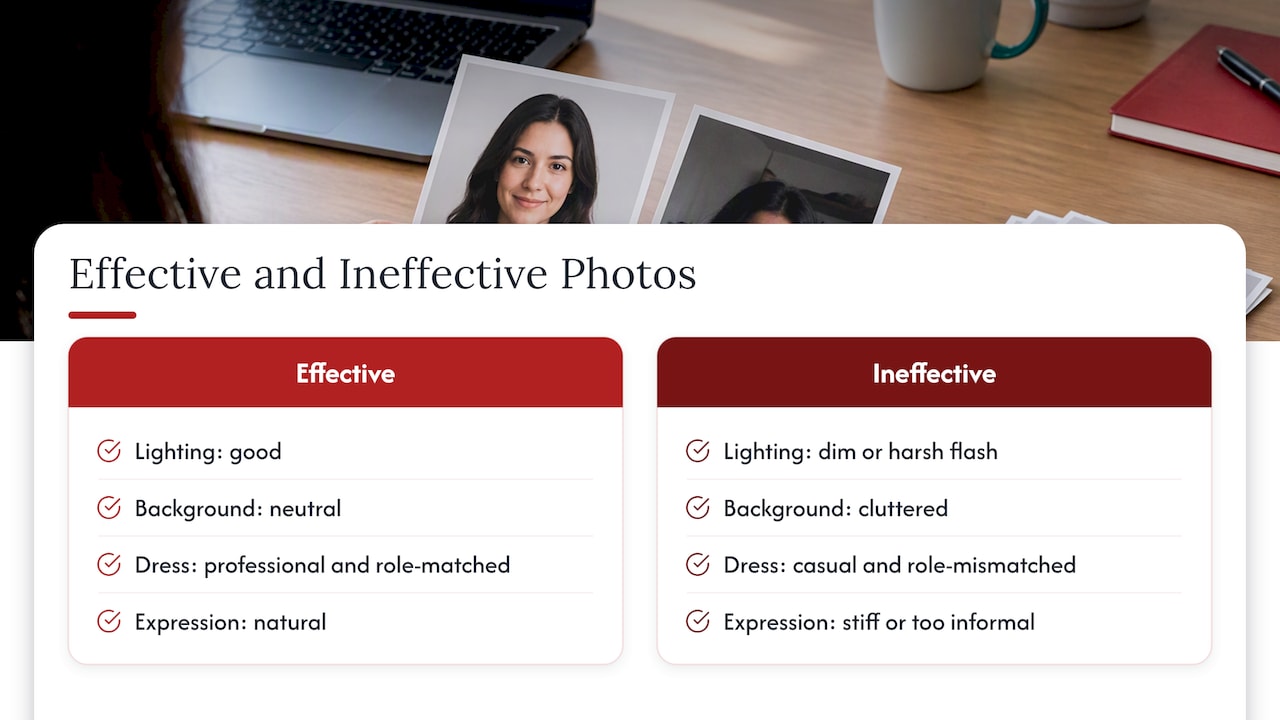
An effective headshot is simple to describe: good lighting, a neutral background, professional dress consistent with the role, a natural expression, and a crop that shows head and shoulders with the face centred and eyes in the upper third of the frame. Nothing in the image competes for attention with your face, and nothing about it looks rushed.
Ineffective photos tend to share a few recurring problems. A photo cropped awkwardly out of a group shot, with another person’s arm or shoulder still visible, signals a lack of attention to detail before a reviewer has read a single line of your resume. Poor lighting, such as a dim indoor shot with heavy shadows or a harsh direct flash, works against you the same way. Casual attire that doesn’t match the role, a cluttered or busy background, or an expression that reads as overly stiff or, at the other extreme, too informal, all undercut the professionalism the rest of the document is trying to convey.
The technical side matters just as much as the visual one. A photo saved as part of a flattened, image-only PDF page defeats the purpose of an otherwise well-formatted resume, since it can prevent an ATS from reading any of the surrounding text. An effective photo, when one is needed, is a small, well-lit, properly cropped image embedded cleanly in a text-based document, never a scanned page or a screenshot.
How to handle resume photos in digital versus printed resumes
Digital resumes face the ATS test that printed ones never do. A PDF or Word document uploaded to an online application portal passes through parsing software before a person ever sees it, which means every formatting choice, including whether and how a photo is embedded, affects whether the content reaches a human reviewer at all. For digital submissions, the priority is a text-based file with the photo, if included, embedded as a proper inline image rather than part of a flattened layout.
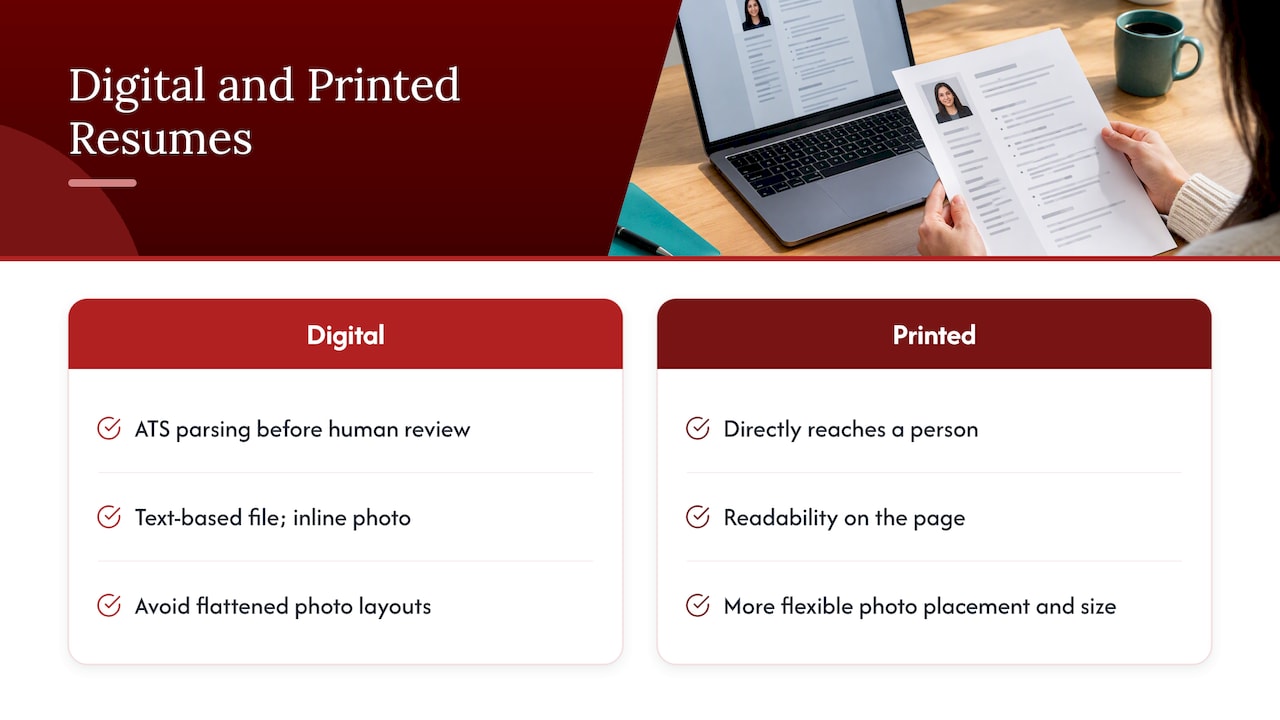
A printed resume, handed over at a career fair or brought to an in-person interview, faces no such software gatekeeper. Formatting choices there are purely about visual presentation and readability on the page, which gives slightly more flexibility for placement and size if a photo is appropriate for the context.
The safest approach for most job seekers is to build one clean, text-based digital version that works everywhere a resume might end up, whether emailed, uploaded, or printed at the last minute before an interview. If you are in one of the few circumstances where a printed version with a different layout genuinely helps, such as a design portfolio piece or a role in a visually driven field, keep that as a clearly separate supplementary document rather than your primary application file.
Author perspective: balancing fairness and personal branding
My view, after seeing how both screening software and human reviewers actually behave, is that the case for leaving photos off resumes is stronger than most job seekers assume, and the exceptions are narrower than career folklore suggests. Bias risk and ATS fragility are real, measurable costs for a cosmetic benefit that LinkedIn already delivers better.
Where I coach clients differently is in redirecting the instinct to look polished: put that effort into a current, well-lit LinkedIn photo, and let the resume carry the achievements. If you need both a defensible headshot and a document built to pass ATS screening, that is worth getting professional help on rather than guessing.
— Professional
Services that help with photos, ATS formatting and LinkedIn profiles
If you want the visual and written sides of your application handled together, that is exactly where services like ours fit. Each engagement should start with a consultation, include formatting, and revisions, so the document works with screening software while your LinkedIn profile carries the professional image recruiters expect.
- Advanced Resume ($239 one-off): a tailored, ATS-friendly resume built through direct consultation for candidates past entry level.
- Executive Resume ($289 one-off): senior-level resume writing suited to leadership roles and board-level audiences.
- Executive Package Deal: a bundled offering pairing resume writing with LinkedIn optimization for a complete, consistent application.
- LinkedIn profile optimization: the service to pair with any resume order so your professional photo lands where it works best.
Browse the full lineup, including Early Career Resume and Next Step Resume, and start with the service that matches where you are in your career.
FAQ
Is it appropriate to put your photo on your resume?
In Canada and most of North America, it is generally not appropriate unless an employer specifically requests one or the role requires visual assessment, such as acting or modelling. Standard practice is to omit the photo and direct recruiters to LinkedIn instead.
What is an appropriate resume photo?
An appropriate photo is a head-and-shoulders shot with a neutral background, professional attire matching the role, good lighting, and a natural expression. It should be embedded in a text-based PDF at high resolution with a small file size, never saved as part of a flattened, image-only page.
Does a resume need a 2×2 picture?
No, a standard resume in Canada does not require a specific photo size such as 2×2; that format applies to certain government or visa documents, not job applications. When a photo is requested, follow the employer’s or portal’s exact specifications rather than a generic standard.
How important is a photo on a resume?
For most roles, a photo has little bearing on hiring outcomes and can introduce bias risk or ATS parsing problems, so leaving it off is usually the safer choice. LinkedIn profiles with photos receive more engagement, which makes it the better place to invest in a professional image.
Can a photo on LinkedIn replace a resume photo?
Yes, a current LinkedIn photo is the industry-standard place for your professional image, and including your LinkedIn URL on your resume lets recruiters see it without the risks that come with embedding an image directly in the document. If you are actively searching, our guide on researching listings through LinkedIn tools can also help you track down roles worth applying to.
Sources
- Definitions: biases, barriers and disadvantage | Public Service Commission Canada
- Resume Photo: Should You Put a Headshot on Your Resume? | Magic Studio
- 6 ways your resume should differ from your LinkedIn profile | UConn Career Development
- The truth about headshots on resumes: a recruiter’s perspective | Brett Elizabeth