
The best subject line for an emailed cover letter and resume is the one the employer asks for. When no format is given, state your name, the job title and the posting number if there is one, in that order of importance for the reader and with the role first so it survives a phone screen. Something like “Administrative Assistant – Posting 12345 – Chris Black” does the work. It is also the first test of the care you bring to the application itself, and a precise subject line is the first of several details that separate a candidate who is read from one who is filtered out.
This guide sets out the rule, the formula, worked examples for the situations Canadian job seekers actually face, and the mistakes that send an application to the junk folder.
TL;DR
- Follow the employer’s instructions exactly; if none are given, use job title, posting or job ID, and your full name.
- Put the essential words in the first 25 to 30 characters, because mobile screens cut the rest off.
- Never leave the subject line blank, and avoid vague, informal or all-capitals wording.
- Adapt the format to the situation: a posted job, a referral, a speculative application, a follow-up or a public sector competition.
- Match the subject line to your attachments: PDF files named with your name, and a cover letter that carries the substance.
Table of Contents
- Start With the Employer’s Instructions
- The Subject Line Formula
- Examples for Each Situation
- How Long Should It Be, and What Comes First?
- What to Avoid
- Attachments and File Names
- Adapting the Subject Line to Your Situation
- Writing the Email Body That Follows
- From Subject Line to Complete Application
- Our Perspective
- FAQ
- Sources
Start With the Employer’s Instructions
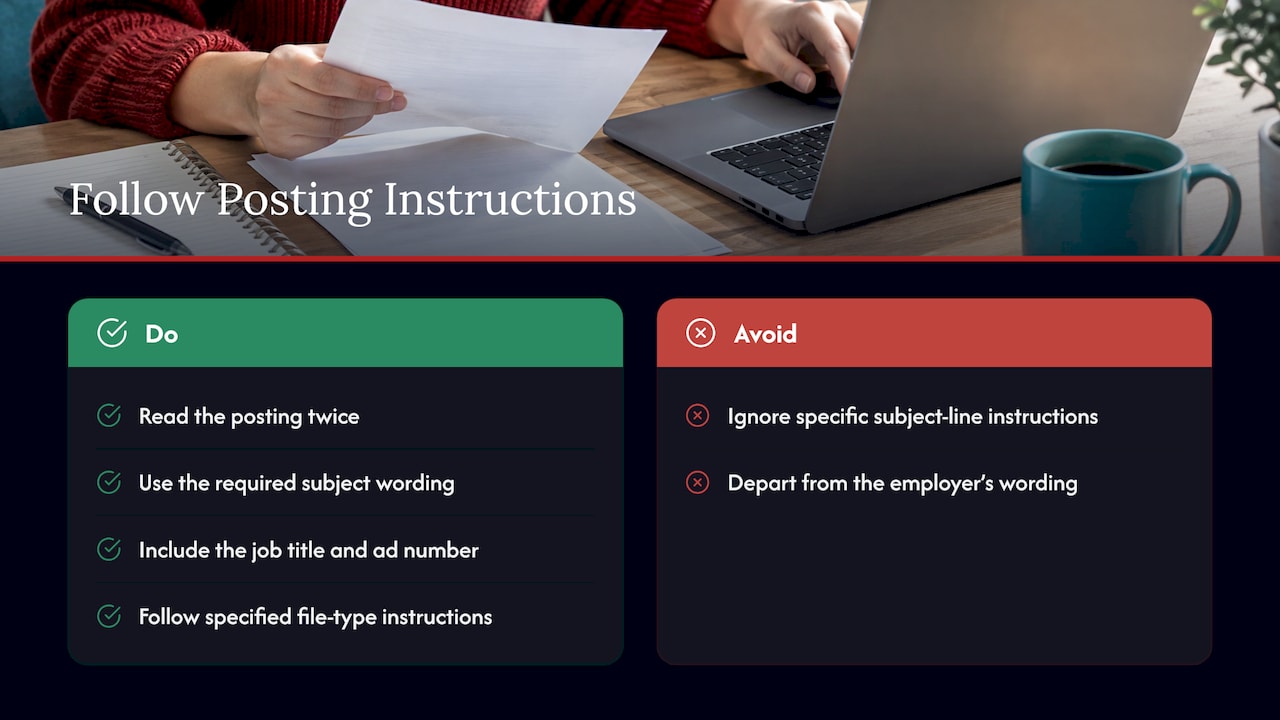
Every other rule in this article gives way to the instruction in the job posting. Career guidance from HEC Montréal states that, unless the employer specifies otherwise, you write the job title and the job-ad number, if there is one, in the subject line. Indeed’s subject-line guide lists ignoring the employer’s specific subject-line instructions among the mistakes to avoid. Employers often use exact wording to sort incoming applications, and a message that departs from it may never reach the person who reviews it.
Read the posting twice before you write. Look for phrases such as “quote the competition number,” “use the subject line …” or “send as a single PDF.” If the instruction says to attach documents in one file or in particular file types, George Brown College advises following it, along with including the job number or job title in the subject line.
The Subject Line Formula
When there are no instructions, the guidance from Canadian career services is consistent. Alberta’s ALIS career service says to include your name, the job title and the posting number when available, and not to leave the subject line blank. The ECO Canada Job Seeker Toolkit likewise points to the position title and any reference or position number.
That gives you three elements:
- Role: the title exactly as posted, not your own shorthand.
- Reference: the posting number, job ID or competition number, if the ad shows one.
- Name: your full name, so the recruiter can identify you without opening the message.
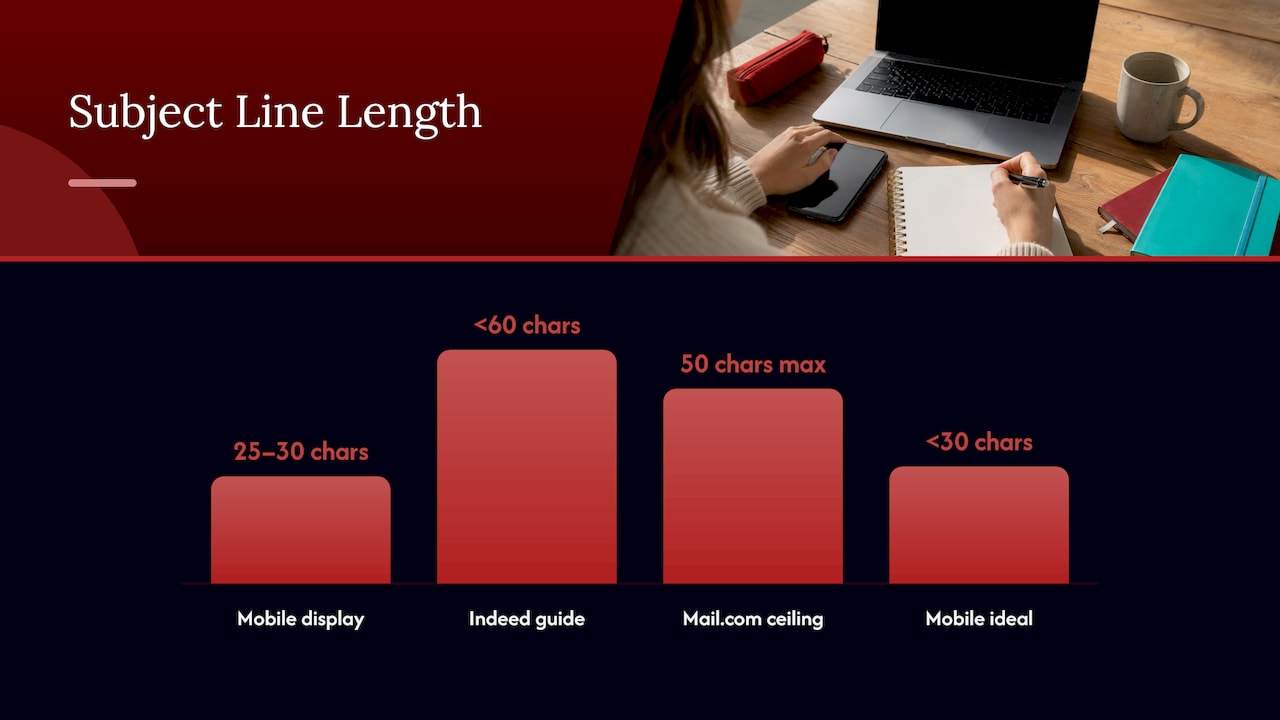
Indeed’s guide proposes the pattern “Job application, job title, job ID (if applicable), your name,” and advises placing the essential words first because mobile devices display only 25 to 30 characters. Its separate guide to emailing a cover letter suggests keeping the line under 60 characters, while Mail.com suggests a ceiling of 50 and ideally under 30 for mobile. The sensible reading: keep the whole line short, and make sure the first half could stand alone.
Formats compared
| Format | Example | Best used when |
|---|---|---|
| Role, reference, name | Comp. #222-222 Skilled Admin Assistant | The ad gives a reference number |
| Application label, role, name | Application for Marketing Coordinator – Ann Harris | A posted job with no number |
| Cover letter label | Cover Letter – Project Manager – Your Name | The employer asked for the letter by email |
| Role, resume, name | Senior accountant resume, Mark Don | No specific vacancy |
| Referral first | Referred by Linda Brown: Ann Harris, Marketing Executive | A named contact suggested you apply |
The first example comes from a sample email cover letter published by ALIS, which advises putting the job’s reference number in the subject line when answering an ad. The “senior accountant resume” pattern is the one Indeed recommends when you are sending a resume without applying for a specific position. The cover letter pattern appears in Indeed’s email cover letter guide, which offers “Cover Letter – Job Title – Your Name” as one structure.
Examples for Each Situation
A posted job with a reference number
Use the reference as the employer wrote it. “Application for job posting #472 – Ann Harris” is one of the formats in Toronto School of Management’s guide. Copy the number character for character, including prefixes and hyphens, because inbox rules and applicant tracking systems may match on it.
A posted job without a number
Name the role and yourself: “Application for Financial Analyst – Priya Nair.” The University of Ottawa’s law career services guide gives “Application for Summer 2022 Student Position” as its model for indicating the position, which shows the principle: say what the email is, then what it is for. Replace the placeholder year with the actual intake only if the posting names it.
A referral
A referral is your strongest signal, so it belongs at the front. Indeed suggests adding “referred by” for referrals, and Mail.com gives “Referred by Jada Jones: Linda Smythe applying for Software Engineer role” as a model. Confirm with your contact that they are willing to be named before you use their name.
An unadvertised opportunity
When you write to a company with no posted vacancy, lead with your value: “John Smith, CPA with 10+ years’ experience in accounting” is a Mail.com example, and Toronto School of Management offers “Ann Harris, Merchandising Expert with 10 years’ experience.” State a real figure from your career, one that your resume supports in the first third of the page.
A follow-up
A follow-up should say so plainly: “Following up on the Marketing Position – Ann Harris.” After an interview, Indeed suggests “thank you” wording. Keep the original job title in the line so the message threads sensibly with the first one.
With a touch of enthusiasm
Indeed Canada’s job application email guide recommends a brief, clear line with your name, the position and some enthusiasm, and offers “Ava Lewis is ready to join your team as your senior graphic designer – reference #53116.” That works for roles where personality is part of the brief, such as communications or design. For finance, legal, healthcare and public sector roles, the plain format is the safer choice.
How Long Should It Be, and What Comes First?
Because the first 25 to 30 characters are what many readers see on a phone, front-load the role. Compare two lines:
- “Application for the position advertised on your website – Marcus Lee” loses the role behind the cut.
- “Data Analyst #8841 – Marcus Lee – Application” shows the role and number immediately.
Target roughly 40 to 60 characters in total. If the job title is long, drop the word “Application” rather than the title or your name.
What to Avoid
Indeed’s guide names the common errors, and Waterloo’s Writing and Communication Centre explains the risk: a vague subject line may be ignored or sent to the junk folder. Avoid:
- A blank line. ALIS says to include one every time.
- Informal greetings such as “Hey” or “What’s up.”
- Generic wording such as “Resume,” “Job” or “Application” with nothing else.
- Every word capitalized, or the whole line in capitals.
- Spelling and grammar errors, including a misspelled job title or company name.
- Overlong lines that bury the role.
- An unprofessional sender address. Indeed advises an address with some variation of your name.
The address matters as much as the line. A message from “jane.okafor@…” with the subject “Registered Nurse #4410 – Jane Okafor” reads as a coherent package; a nickname address undermines it.
Attachments and File Names
The subject line promises a package, and the files must match it. Toronto Metropolitan University advises attaching the resume and cover letter as PDFs with your name in the file name, for example Greenwood_resume.pdf, and checking spelling and grammar before sending. The University of Ottawa guide suggests a merged PDF named YourName_Position_Employername.pdf unless the employer states a preference. George Brown also recommends mentioning in the email which documents are attached.
Where the employer’s system or instructions call for a specific file type, follow them. A resume built with plain, ATS-friendly formatting is more likely to be read correctly by an applicant tracking system, which is the software many employers use to collect and sort applications, so the attachment should be as carefully prepared as the subject line.
Adapting the Subject Line to Your Situation
Public sector and federal government applications
Government postings are often specific about how to apply, and many run through an online portal rather than email. When email is accepted, quote the competition or file number exactly. Ontario’s guide to writing a cover letter and resume for the public service describes it as good practice to reference the file number and job title in the subject line and to include the ministry’s name. Our government and public sector resumes page covers how those documents are structured.
Executives
An executive application usually goes to a search consultant, a board chair or a senior leader, and discretion matters. Keep the subject line formal and precise: “Chief Financial Officer, Search 2291 – Name.” Reserve achievement language, such as the scale of a P&L or a transformation led, for the cover letter and resume. If the approach is speculative, a short role-plus-credential line like “CFO, 15 years in manufacturing, Name” does more than a generic expression of interest. Include only credentials and years you can document.
Returning to work after a gap
The subject line is not the place to explain a gap. Use the same neutral format as any other applicant: role, reference, name. Address the gap, briefly and positively, in the cover letter, where you control the framing. A subject line that tells the story of your break gives the reader a reason to judge before they have read your qualifications.
Newcomers to Canada
Canadian employers expect a short, direct subject line and a plain email. Avoid honorifics, long descriptions of your background and phrases such as “kindly consider my humble application.” State the role, the reference and your name, then let the attachments carry the detail. Our guide to resume writing for newcomers to Canada explains how to adapt the documents themselves to local expectations.
Healthcare professionals
Health employers often post many near-identical roles at once, so the posting number is what keeps your application in the right pile. Use “Registered Nurse – Posting 4410 – Name,” and add the unit or site only if the ad uses it. See our nursing resumes page for how RN, RPN and NP documents are prepared.
Writing the Email Body That Follows
Once the subject line gets the email opened, the body has to confirm that you are the right person. Indeed’s guide to job application emails describes a simple structure: a salutation, a first sentence that introduces you, and a body that turns your cover letter into the message. Keep it to a few short paragraphs, name the role again, and close with a clear statement that your resume is attached. If you want more phrasing for writing to a recruiter, these subject-line examples for recruiter emails show further variations.
When the cover letter is a separate attachment, do not repeat all of it in the email. Two or three sentences stating the role, your most relevant qualification and your availability are enough. Our cover letter writing services page explains how a tailored letter is prepared for the attachment itself.
From Subject Line to Complete Application
A correct subject line costs nothing and a weak resume cannot be rescued by it. Professional Resumes writes customized resumes, cover letters and LinkedIn profiles, with extensive consultations and multiple revisions, and with ATS-friendly formatting. Our published resume packages are:
- Early Career Resume: $139
- Next Step Resume: $189
- Advanced Resume: $239
- Executive Resume: $289
They are one-off prices. You can compare them on the shop page, or go straight to the Executive Resume if you are preparing for a senior search.

If recruiters will look you up after your email arrives, the LinkedIn profile optimization service aligns your profile with the documents you send.
Our Perspective
We read subject lines as the first line of a candidate’s professional record. A recruiter who sees a precise role, a correct reference number and a full name has already formed an impression of how the candidate handles detail, and that impression carries into the attached resume.
For that reason we treat the email and the documents as one package. A subject line that matches the posting, a cover letter that speaks to the role and a resume formatted for applicant tracking systems all tell the same story. Our approach is to work directly with each client through an extensive consultation, shape the documents around their goals and the expectations of their industry, and revise until they are ready to send.
Executives, professionals returning after a break, newcomers adapting to Canadian norms and healthcare and public sector candidates each face different scrutiny. The subject line is the smallest part of the application, yet it is the part every reader sees first, and it deserves the same discipline as the rest.
Professional
FAQ
What should the subject of a cover letter email be?
Use the format the employer requests. If none is given, write the job title, the posting number if available, and your full name, for example “Marketing Coordinator – Posting 5530 – Ann Harris.” Add “Cover Letter” only if the employer asked for the letter separately.
What is a good subject line when sending a resume without a specific job?
Write your job title, then “resume,” then your name, such as “Senior accountant resume, Mark Don.” This is the pattern Indeed recommends for speculative applications. If you have a referral, put the referrer’s name at the front.
Should I put my name in the subject line?
Yes. Your full name lets the recruiter identify and file your message without opening it. It also helps when someone searches their inbox weeks later for your application.
How long should a job application subject line be?
Keep it short, ideally under 50 to 60 characters, with the role and reference in the first 25 to 30. Mobile devices show only that much, so the essential words must come first.
Can I use an enthusiastic subject line?
Yes, in moderation. Indeed Canada suggests combining the position and reference number with a touch of enthusiasm. In conservative fields, such as finance, law, healthcare and government, a plain role-and-name line is the stronger choice.
Sources
- How to Send Your Resumé Package in Multiple Formats, ALIS
- Sample Cover Letter as an Email, ALIS
- ECO Canada Job Seeker Toolkit
- How To Write a Subject Line for a Job Application, Indeed
- How To Send an Email Cover Letter, Indeed
- Best job application subject lines, Mail.com
- How to submit your application, HEC Montréal
- Email Job Application Tips, George Brown College
- Use an email subject headline to your advantage, Toronto School of Management
- Writing Professional Emails in the Workplace, University of Waterloo
- Emailing Your Application, Toronto Metropolitan University
- The Resume and Cover Letter Guide, University of Ottawa
- Writing a cover letter and resume, Ontario Public Service