Decorative entry-level letter template title card

Two Quick Entry Level Templates: 50–100 Word Note and One Page Letter

Yes, you can write an effective cover letter with no paid experience. A short, tailored letter that highlights transferable skills and connects them to a job requirement can win interviews on its own. If the posting doesn’t ask for a full letter, a 50 to 100 word note works better; if it does, follow a one-page, five-element structure and skip the apologies.


TL;DR:

  • A tailored cover letter with specific examples can demonstrate suitability even without paid experience, especially when linking transferable skills directly to the job posting.
  • Use a five-element structure—greeting, opening, body with two skills-based examples, connection, and closing—to maximize clarity and relevance in your application.
  • Write the cover letter quickly by focusing on one concrete requirement from the posting, drafting relevant examples, and linking them explicitly to the employer’s needs.
  • Short notes of 50 to 100 words can often outperform full letters when the application system offers only limited space or when applying for high-volume roles.
  • Avoid common mistakes such as apologizing for inexperience, repeating your resume, using generic language, or neglecting to connect examples directly to the job requirements.

Professionalresumes
Make Your Cover Letter Stand Out
Professional Resumes creates customized cover letters that connect your skills and experience directly to the roles you want.

Explore resume services

Table of Contents

How do you write a cover letter with no experience?

Every entry-level cover letter needs five elements, regardless of the industry you’re targeting. Skip one and you’re either leaving credibility on the table or making a hiring manager work harder than they should to see your fit.

  • Greeting. Search LinkedIn or the company’s “About” or “Team” page for the hiring manager’s name. If you can’t find one, “Dear Hiring Manager” or “Dear [Department] Team” beats “To Whom It May Concern” every time.
  • Opening. Name the exact role, state one clear value claim, and show genuine interest in the company, not just the paycheque.
  • Body. Write two short paragraphs covering two or three transferable skills, each backed by a specific example from school, volunteering, or a personal project. Vague claims like “hard worker” mean nothing without proof attached.
  • Connection. Add a sentence that ties each example directly to something the posting actually asks for. This is the step most beginners skip, and it’s the one hiring managers notice most.
  • Close. End with a decisive call to action requesting an interview, your contact details, and a professional sign-off.

Format matters more than most applicants think. Keep the letter to one page, use a 10 to 12 point font, and follow standard business letter formatting, according to a one-page cover letter handout from a university career centre. Save it as a PDF if the application system requests one, since formatting can shift in other file types. Most applicant tracking systems don’t weigh cover letter keywords heavily, so write for the human who’ll actually read it, not for an algorithm that probably won’t.

How do you write a cover letter in 20 minutes?

You don’t need an hour and a blank-page stare to produce something strong. Follow this order and you’ll have a tailored draft before your coffee goes cold.

  1. Read the posting once for the job title, then again for one concrete requirement you can speak to directly, whether that’s customer service, organization, or a specific software tool.
  2. Draft your opening in one or two sentences, naming the job and the single strength most relevant to it.
  3. Write two short STAR-style examples, covering the situation, the action you took, and the result, pulled from coursework, volunteer work, or a class project.
  4. Add one connection sentence linking your examples to what the employer actually needs, then close with a direct request for an interview.
  5. Proofread out loud, run a spelling and grammar check, and ask one other person to read it for tone before you send it, a routine career-centre guidance recommends for catching the errors your own eyes skip past.
  6. Save as PDF if the system requests it, and double check the file opens correctly before attaching it.

Not every application calls for the full treatment. When a posting doesn’t explicitly request a cover letter, or the application system offers only a small text box, a 50 to 100 word note outperforms a long letter, since recruiter interviews suggest shorter, role-specific notes get read more often than lengthy generic ones. Name the requirement, give one matching example, and ask for a brief conversation. That’s the whole note.

Pro Tip: Write your opening line last. Once you’ve drafted your examples, you’ll know exactly which strength to lead with, instead of guessing at the start and rewriting it anyway.

Templates you can personalize in five minutes

Two formats cover almost every entry-level scenario: the short note and the one-page letter. Below is one of each, plus a filled example so you can see the structure in action.

The short note (50 to 100 words):
“I’m applying for the [Job Title] role at [Company]. During [class project / volunteer role], I [specific action], which resulted in [specific outcome]. That experience directly matches your need for [requirement from the posting]. I’d welcome the chance to discuss how I can contribute. [Name] / [Phone] / [Email].”

The one-page letter, filled for a customer-service role:
“Dear Ms. Chen, I’m writing to apply for the Customer Service Representative position at Northline Retail. During a two-semester retail co-op, I resolved an average of 30 customer inquiries per shift while training two new team members on the point-of-sale system. That mix of composure under pressure and hands-on training experience lines up closely with the collaborative, fast-paced environment your posting describes. I’d welcome the opportunity to discuss how I can support your team. Thank you for your consideration.”

For an internship or project-based example, lean on coursework: describe the challenge, the tools or coordination involved, and a measurable result like attendance figures, grades, or a deliverable your professor praised. To personalize any template fast, swap in the job title, one matching requirement from the posting, and one real example, then reread it once for tone. Five minutes, done.
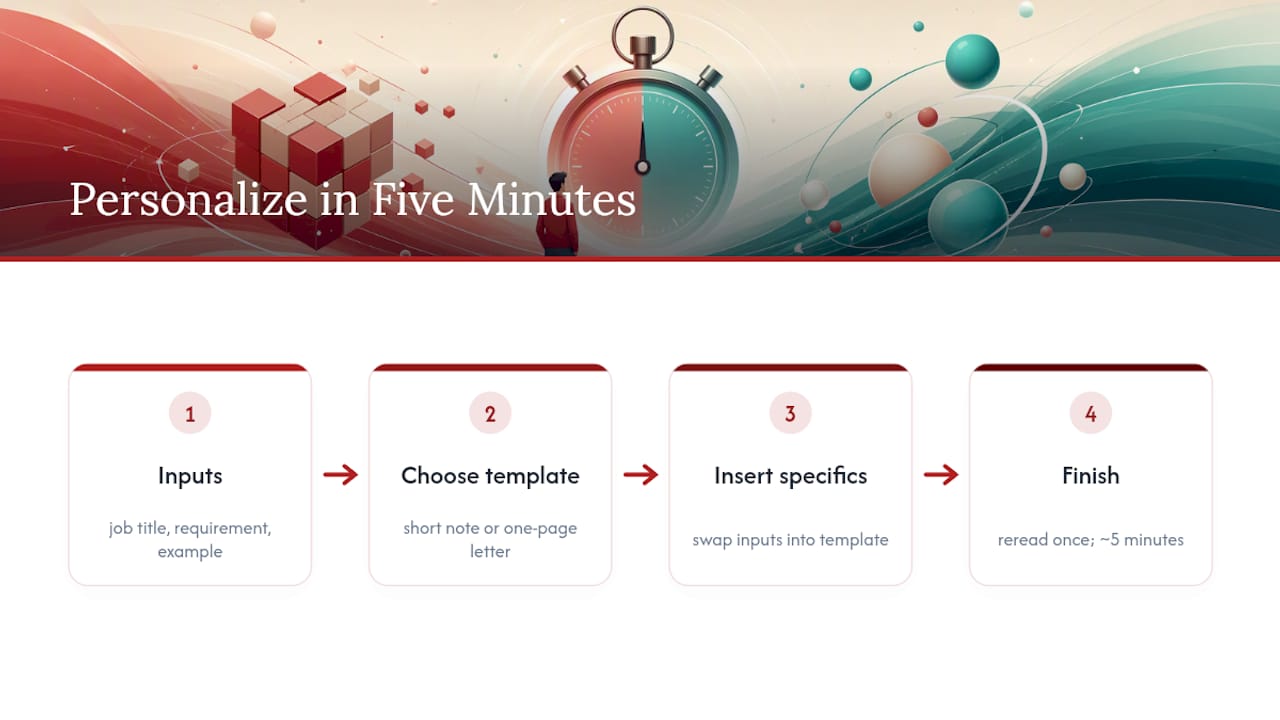
Three inputs personalize a cover letter

What mistakes make an entry-level cover letter weak?

Most weak letters fail for the same handful of reasons, and every one is fixable in under a minute.

  • Apologizing for inexperience. Never open with “I don’t have much experience, but…”. Lead with what you can actually do.
  • Repeating the resume. Use the letter to explain context and fit that your resume’s bullet points can’t show.
  • Generic enthusiasm. “I’m excited about this opportunity” says nothing. Name one specific part of the role or company that matches your skills.
  • Wrong length. A short note stretched to a full page reads as padded; a full letter squeezed to three lines reads as rushed. Match length to what the posting asks for.
  • Obvious templated phrasing. Career-centre guidance flags generic salutations and copy-paste openers as common pitfalls that flatten an otherwise strong application. Personalize your voice and your examples every time.

Final pre-send checklist

Run through this in under a minute before you hit submit:

  1. Is the greeting personalized with a name, or professionally neutral if you couldn’t find one?
  2. Does the opening state the exact role and one clear strength?
  3. Are there two short examples directly tied to what the job needs?
  4. Is there a decisive call to action, plus your phone number and email?
  5. Is the format correct: one page or short note, 10 to 12 point font, standard margins, saved as the requested file type?

How do you handle gaps or a thin resume in a cover letter?

Address a gap by shifting the frame, not by apologizing for it. Instead of explaining what you don’t have, name what you built during that time, whether that’s a certificate, a volunteer commitment, freelance work, or caregiving responsibilities that developed real skills like scheduling, budgeting, or conflict resolution.

If you’re switching fields entirely, focus the letter on transferable capabilities rather than direct experience. Someone moving from retail into administrative work can point to cash handling accuracy, scheduling coordination, or customer de-escalation. These translate cleanly, provided you make the connection explicit rather than assuming the hiring manager will draw the line themselves.

For a true resume gap, whether from school, travel, or a health issue, one honest sentence is usually enough: state briefly what the period involved and pivot immediately to what you’re bringing now. Dwelling on it signals insecurity; naming it and moving on signals confidence. Job-site guidance on writing without experience consistently points to coursework, volunteer roles, and personal projects as legitimate, credible substitutes for paid history, provided the examples are specific rather than vague.

The goal isn’t to hide the gap. It’s to make the employer’s need the centre of the sentence, with your example as the proof, not the excuse.
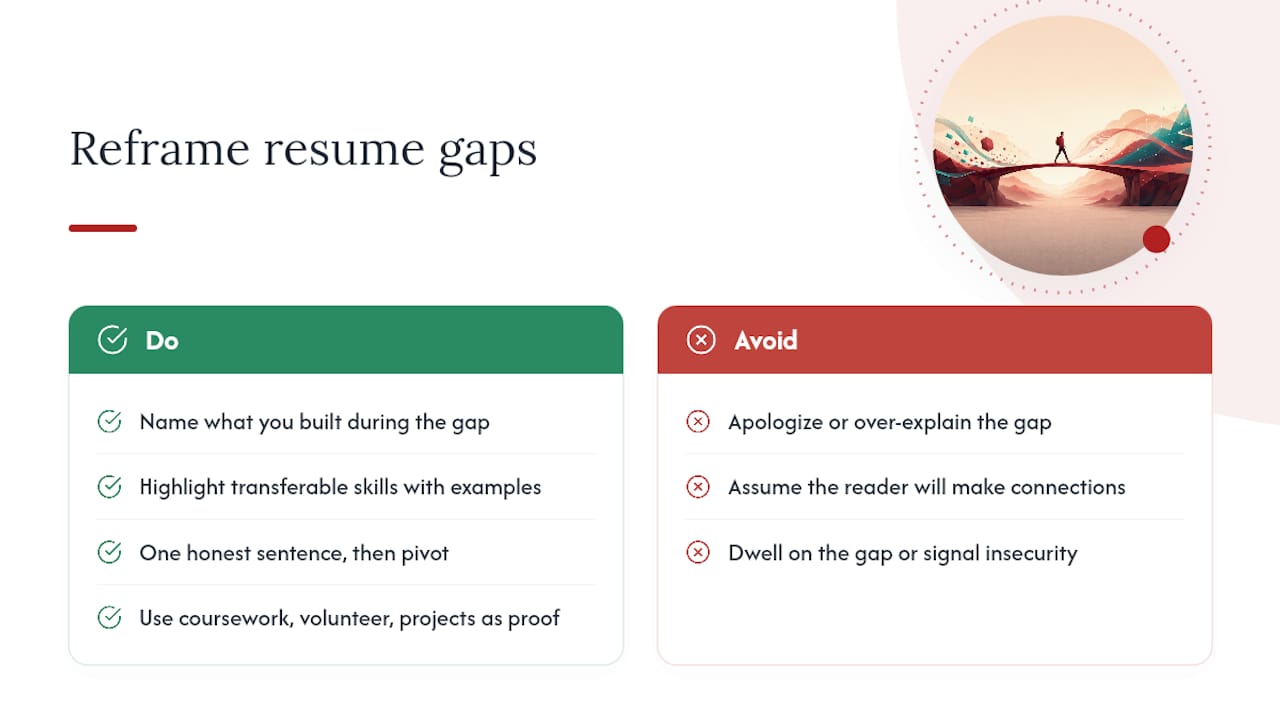
How do you handle gaps or a thin resume in a cover letter? — overview diagram

How do you customize a cover letter for different industries?

The five-element structure holds across industries, but which skills you foreground should shift with the role. A retail or hospitality posting rewards examples showing composure under pressure and direct customer interaction. An office or administrative role rewards organization, attention to detail, and software familiarity, even if that familiarity comes from school assignments rather than a job.

For technical or trades-adjacent entry points, lead with hands-on project work: a class build, a repair you completed, or a tool you learned to operate competently. For creative roles, a short portfolio link paired with one sentence about your process often carries more weight than a paragraph of adjectives.

Nonprofit and community-facing roles respond well to volunteer history framed in outcomes: people served, funds raised, events coordinated. Corporate roles tend to favour measurable results, even small ones, like “reduced processing errors by double-checking a shared spreadsheet weekly.” The throughline across every industry is the same: match your example’s language to the posting’s language. If the job ad says “collaborative,” use a team example. If it says “detail-oriented,” use an example that proves precision, not just claims it.

When does a cover letter actually move the needle?

Some hiring managers skim past cover letters entirely, and some recruiters have said as much on record. But the pattern that matters for entry-level candidates is different: when a resume alone doesn’t show fit, whether because of thin experience or a career change, a specific, well-connected letter often does the explaining a resume can’t. Tailored documents tend to draw more interview requests than generic ones, particularly for candidates early in their careers where the resume carries less context on its own.

The short note works when the system asks for it or the role is high-volume. A full letter earns its place when you actually care about the role and have something specific to say about it.

— Professional

How Professionalresumes helps you get past the first cut

Writing a strong cover letter from scratch takes real effort when you’re new to the job market and unsure which examples actually count as relevant experience. Professional services build that document for you, tailored to your target role, so you’re not guessing at what a hiring manager wants to see.
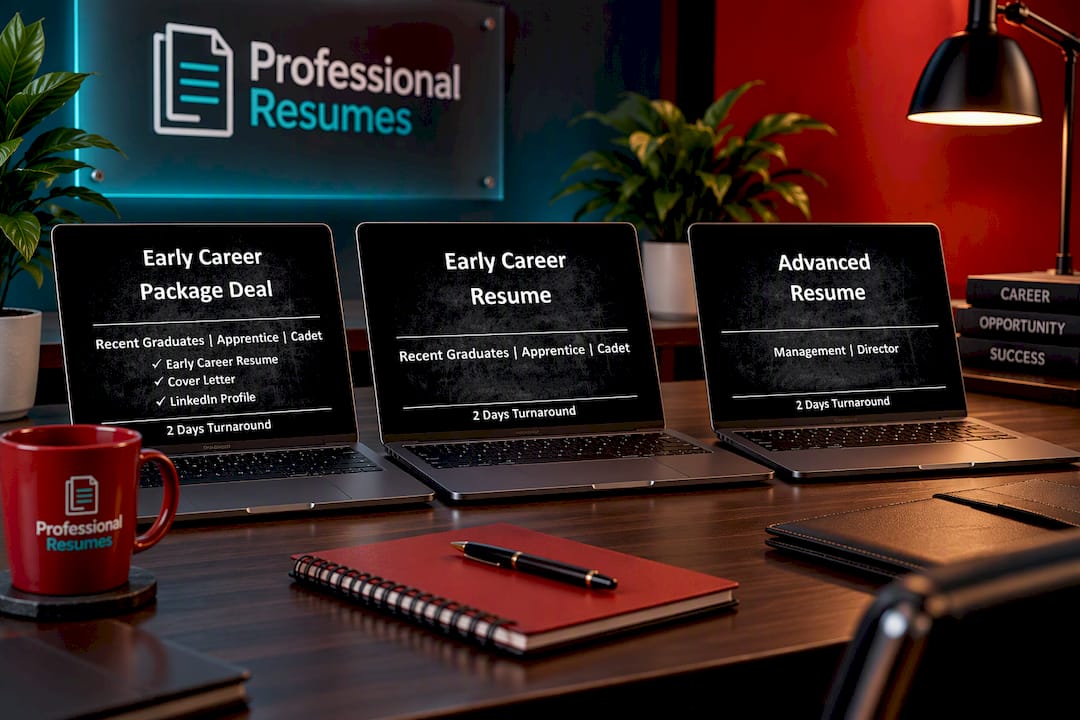
Early Career Package Deal

The Early Career Package Deal pairs a professionally written resume with a matching cover letter built around your actual coursework, volunteer work, and projects, developed through a real consultation rather than a generic template. It includes revisions, so the final version reflects your voice, not a form letter. If you need the resume piece on its own, the Early Career Resume covers that, and candidates with more to showcase can step up to the Advanced Resume for deeper optimization. Browse the full range on the shop page or add a LinkedIn profile optimization to match. Start with a consultation on a package page and see what a tailored letter looks like for your situation.

Sources

For structure and formatting rules, see the IUP career centre’s cover letter handout, Indeed Canada’s no-experience guide, and Monster’s entry-level examples. For interview-day follow-through, check this interview readiness checklist.

FAQ

How do I write a cover letter if I have no job experience?

Focus on transferable skills from school, volunteering, or personal projects, and connect each one directly to a requirement in the posting. Use the five-element structure: greeting, opening, two skill-based body paragraphs, a connection sentence, and a decisive close, following standard formatting guidance.

Are cover letters outdated in 2026?

No, but they’re used differently than they were a decade ago. Some recruiters skim past them for high-volume roles, but hiring managers interviewed on the topic still read a specific, well-tailored letter, especially for entry-level candidates whose resumes carry less context on their own.

What are common cover letter mistakes to avoid?

The most common mistakes are apologizing for lack of experience, repeating the resume instead of adding context, using generic enthusiasm without specifics, and skipping the connection between your examples and the job’s actual requirements, according to career-centre pitfall guidance. Poor proofreading rounds out the list.

What should a cover letter include?

A strong entry-level letter includes a professional greeting, an opening that names the role and one value claim, two or three body examples showing transferable skills, a sentence connecting those skills to the employer’s needs, and a clear call to action requesting an interview. Keep it to one page with 10 to 12 point font, per standard formatting rules.

How much does a professional cover letter service cost?

Professionalresumes bundles cover letter writing into its entry-level packages rather than selling it as a standalone product, with the Early Career Package Deal covering both resume and letter together. Current pricing for all packages is listed on the shop page.
Decorative cold cover letter title card

Cold Cover Letter That Gets Replies: Use a One Sentence Hook

Yes, a cold cover letter is worth sending when you’re targeting a company or role you genuinely want, even without a posted opening. For most first contact, a short cold email outperforms a full letter. Reserve a one-page speculative cover letter for senior executives or roles where a formal document signals seriousness. If you hear nothing back, follow up once, after seven to ten days.


TL;DR:

  • Sending a highly personalized cold cover letter can create new opportunities, especially if targeted to a specific contact and tailored to the company’s needs.
  • Keep outreach brief, focusing on one clear value proposition with a verifiable example, and avoid asking for direct employment, instead requesting small, low-friction actions.
  • Follow up politely after seven to ten days if there is no response, as persistence enhances the chance of engagement without damaging relationships.
  • Avoid generic templates and spelling errors, and heavily edit AI-generated drafts to include genuine, specific details that reflect your actual experience.
  • Using physical portfolios in design or trades can outperform emails, and hiring professional writers is advisable when reaching senior contacts or transitioning into new industries.

Professionalresumes
Make Your Career Story Stand Out
Professional Resumes creates customized cover letters tailored to your aspirations, experience, and the employers you want to reach.

Explore professional resume services

Table of Contents

What is a cold cover letter and when should you use one?

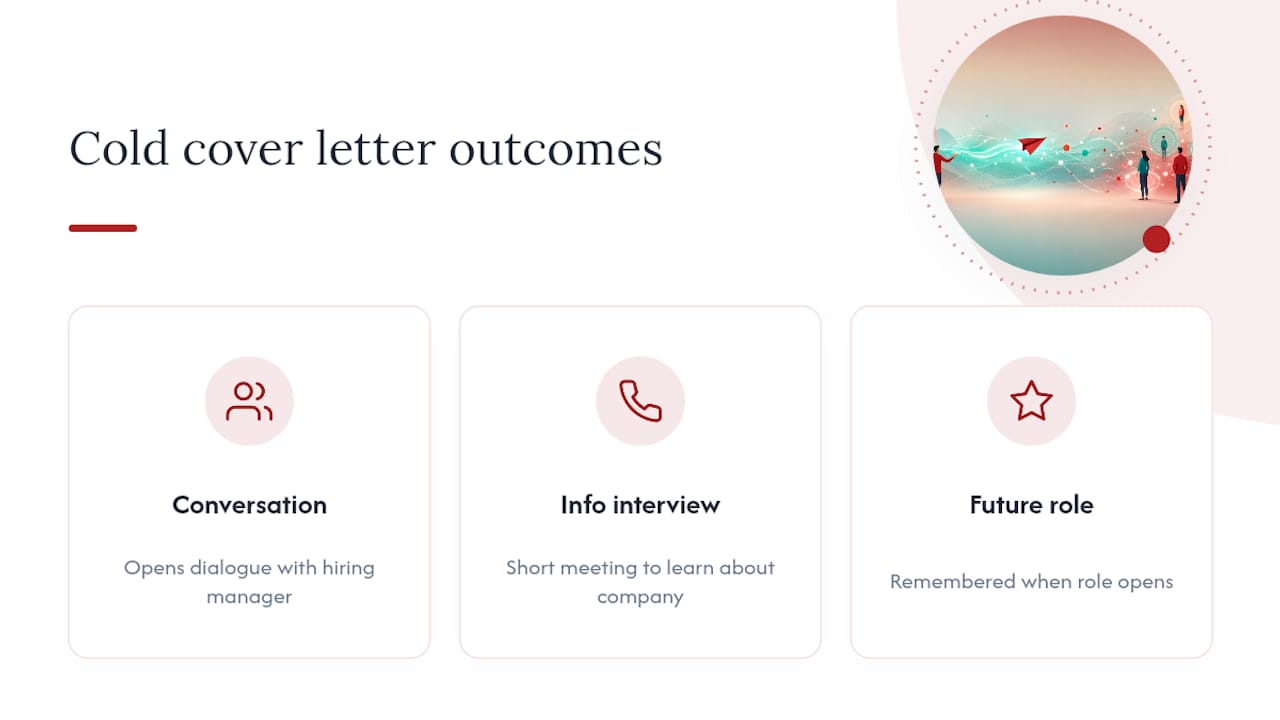
A cold cover letter, also called a speculative cover letter or unsolicited job application, is a message sent to a company without a corresponding job posting. It differs from a standard cover letter in one critical way: there’s no advertised role to respond to, so you’re creating the opportunity for a conversation rather than answering one. The goal isn’t always a direct hire. More often, a strong letter of interest for a job opens a conversation, secures an informational interview, or puts your name in front of a hiring manager before a role even exists.

Cold cover letter pathway and outcomes

Career resources describe this as a proactive way to get on a company’s radar, and it works because it operates on a different timeline than reactive applications. You’re not competing against fifty other candidates for one posting. You’re the only unsolicited job application that manager received this month, which changes the dynamic entirely.

Set realistic expectations. Most cold outreach leads to networking, referrals to other openings, or a “keep in touch” response rather than an immediate offer. That’s still valuable. A contact who remembers you favourably when a role does open is worth more than another anonymous application in an applicant tracking system.

How do you write and send a cold cover letter that gets read?

Treat this as a sequence, not a single draft you fire off in ten minutes.

  1. Research the company and confirm the right contact. Don’t send this to a generic careers inbox. Find the hiring manager or team lead on LinkedIn, check the company’s recent news or a specific project, and confirm the spelling of their name and title before you write a word.
  2. Decide between an email and a letter. A short cold outreach letter sent as an email works for most situations, especially early and mid-career outreach. Switch to a formatted one-page letter when you’re approaching a senior executive, applying in a field where a portfolio or writing sample matters, or when the company culture leans formal (law, finance, government).
  3. Write a subject line that earns the open. Vague subject lines get ignored. Try “Question about [Company]’s [specific project]” or “Referred by [mutual contact] regarding [team]” over anything generic like “Job Inquiry.”
  4. Open with a one-sentence hook. Tie yourself to a real company need in the first line: “I noticed [Company] recently expanded its supply chain team, and I’ve spent six years solving exactly that bottleneck.”
  5. Pitch your value in two or three lines. Quantify an outcome or point to one concrete example rather than listing your résumé. This is where most unsolicited cover letters lose the reader.
  6. Make a single, low-friction ask. Request a 15-minute call, an informational chat, or permission to send a portfolio. Don’t ask for a job outright.
  7. Follow up once, seven to ten days later. A brief, polite nudge referencing your original note is enough.

Cold outreach is frequently ignored, and the ones that land tend to demonstrate real understanding of the recipient’s work while making the ask easy to grant with minimal friction. That single idea, low friction, does more for your reply rate than any clever phrasing.

Pro Tip: In design, trades, or construction, a curated physical portfolio handed over in person can outperform a dozen polished emails. Tangible proof of work still moves people that a PDF attachment doesn’t.

What common mistakes kill your reply rate?

Most failed cold cover letters share the same handful of problems, and they’re all fixable once you see them named.

  • Sending a letter that reads like it was generated in thirty seconds, with no company-specific detail anywhere in it.
  • Listing five or six vague achievements instead of naming one project, metric, or link a reader can actually verify.
  • Misspelling the recipient’s name or title, which signals you didn’t do the research you claimed to.
  • Writing three pages when the reader will skim it in under a minute.
  • Going silent after one attempt instead of following up, or burning a bridge after a polite no.

Recruiters increasingly notice when a cover letter looks machine-written, and that’s not a minor concern. Reporting on 2026 hiring trends shows recruiters growing wary of the flood of AI-polished applications now landing in their inboxes, and surveys suggest a meaningful share of them believe they can spot AI-generated submissions on sight. If you use AI to draft, edit it hard afterward. Add the one detail only you would know: the specific project you referenced, the actual number behind your claim, a phrase that sounds like you and not a template.

When you hit silence, wait it out past your one follow-up and move to the next target. A polite rejection is often worth a short thank-you reply, since that’s how referrals happen months later.

What do a cold email and a speculative letter actually look like?

Structure beats length here. A letter of interest should stay short, name the organization specifically, and end with one clear ask.

Cold email template:

  • Subject: “Quick question about [Company]’s [specific initiative]”
  • Line 1: the hook tying you to their need
  • Line 2 to 3: your value pitch with one concrete example
  • Line 4: your ask (a 15-minute call, or permission to send more detail)

One-page speculative letter template:

  • Opening paragraph (40 to 60 words): the hook plus why this company specifically
  • Body paragraph (60 to 80 words): your value pitch and one verifiable example
  • Closing paragraph (30 to 40 words): your ask and a thank-you

Swap out every bracketed detail for something real. Generic placeholders are the fastest way to make an otherwise solid networking cover letter feel like a mass mailing.

When is it worth hiring a professional writer instead?

Doing this yourself works for most early and mid-career outreach. It’s worth paying for professional help when you’re targeting a senior executive, pivoting into a new industry where your language doesn’t match the role yet, or approaching a contact you can only realistically reach once. Professionalresumes builds custom, consultation-driven documents with multiple revisions and applicant tracking system-friendly formatting, which tightens both your value pitch and your follow-up plan for outreach that actually matters.

Why authenticity beats polish in 2026 hiring

Tailored outreach is scarce, which is exactly what makes it work. Most job seekers still send nothing unsolicited, so a specific, well-researched letter stands out by default. Use AI to draft if you want, but edit until it sounds like you, not a template. Track which targets respond and put more effort where the return is real.

— Professional

Get expert help writing outreach that lands

If you’re approaching a senior contact or pivoting industries, the margin for error in a cold cover letter shrinks fast, and a generic template won’t carry that weight. The Advanced Resume package from Professionalresumes gives you a consultation-driven, custom-written document built around your actual target roles, not a recycled draft. Every project includes direct consultation, multiple revisions, and applicant tracking system-friendly formatting, so your outreach and your resume tell the same tightened story. If your outreach references an online presence, pair it with the LinkedIn profile optimization service so a curious hiring manager finds a consistent picture the moment they search your name. Compare document levels on the full shop page and start with whichever package matches how far along your search actually is.

Get expert help writing outreach that lands — overview diagram

Sources

Advanced Resume

For more on cover letter trends, authenticity in AI-era hiring, and application packaging, see Business Insider and the Our Languages blog.

FAQ

Are cover letters outdated in 2026?

No. Experts remain split, but the consensus leans toward cover letters still mattering precisely because so few applicants send them. A tailored one, especially an unsolicited job application to a company you actually want, still stands out against a sea of resume-only submissions.

How do I write a cold email for a job?

Open with a one-sentence hook tied to a real company need, follow with two or three lines of value backed by one verifiable example, and close with a single low-friction ask like a 15-minute call. Keep the message short and personalize the subject line.

What are five common cover letter mistakes?

The biggest ones are obviously AI-generated phrasing with no personal detail, vague achievements instead of one verifiable example, misspelled names or titles, letters that run too long for a quick skim, and going silent after a single attempt instead of following up once.

Can I use ChatGPT to write a cover letter?

You can use it to draft, but recruiters increasingly report noticing AI-polished applications and growing wary of them. Edit any AI draft heavily to add specific, personal, verifiable details before you send it.

Decorative resume verb title card illustration

9 Verb Categories for Canadian Resumes and the Verb to Outcome Formula

Action verbs are the words that open a resume bullet and name the specific thing you did: “negotiated,” “analyzed,” “trained,” not “responsible for.” The immediate fix for a weak resume is simple: replace every duty phrase with a precise verb, then attach a measurable result to it. Yale University’s Office of Career Strategy and MIT’s Career Advising office both build their entire resume guidance around this swap, and this principle is applied in every client resume rewrite.


TL;DR:

  • Using specific action verbs aligned with skills improves clarity and demonstrates capability before reading any other resume content.
  • The typical structure of a strong bullet is verb plus contribution, context, and measurable outcome, ensuring each statement is concrete and interview-ready.
  • Avoid vague or overused words like “responsible for,” “helped with,” and “worked on,” replacing them with precise verbs paired with quantifiable results.
  • Tailoring verbs to the job posting’s keywords and maintaining consistent tense enhances ATS compatibility and overall professionalism.
  • Repeated overused verbs and missing outcomes signal rushed editing; a quick six-point checklist can help ensure each bullet is achievement-driven and accurate.

Professionalresumes
Make Every Resume Bullet Count
Professional Resumes creates customized resumes with personalized consultation and revisions, helping your skills and outcomes speak clearly to employers.

Explore resume services

Table of Contents

Categorized action verbs for resumes by skill and impact

Picking the right verb starts with naming the skill the bullet needs to prove. MIT’s Career Advising office organises its own verb bank this way, sorting words by category such as management, communication, research, and technical work, because a hiring manager scanning a resume reads verbs as shorthand for capability before they read anything else.

Here is a working library organised the same way, built for job seekers who want options they can drop straight into a bullet.

Achievement and results: achieved, attained, exceeded, surpassed, pioneered, generated, delivered, secured, reduced, increased, expanded, accelerated, converted, outperformed, restored.

Leadership and management: directed, orchestrated, chaired, spearheaded, mentored, delegated, mobilized, championed, authorized, appointed, supervised, motivated, unified, empowered, cultivated.

Growth, efficiency, and cost savings: streamlined, consolidated, optimized, automated, restructured, cut, trimmed, eliminated, standardized, accelerated, scaled, economized, renegotiated, condensed.

Communication and partnership: negotiated, liaised, briefed, persuaded, articulated, presented, facilitated, mediated, collaborated, corresponded, advocated, translated, publicized.

Research and analysis: analyzed, evaluated, quantified, audited, investigated, forecasted, benchmarked, diagnosed, interpreted, surveyed, modelled, validated, synthesized.

Creation, innovation, and technical work: engineered, developed, programmed, designed, architected, built, configured, integrated, prototyped, debugged, deployed, automated, migrated.

Teaching and helping: coached, instructed, trained, mentored, tutored, guided, onboarded, counselled, advised, supported, empowered, demonstrated.

Clerical and administrative: processed, coordinated, scheduled, compiled, catalogued, organized, maintained, documented, reconciled, dispatched, filed, tracked.

Illustration of categorized resume action verbs

Creative: conceived, crafted, produced, composed, illustrated, storyboarded, curated, branded, scripted, visualized.

If you want role-specific starting points instead of scanning nine categories, try these short lists:

  • Entry-level: assisted, contributed, supported, learned, participated, compiled
  • Mid-level manager: supervised, delegated, coordinated, improved, resolved, allocated
  • Technical: engineered, deployed, automated, debugged, integrated, migrated
  • Sales and marketing: generated, closed, upsold, launched, positioned, converted
  • Customer service: resolved, de-escalated, retained, responded, guided, triaged

Harvard Law School’s action verb bank organises verbs on the same category logic, which is a useful cross-check if you want a second source before committing to a word.

How do you turn a verb into a resume bullet?

A verb alone does nothing. Every strong bullet follows the same structure: verb + contribution + context + outcome. You name the action, what you did it to or with, the setting or scale, and what changed because of it. Yale’s guidance on writing impactful resume bullets points to the same pattern, and it echoes structure used in Canada’s federal public service: action verb, then result, then the means used to get there.

Three before-and-afters show how much that structure changes a bullet:

  1. Before: “Responsible for customer accounts.” After: “Managed 40 client accounts worth $2M in annual revenue, retaining 95% through proactive check-ins.”
  2. Before: “Helped with social media.” After: “Grew Instagram engagement 60% in six months by launching a weekly behind-the-scenes video series.”
  3. Before: “Worked on inventory.” After: “Reduced inventory holding costs by 18% by redesigning the reorder schedule across three warehouses.”

On tense: use past tense for every prior role, present tense only for the job you currently hold, and never mix the two within one job’s bullet list. Consistency here matters more than variety.

Keywords deserve the same discipline as verbs. If a job posting says “cross-functional collaboration” and “budget forecasting,” work those exact phrases into bullets that already lead with a verb, like “Forecasted a $500K departmental budget across four cross-functional teams.” That pairing satisfies both a human reader and an applicant tracking system scanning for exact terms.

Pro Tip: Don’t reach for a thesaurus first. Write the plain action in ordinary words, then add who, how, and what changed. Only after that’s on the page should you pick the sharpest, most accurate verb. Picking an impressive-sounding word before the facts exist is how resumes end up overstating what actually happened.

Which resume verbs and phrases should you avoid?

Some words show up on so many resumes that hiring managers stop reading them as information. Indeed’s guidance on action verbs that make a resume stand out flags vague framing like “tasked with” and “experience in” as the biggest offenders, because neither one names an action or an outcome.

Watch for these and swap them out:

  • “Responsible for” tells nobody what you did. Replace with managed, owned, or directed plus a specific result.
  • “Helped with” is passive and vague. Replace with supported, contributed to, or assisted, naming exactly what you added.
  • “Worked on” says nothing about scope. Replace with developed, built, or executed.
  • “Experience in” describes exposure, not achievement. Replace with a verb naming what you actually produced.
  • “Tasked with” frames you as passive. Replace with led, executed, or delivered.
  • “Managed” (overused across every bullet). Break it into coached, allocated, negotiated, or scheduled to show distinct actions instead of repeating one generic word.

Whatever verb you choose, make sure you can defend it in an interview. Claiming you “spearheaded” a project you supported peripherally is a credibility problem the moment someone asks a follow-up question.

Why Professionalresumes applies this same verb formula

Customized resumes, cover letters, and LinkedIn profiles are written for job seekers across industries, from executives to career changers adapting to a new market. The verb + contribution + context + outcome structure described above is the same framework applied in every client resume, adjusted to the client’s actual role and measurable results.

  • Each resume undergoes a consultation to extract real numbers before verbs are chosen.
  • Documents are built to be ATS-friendly, matching posting language without sacrificing readability.
  • Clients receive multiple revision rounds to sharpen verbs until each bullet is interview-defensible.

An editor’s checklist for catching weak verbs before you hit submit

Three problems show up constantly during resume edits: “managed” repeated across five unrelated bullets, verbs with no number or outcome attached, and past and present tense mixed within the same job entry. Any one of these signals a rushed edit to a recruiter skimming fast.

Run this six-point check in under five minutes: scan for repeated verbs, confirm every bullet has a number or concrete result, check tense consistency job by job, cut any “responsible for” or “tasked with” phrasing, verify each verb is one you could explain in an interview, and read the top three bullets aloud to see if they sound like an achievement or a chore. Variety matters, but accuracy always wins when the two are in tension. A slightly repetitive resume that’s true beats a colourful one you can’t back up.

— Professional

Get expert help writing verb-driven resume bullets

Reading a verb list gets you halfway there. Turning your own scattered accomplishments into tight, quantified bullets under deadline pressure is the part most job seekers struggle with alone. That service is offered as a direct one, where a writer works with the client’s work history to build the verb, contribution, and outcome into each line.

Advanced Resume

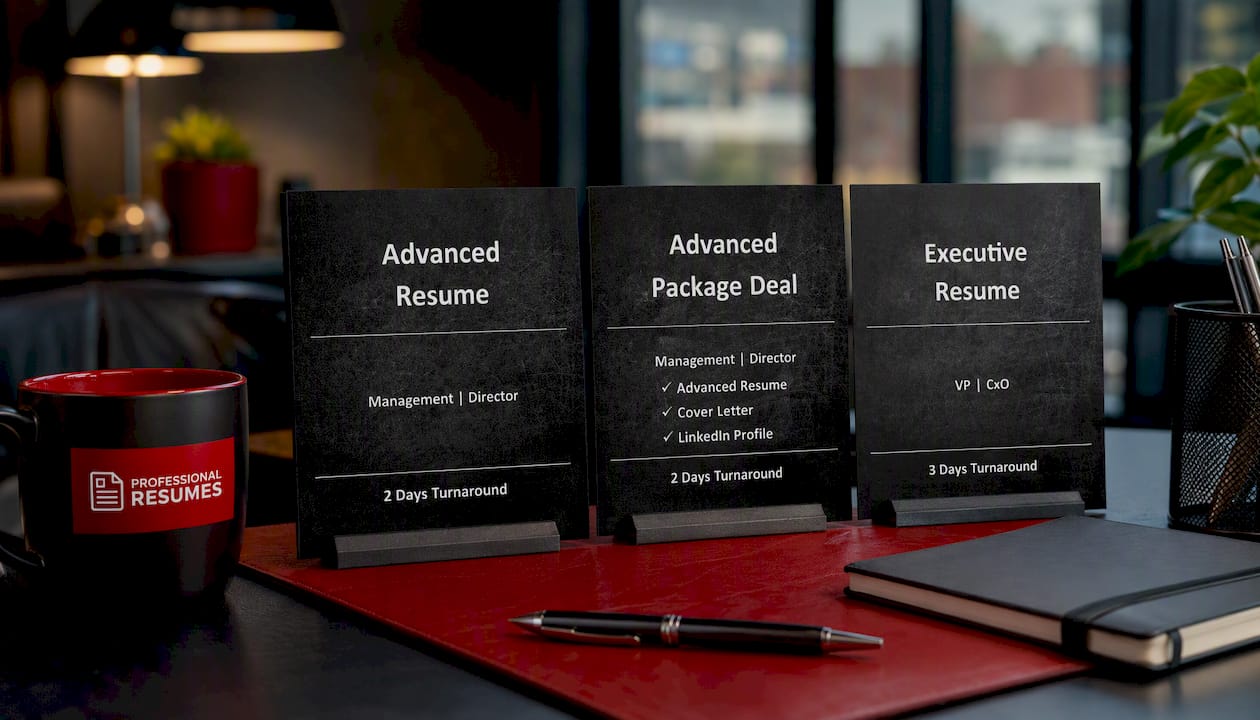
The Advanced Resume service is built for professionals with several years of experience who need every bullet quantified and ATS-optimized. The Advanced Package Deal bundles that resume work with cover letter writing, useful for anyone refreshing a full application at once. For senior leaders, the Executive Resume is written specifically for board-level and P&L-owning candidates whose bullets need to carry organizational weight, not just task lists. If you’re not sure which fits your career stage, the full product lineup lays out every option side by side, and a LinkedIn profile optimization service is available to carry the same verb-driven language onto your profile. Start by picking the resume tier that matches your career stage and let a writer take it from there.

Sources

If you’re clarifying which leadership verbs actually match your management style before writing bullets, a short tool like this leadership-style assessment can help you pinpoint the right words instead of guessing.

FAQ

What are some strong examples of action verbs for resumes?

Strong examples include achieved, negotiated, streamlined, engineered, coached, and analyzed, each chosen because it names a specific action rather than a general duty. The best choice always depends on the skill the bullet needs to prove, whether that’s leadership, technical work, or communication.

What is the verb-plus-outcome formula for writing resume bullets?

The formula is verb, contribution, context, and outcome: name the action, what it applied to, the setting or scale, and what result followed. This structure lines up with Yale’s approach to writing impactful bullets and with active-voice guidance used in Canada’s public service.

Which action verbs should you avoid on a resume?

Avoid vague framing like “responsible for,” “tasked with,” “experience in,” and “helped with,” since none of them names a real action or result. Indeed’s guidance recommends replacing these with verbs like led, executed, or delivered, each paired with a specific outcome.

Does Professionalresumes help with choosing action verbs for a resume?

Yes. Every resume Professionalresumes writes applies the verb plus contribution, context, and outcome structure, tailored to the client’s actual role and numbers. Pricing for the Advanced Resume and Executive Resume services is listed on the product pages.

How many action verbs should appear on one resume?

There’s no fixed count, but each bullet should open with a different verb wherever possible to avoid repetition, especially around commonly overused words like “managed.” A resume with 15 to 20 bullets typically draws from several categories rather than repeating the same three or four verbs throughout.

Decorative Canadian cover letter title card

Canadian Cover Letter: One STAR Paragraph That Gets Interviews

A strong Canadian cover letter does one job: it connects a specific, measurable achievement to the exact priority named in the posting, then asks for an interview. Keep it to one page, tailored to that employer, backed by one STAR example, and proofread twice. Everything else in this guide exists to help you execute that one paragraph well, with samples and a template you can adapt tonight.


TL;DR:

  • A Canadian cover letter should connect a measurable achievement directly to the job’s top requirement using a STAR example to demonstrate impact.
  • Tailoring the letter to the specific employer and including exact keywords from the posting increases the chances of passing ATS scans and impressing recruiters.
  • Keep the letter to one page, with a professional format matching your resume, and avoid including salary expectations or vague generalities.
  • Use a warm, confident tone that balances professionalism and approachability, adjusting formality based on the industry and province.
  • Hiring a professional writer is beneficial if you lack time, especially for senior roles, as they ensure proper formatting, impactful language, and tailored content.

Professionalresumes
Make Your Cover Letter More Targeted
Professional Resumes crafts customized cover letters tailored to your aspirations, with consultations and revisions to help showcase your experience.

Explore cover letter services

Table of Contents

Cover letter format canada: header, length and layout rules

Canadian employers expect a clean, single-page letter that mirrors your resume’s formatting. Federal and provincial applications, in particular, reward precision over creativity here.

Your header needs your full name, phone number, a professional email address, and optionally your LinkedIn URL. Below that, add the date and, when you have it, the recipient’s name, title, and company address. For emailed applications, a short letter can go directly in the email body; for online portals or PDF uploads, attach a formatted document instead.

Stick to a standard, readable font (Calibri, Arial, or Times New Roman at 10 to 12 point) and single spacing with a blank line between paragraphs. Length matters: RBC’s guidance for job seekers new to Canada is explicit that a Canadian resume and cover letter should stay to one page, tailored for each role.

A few specifics that trip people up:

  • Federal and government postings often require a reference number and specific subject-line wording. Government application guidance instructs applicants to include contact details in the header and cite the exact position title and file number when requested.
  • Skip the “Cover Letter” title at the top. It’s implied by the format.
  • Save the file as “FirstName_LastName_CoverLetter.pdf,” not “Document1.pdf.”

How do you address the hiring manager in a Canadian cover letter?

Spend five minutes on LinkedIn or the company’s “our team” page before you default to a generic greeting. A name signals you did the work; a title alone rarely does.

When you can’t find a name, Canadian business communication guidance recommends “Dear Hiring Manager” rather than “To Whom It May Concern,” which reads as outdated and impersonal to most Canadian recruiters.

Your opening paragraph should name the role, deliver a one-line hook built around your best relevant result, and state briefly why this employer specifically interests you. Three examples worth adapting:

  • “As a bilingual project coordinator who cut vendor onboarding time by 30% at a Toronto logistics firm, I’m applying for the Operations Analyst role at [Company].”
  • “I’m writing to apply for the Registered Nurse position at [Hospital], where my five years in acute care and CNO licensure align directly with your unit’s needs.”
  • “Your posting for a Marketing Specialist caught my attention because of [Company]’s recent expansion into Alberta, a market where I helped grow a competitor’s client base by 22%.”

How to write the body: showing impact with the STAR method

Career resources across Canada consistently point to the STAR method, Situation, Task, Action, Result, as the clearest way to prove impact instead of just claiming it. Hiring managers skim dozens of letters a day; a concrete result stops the skim.

Pick one or two achievements that map directly to the job description’s top requirements. Don’t try to summarize your whole career here.

  1. Situation: Set the scene in one short clause (“When our team’s client retention dropped 15% in a quarter…”).
  2. Task: State what you were responsible for.
  3. Action: Describe the specific step you took.
  4. Result: Quantify the outcome, percentage, dollar figure, time saved, or scale affected.

A weak resume bullet like “Managed customer accounts” becomes: “When client churn spiked, I redesigned our onboarding calls and personally managed the top 40 accounts, cutting churn by 18% in two quarters.” That’s a full STAR story in one sentence.

Pro Tip: If you’re early in your career and short on hard metrics, quantify scale instead of dollars, “coordinated a 12-person volunteer team” still proves you can lead.

Matching keywords without sounding like a robot

Applicant tracking systems scan for exact phrases from the job posting, but a letter stuffed with buzzwords reads badly to the human who eventually opens it. The fix is reading the posting twice: once for required qualifications (licences, years of experience, named software) and once for preferred or “nice to have” language.

Weave the required terms into your STAR sentences naturally rather than listing them. If a posting names a provincial credential, a nursing licence with the College of Nurses of Ontario, or a Professional Engineer designation with a provincial regulator, mention it plainly rather than assuming your resume alone covers it.

A quick checklist before you send:

  • Does the letter repeat at least two or three exact phrases from the posting’s “requirements” section?
  • Have you named any required licence, certification, or software by its exact title?
  • Did you avoid repeating the same keyword more than twice, which reads as stuffing to a human reader?
  • Is every sentence still readable out loud, not just scannable?

Recruiters in competitive Canadian sectors, tech, health care, and public service, often use a tailored letter as the tiebreaker between two similarly qualified candidates, since it’s the clearest signal of genuine interest and fit for the role and company.

Cover letter examples canada: three templates you can adapt

Templates work best as a skeleton you rebuild with your own numbers, not a script you copy verbatim. University career centres, including the University of Calgary’s career resources, structure every strong letter the same way: opening hook, STAR-based body, and a closing ask.

Entry-level: “I’m applying for the Junior Analyst role at [Company]. During my co-op term at [Previous Employer], I automated a weekly reporting task that saved the team six hours per week, a skill I’m eager to bring to your data team. My degree in Economics from [University] gave me the analytical foundation; your posting’s emphasis on Excel and SQL matches coursework I completed with distinction.”

Career changer: “After eight years managing retail operations, I’m transitioning into project coordination, and your posting for a Project Coordinator at [Company] is exactly the fit I’ve been building toward. At [Previous Employer], I led a store renovation project across three locations, coordinating five contractors and finishing two weeks ahead of schedule.”

Experienced professional: "With twelve years in supply chain management, including a CSCP designation, I’m applying for the Senior Buyer role at [Company].

Swap the metrics, company name, and credential in each template for your own. If your target role requires provincial licensing, name the licence explicitly rather than assuming the reader will find it in your resume, and pair your cover letter with a career summary that echoes the same tone.

The mistakes that cost you the interview

Most rejected cover letters share the same handful of errors, and they’re all fixable in ten minutes.

  1. Sending a generic letter. If it could go to any company, a hiring manager assumes you sent it to twenty companies.
  2. Typos and misnamed companies. Nothing signals carelessness faster than “Dear [Company Name]” left unedited.
  3. Formatting that doesn’t match your resume. Different fonts or margins between documents look sloppy, even if the content is strong.
  4. Broken or missing links. Test your LinkedIn URL and portfolio link before you hit send.

Run a one-minute pass before submitting: read it aloud once, confirm the company name and role title are correct everywhere, and check that your contact details match your resume exactly.

Why and when to hire a professional cover letter writer

A well-tailored letter takes real time to get right, and not every job seeker has that time between applications, interviews, and, often, a current job. This is where Professionalresumes fits for readers who want the STAR structure and ATS formatting done by someone who does it daily.

Professionalresumes offers resume packages for different career stages, with pricing details available on their website. Package deals bundle resume, cover letter, and LinkedIn work at each tier. Every engagement includes a consultation, a tailored cover letter written around your own achievements, ATS-friendly formatting, and revision rounds until the document is right.

Getting the tone right: professionalism without stiffness

Canadian workplace culture sits somewhere between the formality of British business writing and the more casual tone common in American cover letters, and that middle ground trips up a lot of job seekers. The safest register is warm but restrained: confident about your results, modest about your delivery.

Avoid two failure modes. The first is over-formality, opening with “I am writing to express my sincerest interest” and never using a contraction anywhere in the letter. It reads stiff and dated to most Canadian recruiters, particularly in tech, creative, and startup environments where a more conversational tone is expected. The second is over-familiarity, jokes, exclamation points, or overly casual phrasing that undercuts the seriousness of the application. Neither extreme lands well.

Canadian professional writing also tends to favour understatement over aggressive self-promotion. Where an American cover letter might say “I am the ideal candidate and will exceed all expectations,” a Canadian equivalent reads more like “I believe my experience aligns closely with what you’re looking for, and I’d welcome the chance to discuss how I could contribute.” The claim is just as confident, but the delivery is quieter.

Sector matters too. A cover letter for a government or public-sector role in Ottawa should lean more formal and precise, echoing the structured language of the posting itself. A letter for a Vancouver tech startup can be noticeably more direct and personable, sometimes even mentioning company culture or product enthusiasm. Read the tone of the job posting itself; it’s usually your best clue for how formal the employer expects your letter to be.

Should you write your cover letter in French?

Language choice matters most in Quebec, where Bill 96 and the province’s language requirements mean employers frequently expect application materials in French, even for roles that will ultimately be performed in English. If a posting is in French, or the company operates primarily in Quebec, submit your cover letter in French unless the posting explicitly invites English applications.

For federal government roles anywhere in Canada, bilingualism is often a stated asset, and some positions require it outright. If you’re fluent in both official languages, mentioning that explicitly, and demonstrating it by offering to provide a French version of your letter, can set you apart even for roles based outside Quebec.

Outside Quebec and federal postings, English is the default for the overwhelming majority of private-sector applications, including in bilingual cities like Ottawa and Moncton. That said, in New Brunswick, Canada’s only officially bilingual province, some employers, particularly in government, health care, and education, do expect candidates to indicate their language proficiency clearly in the letter itself.

The practical rule: match the language of the job posting first. If the posting is bilingual or silent on the issue and you have genuine fluency in French, a brief line noting your bilingual capability adds real value in a country where it’s a frequently cited differentiator for public-sector and customer-facing roles. Never claim fluency you don’t have; Canadian employers in bilingual regions often test language skills directly in interviews.

Should your cover letter mention salary or availability?

Leave salary expectations out of your cover letter in almost every case. Canadian hiring norms treat compensation as a conversation for later in the process, typically during a screening call or once an offer is imminent, and volunteering a number early can anchor you lower than what the role might otherwise pay. The exception is a posting that explicitly asks candidates to state salary expectations; when an employer requests it directly, provide a realistic range based on market research rather than ignoring the instruction.

Availability is different, and including it is often genuinely useful to the employer. If you’re currently employed and need two or four weeks’ notice, a single line near your closing, “I am available to start within two weeks of an offer”, helps the hiring manager plan without derailing the letter’s focus on your qualifications. If you’re immediately available, saying so plainly can work in your favour for roles with urgent start dates.

Some Canadian employers, particularly in government and unionized environments, list specific application requirements around availability, shift flexibility, or willingness to relocate. When a posting asks for that information directly, answer it briefly and move on. Don’t let a logistics detail crowd out the achievement-focused content that’s doing the real work of getting you an interview.

How to present Canadian work experience and foreign credentials

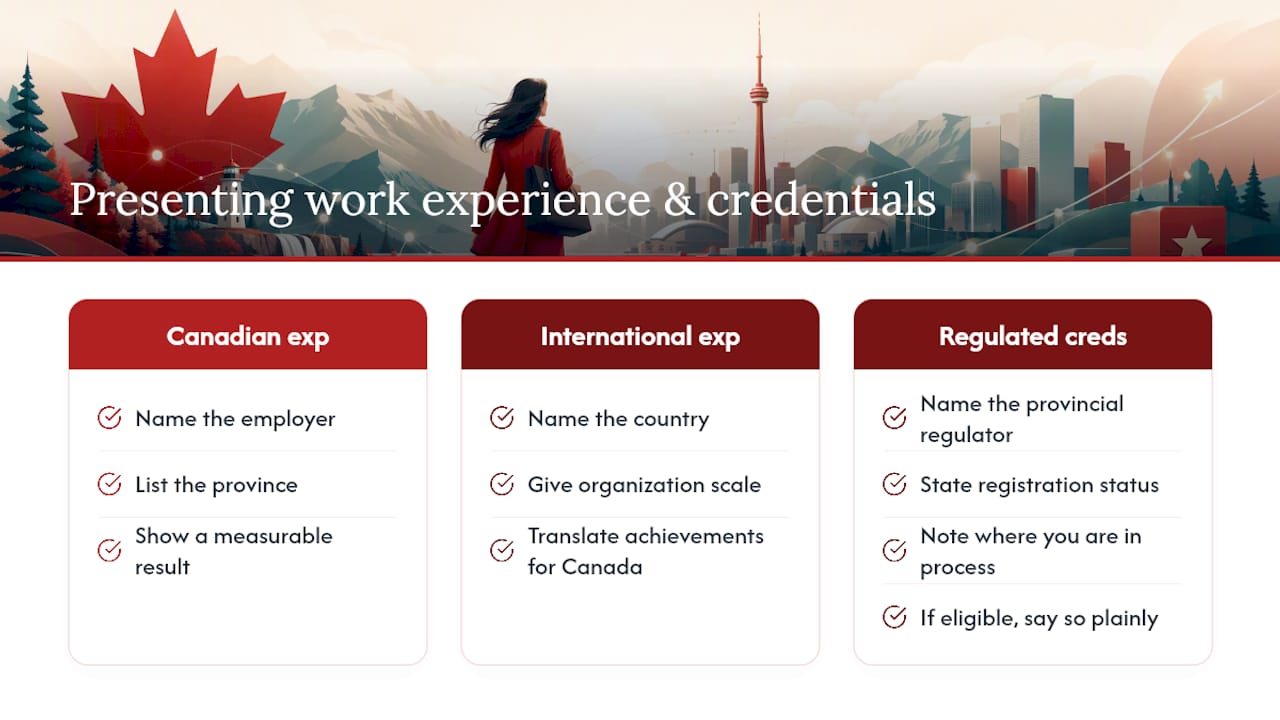
If you have Canadian work experience, even a few months, feature it prominently and specifically. Naming the employer, the province, and a measurable result signals to hiring managers that you already understand Canadian workplace norms, communication styles, and, where relevant, regulatory environments. That familiarity is often exactly what a nervous hiring manager is trying to de-risk when comparing candidates.

If your experience is entirely international, don’t downplay it. Name the country, the scale of the organization, and translate your achievements into terms a Canadian reader will recognize; “managed a team of 15 across two regional offices” reads clearly regardless of where it happened. Where a credential from your home country has a recognized Canadian equivalent, a foreign engineering degree assessed by a provincial regulator, or a nursing licence undergoing recognition, say so explicitly and note where you are in that process. Employers respond well to candidates who show they’ve already started navigating Canadian credential recognition rather than waiting to be asked.

For regulated professions, engineering, nursing, accounting, law, mentioning your registration status with the relevant provincial body (a Professional Engineer designation with Ontario’s regulator, for instance, or registration with the College of Nurses of Ontario) is worth a specific line rather than a vague mention of “licensure.” Provincial resources, including British Columbia’s government site, often list recognized equivalency pathways worth referencing if you’re mid-process. If you’re not yet licensed but eligible to apply, state that plainly rather than letting a hiring manager assume you’re unqualified.

How to present Canadian work experience and foreign credentials — overview diagram

Adapting your letter across provinces and industries

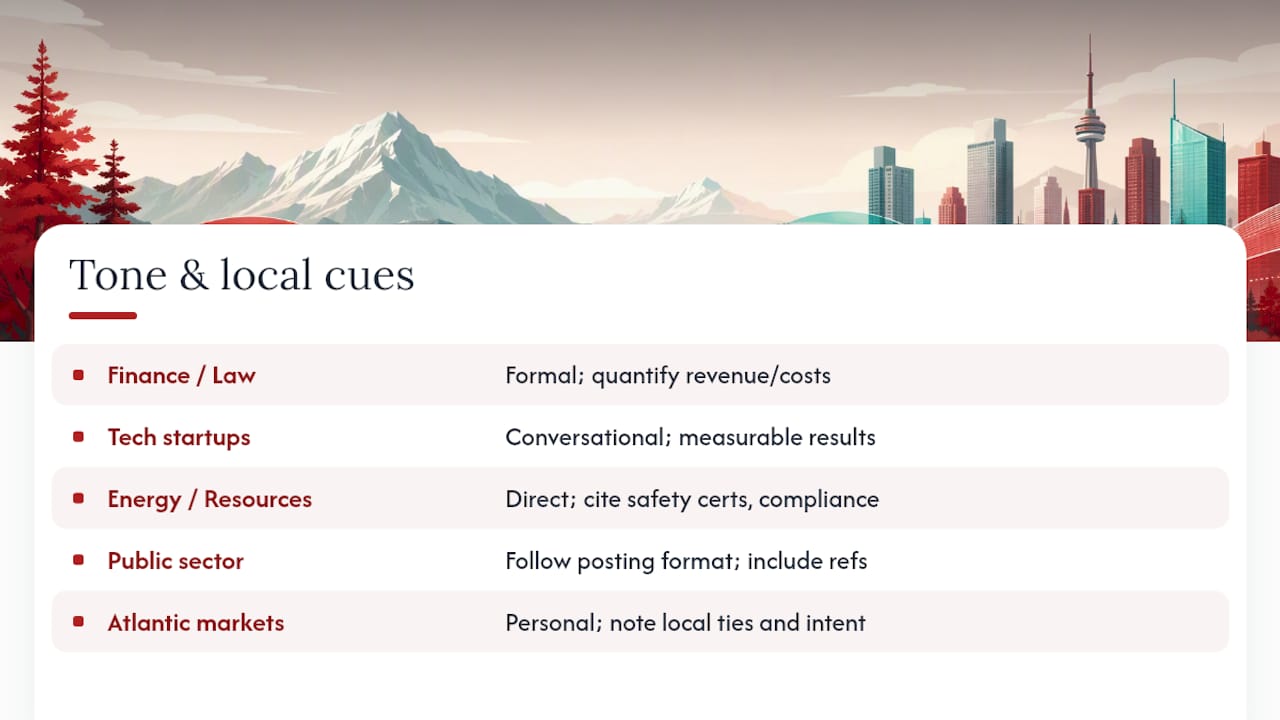
A cover letter that works in downtown Toronto’s finance sector will often feel wrong in Calgary’s energy industry or a Halifax nonprofit, and the difference usually comes down to formality and what results actually matter locally. Financial services and law firms in Toronto and Montreal tend to reward precise, formal language and quantified business outcomes, revenue, cost savings, deal size. Tech companies in Vancouver, Waterloo, or Toronto’s startup corridor generally respond better to a more conversational tone that still leads with measurable results but reads less like a legal document.

Resource and energy sector employers in Alberta and Saskatchewan often value directness and safety-conscious language; mentioning certifications like a Common Safety Orientation or specific regulatory compliance experience carries real weight in those postings. Public sector and government roles, concentrated heavily in Ottawa but present in every provincial capital, reward strict adherence to the posting’s stated format and language, sometimes down to specific headers or reference numbers the posting itself requires.

Atlantic Canada’s smaller job markets, in Halifax, St. John’s, or Charlottetown, often favour a more personal tone that references local community ties or an explicit intent to stay long-term, since employers there are frequently wary of hiring someone who will leave for a bigger city within a year. If you have a genuine local connection, mention it briefly.

The through-line across every province and sector is the same: read three or four job postings from the same company or industry before you write, and let their own language guide your register. A job-search workflow that includes this kind of research before each application consistently produces stronger, more targeted letters than a one-size-fits-all draft sent everywhere.

Adapting your letter across provinces and industries — overview diagram

Author perspective: the editing rules that actually move the needle

Cut every sentence that doesn’t name a result. Replace “responsible for” with what you actually did. Verify every number before it goes out.

One real fix: “Handled client communications” became “Resolved 40+ client escalations monthly, cutting response time by half.” Same job, entirely different letter.

— Professional

How Professionalresumes can help you get there faster

Writing a tailored, STAR-driven cover letter for every application takes real time, time most job seekers don’t have when they’re applying to a dozen roles a month while still working full time. Professionalresumes offers a done-for-you alternative built specifically around the Canadian format and tone this guide covers, without the guesswork of drafting it solo.

Professionalresumes

Recent graduates and first-time applicants typically fit the Early Career Resume ($139) or the bundled Early Career Package Deal, which pairs resume and cover letter work. Professionals moving into a new role suit the Next Step Resume ($189), while senior candidates and executives are better served by the Advanced Resume ($239) or Executive Resume ($289). Every tier includes a consultation, a tailored cover letter written around your real achievements, and ATS-friendly formatting with revision rounds included. Browse the full shop to compare packages and request your consultation today.

Sources

FAQ

How do I write a cover letter for a job in Canada?

Open with the role and one measurable achievement, build the body around a single STAR example matched to the posting’s top requirement, and close with a direct request for an interview. Keep it to one page, formatted to match your resume, following the structure outlined by University of Calgary career resources.

What five things should a cover letter include?

A professional header with your contact details, the date and recipient’s name or title, a strong opening naming the role and a key achievement, one or two STAR-based body paragraphs, and a closing that states your availability and asks for an interview. RBC’s guidance confirms these elements should stay to one tailored page.

How can I write a strong cover letter this year?

Tailor every letter to the specific posting using two or three of its exact keyword phrases, lead with a quantified result rather than a generic claim, and keep the tone confident but understated in the Canadian style. Services like Professionalresumes’s Next Step Resume package handle this tailoring directly if you’d rather not draft it yourself for every application.

What should you not say in a cover letter?

Avoid outdated salutations like “To Whom It May Concern,” which Canadian government writing guidance specifically discourages, and skip vague claims like “hardworking team player” with no evidence behind them. Never volunteer salary expectations unless the posting explicitly asks for them, and never repeat your resume word for word.

How much does a professional cover letter cost in Canada?

Professionalresumes prices its resume and cover letter packages by career stage, from $139 for the Early Career Resume to $289 for the Executive Resume, with package deals bundling LinkedIn optimization at each tier. Current pricing and package details are available on the shop page.
Decorative LinkedIn recommendation title card

Write LinkedIn Recommendations in 3–10 Minutes: Role Grouped Templates

The most effective LinkedIn recommendations use a short, four-part micro-story: who you are, your relationship to the person, one specific action with a measurable outcome, and a clear endorsement. Copy one of the examples below and adapt it in 3 to 10 minutes. The best ones run 50 to 150 words, which is long enough to be credible and short enough that people actually read them.


TL;DR:

  • Effective LinkedIn recommendations are brief stories that include specific actions, measurable results, and a clear endorsement, ideally under 150 words.
  • They should highlight concrete behaviors or outcomes with evidence, such as project success or process improvements, rather than vague praise.
  • Timing your request shortly after a project or achievement ensures the details are fresh, and offering bullet points or drafts increases the likelihood of quality responses.
  • Hiding or revising weak recommendations is preferable to leaving them public, and replacing them with stronger ones can significantly boost your credibility.
  • Recommendations work best when paired with a well-optimized profile that uses consistent, outcome-driven language to reinforce your strongest skills.

Professionalresumes
Make Your LinkedIn Profile Stand Out
Professional Resumes creates customized LinkedIn profiles that align your experience with your career aspirations and today’s hiring market.

Improve your LinkedIn profile

Table of Contents

LinkedIn recommendation examples by relationship

Every strong recommendation follows the same underlying architecture, but the details change depending on who you are to the person. A manager writes differently than a client. A peer writes differently than a mentor. Below are examples organised by relationship, each built on the 4-part micro-story formula that career writers keep converging on: identity and relationship; a specific behaviour with an example; a concrete outcome; and a closing endorsement.

For a manager writing about a direct report:

  • “I managed Priya for two years on our product analytics team. She rebuilt our churn dashboard from scratch after our vendor sunset the old tool, delivering it two weeks ahead of schedule and cutting weekly reporting time by roughly a third. Any team would be lucky to have her.” (Replace: dashboard project, timeframe, and the specific efficiency gain.)
  • “James joined my sales team as a junior rep and closed his first enterprise deal within four months, well ahead of our usual ramp period. He asks better discovery questions than reps with twice his tenure. I’d hire him again without hesitation.” (Replace: deal type, ramp timeframe, and the skill you’re highlighting.)

For a direct report writing about a manager:

  • “I reported to Alan for three years while we scaled our customer success team from four people to fourteen. He gave me real ownership early, including a renewal negotiation with our largest account in my first six months, and coached me through it rather than taking it over. Every promotion I’ve earned since traces back to lessons from him.” (Replace: team size, the stretch assignment, and your career outcome.)

For a peer or colleague:

  • “Maya and I worked side by side on a six-month platform migration. She caught a data mapping error during QA that would have broken invoicing for our top 20 clients, and she flagged it calmly, with a fix already drafted. That’s the kind of colleague who makes deadlines survivable.” (Replace: the project, the specific catch, and the scale of impact.)
  • “I’ve partnered with David across three cross-functional launches. He’s the person who remembers the dependency nobody else tracked and follows up before it becomes a fire. Teams move faster with him in the room.” (Replace: number of projects and the recurring strength you’ve observed.)

For a client writing about a service provider or consultant:

  • “We hired Elena’s team to redesign our onboarding flow after our activation rate had stalled for two quarters. She delivered a revised flow in five weeks that lifted trial-to-paid conversion noticeably within the first month post-launch. She also pushed back, respectfully, when our original brief wasn’t going to solve the real problem.” (Replace: the business problem, the timeframe, and the result you observed.)

For a mentor writing about a mentee:

  • “I mentored Sam through his first year in product management. He came to every session with specific questions rather than general ones, and within eight months he’d shipped a feature he’d originally pitched to me as a rough idea. That kind of follow-through is rare this early in a career.” (Replace: mentorship duration, the pitch-to-ship story, and the trait you want to highlight.)

For a mentee writing about a mentor:

  • “Rachel spent an hour a month with me for over a year, mostly asking questions that forced me to think through my own decisions rather than handing me answers. The negotiation framework she walked me through directly helped me secure a 15% raise at my next review.” (Replace: mentorship cadence and the specific tool or framework, plus your outcome.)

For an intern or new hire:

  • “Olivia interned with our marketing team for twelve weeks and independently built a competitor content audit that our full-time team ended up using for two subsequent campaigns. She asked for feedback constantly and applied it immediately, which is not something every intern does.” (Replace: internship length, the deliverable, and how the team used it.)

For a freelancer or contractor:

  • “I’ve hired Ben for freelance design work on four separate projects over two years. He turns around first drafts faster than any contractor I’ve worked with, and he flags scope creep before it becomes a budget problem rather than after. I keep coming back to him for a reason.” (Replace: number of projects, timeframe, and the specific reliability trait.)

Notice what none of these examples do: they don’t open with “I highly recommend” or drift into generic praise like “a pleasure to work with.” A diverse mix of recommenders, spanning managers, peers, clients, and mentors, communicates different facets of your capability far more persuasively than five recommendations that all say the same thing from the same angle.

How do you write a LinkedIn recommendation that stands out?

Writing a strong LinkedIn recommendation comes down to a repeatable five-part structure, not natural talent for compliments. The Muse’s five-step approach, which pairs well with the broader 4-part micro-story formula used across career-writing guides, breaks the task into pieces small enough to finish in about five minutes.

  1. Open with a knockout line. Skip “I had the pleasure of working with.” Start with something specific: “Jordan solved a problem our team had been stuck on for six weeks.” A strong opener earns the second sentence.
  2. State the relationship plainly. One sentence: how long, in what role, on what team or project. This gives the reader context for judging everything that follows.
  3. Name a specific skill or behaviour, backed by a micro-story. This is the section that does the real work. Vague praise (“great communicator”) reads as filler; a specific incident (“explained a technical delay to an angry client in plain language and kept the account”) reads as evidence.
  4. State the outcome. What changed because of what they did? A number helps when you have one; a clear before-and-after works when you don’t.
  5. Close with a forward-looking endorsement. One sentence that tells the reader what kind of employer, client, or teammate would benefit from hiring this person.

Here’s that structure applied and labelled:

[Opener] “Working with Chen changed how our engineering team approached code reviews.” [Relationship] “I led the backend team he was part of for eighteen months.” [Skill + micro-story] “He introduced a lightweight review checklist after noticing our bug rate spike whenever we skipped peer review under deadline pressure.” [Outcome] “Production incidents from that category dropped noticeably over the following two quarters.” [Endorsement] “Any engineering leader would benefit from having him question the process, not just the code.”

A quick self-edit checklist:

  1. Is it under 150 words? Most guides land on a 50 to 200 word range as the sweet spot.
  2. Does it include one specific example rather than a general trait?
  3. Did you include a number, timeframe, or concrete outcome wherever one genuinely exists?
  4. Would this sentence make sense about literally anyone, or is it specific to this person?
  5. Did you avoid words like “amazing,” “rockstar,” and “hardworking” without backing them up with anything?

Pro Tip: Read your draft out loud. If it sounds like something you’d say about a stranger at a networking event, it’s too generic. Recommendations that sound like you actually know the person get read all the way through.

One more thing worth deciding upfront: whether to offer reciprocation. It’s optional, but a short closing line like “happy to return the favour” costs nothing and often prompts the person to write one back for you.

How do you ask for a LinkedIn recommendation?

Timing matters more than wording. The best moment to ask is right after a win, a positive performance review, or the close of a project, when the specifics are still fresh in the other person’s mind and their goodwill toward you is highest. Asking six months after you’ve left a role produces vaguer, weaker recommendations because the details have faded.

Forbes lays out a proven process for this: identify the right recommenders, give them context about why you’re asking and what you’d like highlighted, offer to draft language or supply talking points, and time the request to a moment of positive momentum rather than a random Tuesday.

Providing bullet points isn’t cutting corners. Offering a short draft or a few bullet points measurably increases both the likelihood someone follows through and the quality of what they write, since most people freeze up staring at a blank recommendation box even when they genuinely respect you.

Here’s what those bullet points might look like if you’re asking a former manager:

  • Led the migration to our new CRM in Q3, finished two weeks early.
  • Trained three junior team members who are now handling accounts independently.
  • Handled the Whitfield account escalation directly, and we kept the client.

Request templates you can send as-is:

To a former manager:
“Hi [Name], I’m updating my LinkedIn profile and would love a recommendation from you if you have a few minutes. I’d especially value a mention of the [specific project] we worked on together. Happy to send over a few bullet points if that’s easier, and of course I’m glad to write one for you too.”

To a peer or colleague:
“Hey [Name], I’m putting together some LinkedIn recommendations and thought of our work on [project]. Would you be open to writing a short one? No pressure on length, just what stood out to you. Happy to return the favour.”

To a client:
“Hi [Name], it’s been great working with you on [project]. If you have five minutes, I’d really appreciate a LinkedIn recommendation, particularly touching on the results we saw. I can send a couple of bullet points as a starting point if that helps.”

To a direct report:
“Hi [Name], as you know I’m applying for [new role/leaving the company], and I’d love a recommendation reflecting our work together, especially [specific initiative]. Totally fine to keep it short. Let me know if a few prompts would help.”

Follow-up script, if two weeks pass with no response:
“Hey [Name], just following up in case my last message got buried. No worries at all if now isn’t a good time. Happy to send a couple of bullet points if that would make it easier.”

Career resources consistently point to one more habit that separates people who build a strong bank of recommendations from people who get one and stop: sending a specific thank-you after the recommendation goes live, referencing what it captured, and offering to write one in return. That single step is what turns a one-time favour into an ongoing exchange.

Templates by role and seniority you can copy right now

These are shorter, fill-in-the-blank versions of the formula above, grouped by relationship and seniority so you can scan for your exact situation and adapt one in minutes.

Manager level:

  • “[Name] managed our [team type] for [duration]. Under their direction, [specific initiative] resulted in [outcome]. They lead with clarity and I’d work for them again without hesitation.” (Fill: team type, duration, initiative, outcome.)
  • “As a manager, [Name] has a rare ability to [specific leadership behaviour], which showed clearly when [brief example]. Our team’s [metric] improved as a direct result.” (Fill: behaviour, example, metric.)

Senior manager or director:

  • “[Name] led [department/function] through [specific challenge, e.g., a reorganisation or major system change]. They kept the team aligned through [duration] of change and delivered [outcome]. Executives who want steady hands during transformation should look no further.” (Fill: challenge, duration, outcome.)
  • “I reported into [Name] during [context]. They gave me the latitude to own [specific project] while staying available for real guidance when I needed it, not just when things went wrong.” (Fill: context, project.)

Peer, same level:

  • “[Name] and I worked together on [project] for [duration]. What stood out was [specific behaviour, e.g., how they handled a deadline or a technical problem]. Colleagues like this make hard projects easier.” (Fill: project, duration, behaviour.)
  • “Few colleagues catch [specific type of issue] the way [Name] does. On [project], they [specific action], which saved [outcome, if known].” (Fill: issue type, project, action, outcome.)

Direct report or junior team member:

  • “[Name] joined our team as [role] and quickly took on [specific responsibility] beyond their original scope. Within [timeframe], they delivered [outcome]. I’d welcome the chance to work with them again.” (Fill: role, responsibility, timeframe, outcome.)
  • “As a new [role], [Name] asked sharper questions in their first month than most people ask in their first year. That curiosity showed up directly in [specific result].” (Fill: role, result.)

Client relationship:

  • “We engaged [Name] for [service/project]. They delivered [specific outcome] within [timeframe], and communicated clearly throughout, including when [challenge] came up. We’d hire them again.” (Fill: service, outcome, timeframe, challenge.)
  • “[Name]’s work on [project] solved a problem we’d struggled with for [duration]. The result was [outcome], and they made the process easy to follow.” (Fill: project, duration, outcome.)

Freelancer or contractor:

  • “I’ve hired [Name] for [number] projects over [timeframe]. They consistently deliver [specific quality, e.g., faster turnaround, cleaner work] and flag issues before they become problems. That reliability is worth more than most people realise.” (Fill: number, timeframe, quality.)

Intern or early-career hire:

  • “[Name] interned with our [team] for [duration] and delivered [specific project], which our team continued using afterward. For someone this early in a career, that level of initiative stands out.” (Fill: team, duration, project.)

Mentor to mentee:

  • “I mentored [Name] over [duration]. They took every piece of feedback and applied it visibly, most notably when [specific example]. Their growth over that period was hard to miss.” (Fill: duration, example.)

Mentee to mentor:

  • “[Name] mentored me for [duration], and the [specific advice or framework] they shared directly shaped [outcome, e.g., a promotion or a decision]. Their guidance had a measurable effect on my career.” (Fill: duration, advice, outcome.)

Once you’ve written a few, decide which to feature. LinkedIn displays recommendations in reverse chronological order by default, but you can reorder them on your profile. Put your strongest, most senior, or most metric-heavy recommendation first rather than leaving it to chance.

What to do about a weak or negative LinkedIn recommendation

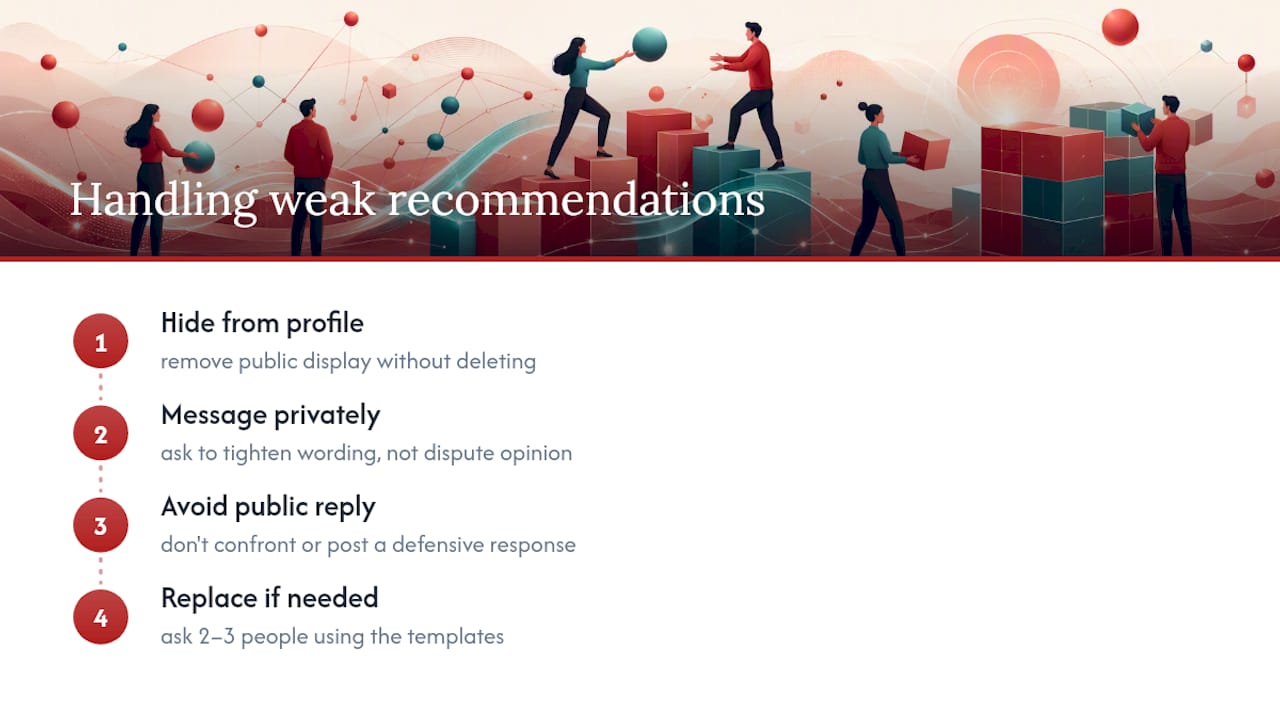
A lukewarm recommendation is worse than no recommendation at all, since a recruiter reading generic praise like “always willing to help” next to specific, detailed ones from other people will notice the contrast. You can hide any recommendation from your public profile without deleting it or notifying the person, so start there if one feels flat or off-message.

If the recommendation is factually wrong, outdated, or reflects a relationship that ended badly, don’t confront the person publicly or leave a defensive reply. Message them privately and ask, plainly, if they’d be open to revising a line or two, framing it as tightening the wording rather than disputing their opinion. Most people agree, since they wrote it as a favour and have no attachment to the specific phrasing.

If the person won’t revise it and it genuinely damages your profile, hiding it is a legitimate option. Nobody sees which recommendations you’ve received unless you display them, so a hidden weak one costs you nothing. Then go replace it: ask two or three people using the request templates above, ideally people who can speak to the exact skill the weak recommendation undercut.

What to do about a weak or negative LinkedIn recommendation — overview diagram

How recommendations fit into your broader LinkedIn strategy

Recommendations do one job well: they turn a claim on your profile into someone else’s testimony. A resume says you led a migration; a recommendation from the person who watched you do it says the same thing with more weight. That’s the gap most professionals underestimate. A polished profile summary and a strong recommendation are supposed to reinforce the same two or three core strengths, not tell three unrelated stories.

Where this gets harder is at the executive level, where recommendations carry board-level scrutiny and the wrong tone, too casual, too vague, or too focused on soft skills, can undercut an otherwise strong candidacy. Time-poor professionals in the middle of a job search often don’t have the bandwidth to draft polished requests, chase busy former colleagues, and rewrite their own profile summary at the same time. That’s a reasonable moment to bring in outside help rather than a sign you can’t handle your own career materials.

LinkedIn profiles and career documents work best when they use consistent, specific, outcome-driven language aligned with strong recommendations.

— Professional

Get your LinkedIn profile working as hard as your recommendations

Strong recommendations only pay off if the profile around them is doing its job. Professionalresumes’ LinkedIn profile optimization service rewrites your summary, experience sections, and keyword positioning to match the same specific, outcome-driven language you’ve just used to ask others to write about you, rather than leaving your own words generic while your recommendations do all the work.

Professionalresumes

Which package fits depends on where you are. If you’re early in your career and building your first strong profile, the Early Career Resume or the Early Career Package Deal pairs resume and profile work together. If you’re aiming for a step up, the Next Step Resume covers that stage, and if you’re at the executive level where every line faces board-level scrutiny, the Executive Package Deal combines resume and profile optimisation into one consultation. Browse the full range of resume packages or book a consultation to get started.

Sources

FAQ

Can you give an example of a good LinkedIn recommendation?

A good one names a specific project and a measurable result rather than general praise. For example: “I managed Priya for two years. She rebuilt our churn dashboard two weeks ahead of schedule and cut weekly reporting time by roughly a third. Any team would be lucky to have her.” That’s the 4-part micro-story formula in action: relationship, specific action, outcome, endorsement.

How do you write a recommendation on LinkedIn?

Go to the person’s profile, click “More,” then “Recommend,” choose your relationship and their position at the time, and write your text in the box provided. Use the five-part structure: an opener, your relationship, a specific skill with an example, the outcome, and a closing endorsement, following the five-minute method most career guides recommend.

What makes a recommendation letter genuinely effective?

An effective one is specific rather than general, includes at least one concrete example of behaviour or a result, and closes with a clear statement of who would benefit from hiring or working with the person. Vague adjectives without evidence, like “amazing” or “a pleasure,” carry little weight on their own.

What words should you actually use in a recommendation?

Skip generic adjectives and lean on words tied to action and outcome: “led,” “delivered,” “reduced,” “built,” “resolved,” “mentored,” “launched,” “improved,” “trained,” “negotiated,” and “exceeded.” These words point to something the person actually did, which is what makes a recommendation read as credible rather than decorative.

How many LinkedIn recommendations should you aim for?

Most career guides suggest 5 to 10 quality recommendations as enough to establish credibility without looking assembled for show. A mix of managers, peers, and clients matters more than the raw count.

Decorative LinkedIn profile title card illustration

Get interviews: Job seekers’ LinkedIn about section templates

An effective LinkedIn about section leads with a hook, states who you help, backs it with one specific proof point, and closes with a call to action, all inside the platform’s 2,600-character limit. The first roughly 300 characters on desktop sit above LinkedIn’s “see more” fold, so that opening line decides whether anyone reads the rest. Templates and annotated examples follow so you can draft yours in the next twenty minutes.


TL;DR:

  • A compelling LinkedIn about section starts with a clear hook that states your target role and outcome, focusing on the first 300 characters that appear above the fold.
  • Include two to three sentences that specify the industry, role, and problem you solve using relevant keywords for search optimization.
  • Provide one or two specific proof points, such as a measurable result or achievement, to demonstrate competence rather than relying on adjectives.
  • End with a concise call to action, guiding readers to message you, connect, or visit your portfolio for next steps.
  • Keep sections short, use bullet points for proof, and update regularly to maintain relevance and visibility to recruiters.

Professionalresumes
professionalresumes.ca
Strengthen Your LinkedIn Presence
Professional Resumes creates customized LinkedIn profiles tailored to your aspirations, with personalized consultations and revisions to showcase your experience.

Explore LinkedIn profile services

Table of Contents

How to write a LinkedIn about section that gets read

Recruiters scanning a profile are answering three questions in under thirty seconds: what do you do, are you any good, and would they be interested in talking to you. A four-part formula answers all three in order, which is why InsideTrack’s recruiter-focused framework and Forbes’ own step-by-step approach both converge on the same shape.

  1. Hook (1 sentence, front-loaded). Open with your target title and your outcome, not your job history. “I help mid-sized manufacturers cut warehouse shrinkage” beats “Experienced operations professional with a passion for excellence.”
  2. What you do and who you help (2 to 3 sentences). Name the industry, the role, and the problem you solve. This is where you plant keywords a hiring manager would actually type into search.
  3. Proof (2 to 3 sentences or a short bullet list). One concrete number or outcome does more work than five adjectives. “Reduced onboarding time by 30%” is proof. “Results-driven” is not.
  4. Call to action (1 sentence). Tell the reader what to do next: message you, check your portfolio link, or connect if they’re hiring for a specific role.

Give the hook and the “who you help” line roughly the first 300 to 400 characters, since that’s what shows before the fold. Spend the bulk of your remaining space on proof, and keep the CTA to one short line at the end.

Four opener types cover most situations. A story opener works when your career path itself is the differentiator, such as a self-taught developer or a career changer. A problem-solution opener suits consultants and salespeople who want to lead with the pain point they fix. A credential-stack opener fits executives and specialists whose titles and certifications carry weight on their own. A mission opener works for people in nonprofit, education, or purpose-driven sectors where “why” matters as much as “what.”

Pro Tip: Write the hook last. Draft the proof and CTA first, then mine those sentences for the single strongest phrase to lead with.

How to write a LinkedIn about section that gets read — overview diagram

How long should your LinkedIn about section be?

How long should your LinkedIn about section be? — overview diagram

LinkedIn caps the about section at 2,600 characters, but the practical sweet spot sits closer to 150 to 300 words, or roughly 1,500 to 2,200 characters. Anything shorter reads as thin; anything longer risks losing the reader before the CTA.

The fold matters more than the ceiling. On desktop, LinkedIn shows about 300 characters before truncating to “see more.” On mobile, it’s closer to 200. Whatever you put in that space needs to work as a standalone pitch, because a large share of visitors never click through.

  • Write paragraphs of one to three sentences. A wall of text gets skipped, even a well-written one.
  • Use bullet points for three to five proof facts or skill highlights, since scannable bullets outperform buried claims.
  • Bold sparingly if you use Unicode formatting, and check it on mobile first. Unicode bold text can render oddly for screen readers, so reserve it for your name or one key phrase, not full sentences.
  • Pull five to eight keywords from three to five job postings in your target role, then place the most important two or three in your headline, the opening line of your about section, and your skills list.

Completed about sections aren’t optional extras. LinkedIn talent data cited by InsideTrack shows profiles with a finished about section receive up to 40% more InMail from recruiters than those that leave it blank or copy the headline verbatim.

LinkedIn about section examples you can adapt today

Templates work best as scaffolding, not scripture. Swap the bracketed details for your own title, industry, and numbers, and keep the keyword from your target job posting in the first line.

  • Early career: “I’m a [recent graduate/junior marketer] focused on [specific skill, e.g., content strategy] for [industry]. During my internship at [company], I [specific result, e.g., grew organic traffic by 20%]. Looking to bring that same energy to a [target role] team. Open to connecting with recruiters in [industry].”
  • Mid-career pivot: “After [X years] in [old field], I moved into [new field] because [one honest reason]. I’ve since [proof point, e.g., led three product launches]. I bring [old-field skill] into [new-field problem] in a way most newcomers can’t. Let’s talk if you’re hiring for [target title].”
  • Senior executive: “I lead [function] for [industry] companies through [type of change, e.g., post-merger integration]. Over [X years], I’ve [quantified outcome, e.g., managed a $40M P&L across three regions]. My focus is [specific specialty]. Reach out if your board is weighing a [type of hire] search.”
  • Consultant or freelancer: “I help [client type] solve [specific problem] without [common pain point]. Recent work includes [one client outcome, kept generic if under NDA]. Available for [engagement type, e.g., 3 to 6 month contracts]. Message me to see if there’s a fit.”
  • Creative professional: “I design [specific output, e.g., brand identities] for [client type]. My work has appeared in [placement, if real] and helped [client] achieve [outcome]. Portfolio link below. Always open to conversations about [type of project].”

Before: “Results-driven professional with excellent communication skills seeking new opportunities in a dynamic environment.”
After: “I help early-stage SaaS companies cut customer churn through onboarding redesign. At my last role, that meant a 15-point retention lift in six months. Open to product marketing roles where retention is the mandate.”

Both templates and the sample rewrite draw on the before/after approach that specialist guides consistently recommend: specifics beat adjectives every time.

The mistakes that quietly kill your about section

Third-person bios (“Jane is a marketing leader…”) feel like a press release, not a person. Switch to first person immediately. Buzzword openings (“Passionate, driven, results-oriented professional…”) tell a reader nothing; replace the adjective with the outcome it’s supposed to imply.

A wall of unbroken text loses readers before line three. Break it into short paragraphs or bullets. No call to action leaves an engaged reader with nowhere to go. Pasting your resume summary verbatim wastes a space meant for voice and context, and keyword stuffing a list of job titles reads as spam to both recruiters and LinkedIn’s own search algorithm. Sounding desperate (“Please consider me…”) undercuts the confidence your proof point just built.

Before publishing, run through a short checklist: first person throughout, hook in the first line, one number or named outcome, one clear CTA, no paragraph over three sentences.

Pro Tip: Copy your opening 300 characters into a blank text box and read only that portion. If it doesn’t make you want to click “see more,” rewrite the hook before touching anything else.

How Professional Resumes applies this in practice

Professional Resumes builds LinkedIn about sections around the same hook, proof, and call-to-action structure covered here, adapted to each client’s industry and career stage through direct consultation rather than a generic template. The goal on every project is the same: a profile that reads like the person, not a resume pasted into a new format.

Updating the about section every six months, or after notable career changes, helps keep proof points current since old information can lose impact on a platform recruiters check daily.

What most LinkedIn advice gets backwards

Most guidance on this topic treats the about section like a mini-essay: three flowing paragraphs about “who I am” and “what drives me.” That advice was written for a platform where people read profiles top to bottom. Nobody does that anymore. Recruiters scan the first two lines, decide in seconds, and click away if nothing lands.

The bigger error is prioritizing tone over specifics. If your draft could apply to five other people in your field, it’s not doing its job yet.

Start with the templates, not the theory. Pick the opener type closest to your situation, fill in your actual numbers, and read it back against the three-question test: what do you do, are you good at it, would someone want to talk to you. Fix whichever question your draft fails first, then move to the next. That order matters more than getting every sentence perfect on the first pass.

— Professional

Get your LinkedIn about section written for you

Professional Resumes’ LinkedIn profile optimization service turns the framework above into a done-for-you process, without the back-and-forth of freelance marketplaces or the flat fees of DIY template packs that leave you rewriting alone.

Advanced Resume

Such services typically start with a consultation to identify key proof points, then deliver a draft about section, headline, and skills recommendations optimized for search visibility, with revisions until the copy reflects the individual’s voice. They serve a range of candidates from early-career to executives.

Pair it with a resume refresh through the Early Career Package Deal, the Next Step Package Deal, or the Advanced Resume for a matched set of career documents, or browse the full resume shop to see current options. Book your consultation to get a first draft back within days.

Sources

FAQ

What is a good example of “about me” on LinkedIn?

A strong example leads with your target role and outcome, not your title history: “I help early-stage SaaS companies cut customer churn through onboarding redesign.” It then adds one proof point and a clear next step, following the hook, proof, CTA structure most career experts recommend.

What is the 3/2/1 rule on LinkedIn?

There’s no single agreed-upon “3/2/1 rule” tied to the about section in established LinkedIn guidance, and definitions vary depending on the source. If you’ve seen it referenced for posting frequency or content mix, treat it as informal advice rather than a platform standard, and focus instead on the hook, proof, and CTA structure this article covers.

Is the summary and the about section the same thing on LinkedIn?

Yes. LinkedIn renamed the “Summary” field to “About” several years ago, but many guides and job seekers still use the terms interchangeably. Whichever term you see, it refers to the same 2,600-character field near the top of your profile.

How much does Professional Resumes charge for LinkedIn help?

Pricing for the LinkedIn profile optimization service is available on the site. Resume packages like the Early Career Resume, Next Step Resume, and Advanced Resume are listed with fixed one-time pricing if you want to pair your LinkedIn update with a resume refresh.

How often should I update my LinkedIn about section?

Update it roughly every six months, or immediately after a promotion, certification, or major project outcome. Stale proof points, like a number from three roles ago, undercut the credibility the rest of the section is trying to build.

Decorative LinkedIn banner design title card

5 LinkedIn Banner Ideas for Every Role, Sized 1584×396

The fastest way to fix a LinkedIn banner is a centred, one-line value statement or a profession-relevant image sized at exactly 1584 × 396 pixels, placed inside the centre safe zone so nothing gets cropped on mobile. That single move puts you ahead of most profiles on the platform. The section below walks through role-specific banner ideas, the exact specs, and the fastest tools to build one properly.


TL;DR:

  • Centered, one-line value statements or profession-relevant images sized at 1584 × 396 pixels are the fastest way to create an effective LinkedIn banner.
  • Keep key elements within the centre safe zone, roughly 60% of the width, to ensure they are visible on mobile devices.
  • Using templates can produce a professional banner in minutes, but strategic messaging tailored to your role and career level often requires custom design.
  • A coordinated profile, including banner, headshot, and resume, improves response rates for senior candidates in competitive searches.
  • Avoid clutter, multiple messages, or placing important content near the bottom-left corner, where profile photos will cover your banner on all devices.

Professionalresumes
Strengthen Your LinkedIn Presence
Professional Resumes tailors LinkedIn profiles, resumes, and cover letters to your goals, experience, and the expectations of potential employers.

Table of Contents

LinkedIn banner ideas by role and purpose

Most professionals still use the plain blue default background, which means a personalized banner is an easy way to stand out, according to Adobe’s LinkedIn cover photo guide. You do not need a designer to get there. You need one clear idea, executed cleanly, that matches the role you are trying to land or the authority you are trying to project.

A strong LinkedIn banner communicates your role or value proposition at a glance, and every idea below is built around that principle rather than decoration for its own sake. Here are the five concepts worth building from.

  • Brand and identity banners. A solid brand colour with one line of text (your title, your specialty, or your positioning statement) works especially well for consultants and freelancers who need instant clarity on what they do. Keep the type large enough to read at thumbnail size and stick to a single font weight.
  • Credibility banners. Client logos or a compact results stat (think “12 years in supply chain leadership” rather than a paragraph) suit consultants and senior hires who need to establish authority fast. Keep logos tasteful, sized evenly, and only use ones you have permission to display.
  • Portfolio or showcase banners. A product shot, app screenshot, or a strip of portfolio thumbnails works well for creators, designers, and product managers whose work speaks louder than a job title. If you write for a living or build creative campaigns, a marketing-focused resume approach applies the same logic to your banner: show, don’t just tell.
  • Human or behind-the-scenes banners. A photo of your workspace, a conference stage, or your team in action humanizes creative and operations roles where personality is part of the pitch. This works best when the image is bright, uncluttered, and does not compete visually with your headshot.
  • Minimalist banners. Abstract shapes, subtle gradients, or a soft texture that echoes the colour of your headshot background are the fastest to produce and the safest option for active job seekers who want polish without risk. This is often the best LinkedIn banner idea for job seekers who need something professional up within the hour.

Every one of these ideas depends on the same discipline: keep key elements inside the centre safe zone so they survive mobile cropping and don’t get covered by your profile photo.

Pro Tip: Pick one message per banner. A results stat, a value statement, and a product shot all crammed onto one background will read as noise. Choose the single idea that matches what you want a recruiter to think in the first two seconds.

LinkedIn banner dimensions, safe zones, and export rules

Design at exactly 1584 × 396 pixels, a 4:1 ratio, and export as a high-quality JPG or PNG under 8MB. This is LinkedIn’s recommended cover photo size, and going smaller risks pixelation while going larger risks an awkward crop.

The part most people get wrong is the safe zone. Keep your primary text and logos inside the centre roughly 60% of the width, since practitioners consistently recommend this range for legibility across devices. Avoid the bottom-left corner entirely. That’s where your profile photo sits, and anything placed there gets covered the moment someone views your profile.

LinkedIn banner dimensions and safe zones

A simple three-zone layout keeps this manageable: left stays clear for the photo overlap, the centre carries your one message, and the right holds a logo or a secondary detail like a website or tagline. This composition rule shows up across most professional LinkedIn designs because it solves the profile-photo problem without you having to think about it every time.

Before you upload, run through this checklist:

  1. Confirm the canvas is 1584 × 396 px.
  2. Check that all text and logos sit within the centre safe zone.
  3. Preview the design on a mobile screen, since LinkedIn crops more aggressively there.
  4. Check contrast between text and background at thumbnail size.
  5. Export at 2× resolution for retina displays, then confirm the file is under 8MB.

Skipping the mobile preview step is the single most common reason a banner looks fine on desktop and broken on a phone.

Tools and templates that build a banner in minutes

You don’t need Photoshop skills to get this right. Template galleries built specifically for LinkedIn banners come pre-sized at 1584 × 396 px, which removes the most common technical mistake before you even start designing. Swap the image, change the headline, and export.

  • Use a template editor when you need a simple value-statement banner or a quick photo edit and want it done inside 15 minutes.
  • Hire a professional when the stakes are higher: executive branding, a coordinated headshot-and-banner session, or a competitive search where visual consistency across your whole profile matters.
  • Before committing to any template, confirm it follows safe-zone guidance, exports at full resolution, and carries a licence that covers commercial or professional use.

Coordinating your banner and headshot into a single visual set is worth the extra ten minutes, especially when using platforms like Facet Cloud to manage creative assets and brand consistency across profiles. It reads as intentional rather than assembled.

When a profile specialist is worth the investment

Executives, career changers, and anyone running a competitive search benefit most from having a professional coordinate their entire visual profile rather than patching it together piecemeal. A banner that clashes with your headshot, or a value statement that contradicts your resume’s positioning, undercuts the polish you’re trying to project.

Custom banners can be built as part of full LinkedIn profile optimization, working through consultations and revisions until the visual identity matches the career narrative in your resume and cover letter. For senior candidates, this often means direct coordination with executive personal branding work so the banner, headshot, and resume tell one consistent story rather than three disconnected ones.

Clients who invest in a coordinated visual profile alongside a rewritten resume typically report a stronger response rate from recruiters and hiring managers, particularly in competitive, senior-level searches.

  • Customized banner design matched to your industry and career level
  • Multiple revision rounds until the visual and written narrative align
  • Direct consultation rather than a template dropped into your profile

How to build a LinkedIn banner from scratch

Start with the message, not the image. Decide on the one thing you want a viewer to know in two seconds: your specialty, your current role, or a single proof point. Everything else in the design serves that one sentence.

Open a canvas at 1584 × 396 pixels and block out your three zones before adding any content. Leave the left third loose since your profile photo sits on top of it. Put your primary message, whether that’s text or a focal image, dead centre. Reserve the right third for a secondary element: a logo, a tagline, or simply negative space if the centre message is strong enough to stand alone.

Balance matters more than decoration. A banner with one bold sentence and generous white space reads as confident. A banner packed with a headline, three bullet points, and a logo reads as cluttered, and clutter is the fastest way to lose the two seconds you have. If you’re using a photo as your focal point, make sure the subject or object sits in the centre third, not tucked into a corner where it competes with your profile photo or gets clipped on mobile.

Finish by checking contrast: light text needs a dark background behind it, and vice versa. Export at 2× resolution, upload, and view your live profile on both desktop and mobile before you consider it done.

What actually moves the needle on a LinkedIn banner

The conventional advice on LinkedIn banners spends too much time on aesthetics and not enough on function. A gorgeous gradient means nothing if your one-line value statement sits in the bottom-left corner where your photo covers it. The research is consistent on this point: a single clear message, placed inside the centre safe zone, outperforms a beautifully designed banner that tries to say three things at once.

What actually moves the needle on a LinkedIn banner — overview diagram

What’s underrated is how little effort separates a default blue background from a polished profile. Most people never touch this asset at all, so even a modest, well-placed value statement puts you ahead of the majority of profiles a recruiter scrolls past. Prioritize the message and the safe zone first. Worry about visual flourish only after those two fundamentals are locked down.

Where I’d push back on the “just use a template” crowd: templates solve the technical problem, not the strategic one. Knowing what your banner should say about your career, especially at the executive level, takes more thought than a five-minute swap job. That’s the piece worth getting help with.

— Professional

Our packages for a coordinated LinkedIn profile

Choosing the right message for your banner gets easier when it’s built alongside your resume rather than as an afterthought. Banners can be designed as part of full profile optimization, so your visual identity, resume language, and LinkedIn presence all point in the same direction.

Executive Package Deal

The Executive Package Deal suits senior leaders who need a resume, cover letter, and LinkedIn profile, including a custom banner, all coordinated around one leadership narrative. The Early Career Package Deal is built for job seekers earlier in their careers who need a quick, professional profile refresh with practical banner guidance rather than a full rebuild. And for candidates who need a ground-up rewrite with visual coordination, the Executive Resume product pairs a fully rewritten resume with a matched LinkedIn visual package, including banner and headshot alignment.

Browse the package pages to see what’s included, or book a consultation to talk through which option fits your search.

Sources

FAQ

What is an appropriate banner for LinkedIn?

An appropriate banner is one that reflects your professional role or industry, uses a single clear message, and avoids clutter or unrelated imagery. A brand colour with a one-line value statement, or a clean profession-relevant photo, both work well as long as key content stays inside the centre safe zone.

How do I create a unique LinkedIn banner?

Start with one message that sets you apart, such as a specific result, a specialty, or your current focus, then build the design around it using a template or simple editor. Coordinating the banner’s colours and tone with your headshot, as Adobe recommends, makes the whole profile read as one deliberate visual set rather than two mismatched images.

What should I avoid in a LinkedIn banner?

Avoid placing text or logos in the bottom-left corner, since your profile photo covers that area on both desktop and mobile. Also avoid low-resolution images, more than one competing message, and cluttered layouts that make the banner hard to read at a glance.

LinkedIn’s recommended cover photo size is 1584 × 396 pixels, a 4:1 ratio, exported as a high-quality JPG or PNG. Preview the design on mobile before uploading, since LinkedIn crops the outer edges more aggressively on smaller screens.

Should I hire someone to design my LinkedIn banner?

A template works fine for a simple value-statement banner or a quick photo edit. For executive branding or a competitive job search, professional coordination through a service like Professionalresumes ensures the banner, headshot, and resume all align around one consistent career narrative.

Canadian resume format title card illustration

Pick the Right Canadian Resume Format in Under 30 Seconds

Use a reverse-chronological resume, one to two pages, formatted with a simple ATS-friendly layout. Write in Canadian English, format dates as YYYY-MM-DD, and use metric units throughout. Then take one action right now: choose that format, and rewrite your top bullet point as a single quantified achievement instead of a duty.


TL;DR:

  • Canadian resumes should use the reverse-chronological format with a simple ATS-friendly layout, including dates in YYYY-MM-DD and metric units throughout.
  • Tailoring your resume involves linking keywords from the job posting to your achievements and emphasizing relevant certifications or credentials according to the industry.
  • Quantified achievement bullets using the CAR framework significantly improve callback rates by demonstrating measurable impact in past roles.
  • Personal details such as photo, date of birth, Social Insurance Number, and full home address should be left off to prevent bias and protect privacy.
  • Use of templates alone does not guarantee success; a tailored, achievement-driven resume aligned with the specific role and ATS requirements makes the difference.

Professionalresumes
Make Your Canadian Resume Stand Out
Professional Resumes creates customized, ATS-friendly resumes tailored to your aspirations, experience, industry trends, and the Canadian job market.

Explore resume services

Table of Contents

What is the standard Canadian resume format?

Reverse-chronological is the format Canadian recruiters expect, and it is the one you should default to unless your career history gives you a specific reason not to. Each of the three main structures serves a different situation, and picking the wrong one is one of the fastest ways to get passed over before a human ever reads your bullets.

Reverse-chronological lists your most recent role first and works backward. It maps cleanly onto how Applicant Tracking Systems (ATS) parse work history, and it is the format most Canadian recruiters are trained to scan quickly. If your career has moved forward without major gaps, this is your format.

Functional groups your experience by skill category rather than by job or date. It can help candidates with employment gaps or a career change hide a thin work history, but it comes with real trade-offs: many ATS platforms struggle to parse skill-grouped content, and recruiters often view it as a signal something is being obscured.

Hybrid (sometimes called combination) opens with a skills or qualifications summary, then follows with a standard reverse-chronological work history. It is the strongest option when you are pivoting industries and need to put transferable skills front and centre, without losing the credibility that a clear job history provides.

Pick your format in under 30 seconds with this checklist:

  • Steady career, no gaps over six months: reverse-chronological.
  • Career change, re-entering the workforce, or a gap to explain: hybrid.
  • Extensive freelance or project-based work with no single employer narrative: functional, but only as a last resort.

For most job seekers reading this, hybrid or reverse-chronological will cover it. Functional stays a niche option.

What sections belong on a Canadian resume?

Every Canadian resume needs the same core sections, built to a consistent format so both software and hiring managers can find what they need in seconds.

  1. Header. Include your full name, city and province, phone number, a professional email address, and your LinkedIn URL. Leave off your photo, Social Insurance Number, date of birth, and marital status. Canadian employers don’t expect or want them, and including them can actually work against you.
  2. Professional summary. Two to three lines summarizing your value, written for the specific role. Save the objective statement format for new graduates with no relevant experience yet. Everyone else should lead with what they’ve already accomplished.
  3. Work experience. For each role, list the employer, city and province, and dates in the YYYY-MM-DD format, and your job title. Follow with three to five achievement bullets built on the CAR (Context, Action, Result) or STAR framework.
  4. Skills. Choose six to eight skills that mirror the language in the job posting, not a generic list pulled from your last resume.
  5. Education. Recent graduates should place this section near the top, right under the summary; include your graduation date. Experienced professionals move it below work history and can drop the graduation year if it isn’t relevant.
  6. Extras. Certifications, professional licences, volunteer work, and languages spoken. Include these only when they strengthen your case for this specific role.

On formatting: keep margins at 1 inch, body text at 10 to 12 point, and headings at 12 to 14 point. Stick to a single-column layout, and save the file as a Word .docx rather than a PDF whenever the employer doesn’t specify a format, since ATS platforms parse Word files more reliably.

Pro Tip: Before you submit anything, read your resume out loud from the header down. If a section feels like it’s explaining rather than proving, it’s a duty, not an achievement, and it needs a metric.

What sections belong on a Canadian resume? — overview diagram

How do you optimize a resume for ATS in Canada?

Start by pulling exact phrases from the job posting. Most postings repeat their most important requirements two or three times, and those repeated terms are what the ATS is scanning for. Drop those keywords into your summary, your skills section, and at least one achievement bullet, in language that matches, not a rough paraphrase.

Layout choices matter just as much as word choice. Simpler layouts without tables, columns, images, or graphics parse far more reliably than anything with visual flourishes, no matter how polished it looks to a human eye. Use standard section headings such as “Work Experience” and “Education” rather than creative alternatives like “My Journey” or “Where I’ve Been.” ATS software is matching against expected terms, not personality.

  • Extract keywords from the posting and place them in your summary, skills list, and bullets.
  • Avoid tables, columns, text boxes, and headers/footers; they often get skipped entirely during parsing.
  • Name your file consistently: FirstName_LastName_Resume.docx works well and reads clearly to a recruiter’s inbox.
  • Test your layout by pasting the resume into a plain text editor. If the section order breaks or bullets run together, simplify the formatting before you submit.
  • Follow the employer’s stated file format instructions exactly; when none are given, Word is generally favoured for ATS parsing.

Pro Tip: One overlooked check: open your resume in Word and look for hidden formatting artifacts, especially leftover table borders or text boxes from an old template. These are invisible to you but can scramble how an ATS reads your content. A tool built around ATS-friendly resume structure can help you catch these before you hit submit, and the technique of matching your resume to a job posting quickly is worth bookmarking for every application you send.

What does a strong Canadian resume look like?

Seeing the format applied is more useful than reading about it in the abstract. Here’s how the same principles play out at two different career stages.

Mid-level example (Operations Coordinator, five years’ experience):

  • Reduced monthly reporting time by 40% by redesigning the inventory tracking spreadsheet used across three warehouse sites.
  • Managed a $250,000 annual procurement budget, cutting vendor costs by 12% through renegotiated supplier contracts.
  • Trained and onboarded 15 new staff over 18 months, reducing new-hire ramp-up time from six weeks to four.

Entry-level example (recent graduate, marketing):

A tight two-line summary sits at the top, followed immediately by an education section (since the graduation date is recent and relevant), then a short work or internship history with quantified results wherever possible, even from part-time or volunteer roles.

A simple template outline to copy:

  1. Header: Name, City, Province | Phone | Email | LinkedIn URL
  2. Summary: Two to three lines tailored to the target role
  3. Skills: Six to eight bullet points, keyword-matched to the posting
  4. Work Experience: Employer, City/Province, YYYY-MM-DD to YYYY-MM-DD, Title, three to five bullets
  5. Education: Institution, credential, graduation date (YYYY-MM-DD)
  6. Extras: Certifications, languages, volunteer work

Save your draft as a .docx with a clear filename, and keep one master copy you tailor per application rather than editing the same file repeatedly. A strong career summary at the top does more work than people expect. It’s often the only part a recruiter reads closely on a first pass.

How do you write achievement bullets that stand out?

The CAR framework (Context, Action, Result) turns a flat job duty into proof of impact. Take “Responsible for customer service” and rebuild it: Context (a high-volume retail environment), Action (redesigned the return process), Result (“Cut average return processing time from 12 minutes to 7, across 40 transactions per shift”). The metric conversion matters here too: measurements should be in metric, and monetary figures should reflect the currency and scale of the actual role.

Lean on strong action verbs, “reduced,” “negotiated,” “launched,” “streamlined a process,” “generated,” and prioritize metrics tied to money, time, volume, or percentage change over vague scope statements.

  • Cut filler words and adjectives that don’t add information.
  • Prioritize your most recent and most relevant achievements first.
  • Keep each role to three to five bullets; more than that dilutes the strongest ones.
  • Read each bullet and ask: does this prove impact, or just describe a task?

Recruiters in Canada consistently favour quantified achievements over lists of responsibilities, which is why the same duty, written two different ways, can produce very different callback rates.

Where can you find official Canadian resume templates?

The Job Bank Resume Builder offers two starting templates: a traditional option for established job seekers and one designed for youth and recent graduates. It also lets you import job duties directly, which speeds up the first draft considerably.

If you’re applying to a federal public service role, use the Priority Administration résumé template instead. It has required fields and instructs applicants to list education and experience in chronological order, and skipping it can disqualify an otherwise strong application. Professional Resumes also breaks down how to prepare resumes for government and public sector roles if you want a deeper walkthrough of that process specifically.

What personal information should you leave off your resume?

Canadian privacy norms are stricter than what job seekers coming from some other countries expect, and getting this wrong can actually cost you interviews. Leave off your photo, date of birth, marital status, Social Insurance Number, and any health information. None of it is relevant to your ability to do the job, and including it can expose you to unconscious bias during screening, which is exactly what Canadian hiring practices are designed to reduce.

Your Social Insurance Number in particular should never appear on a resume under any circumstances. It’s only ever requested after a formal job offer, for payroll and tax purposes, and providing it earlier creates unnecessary identity theft risk with no upside for you.

Home address is another area worth rethinking. Full street addresses are becoming less common on Canadian resumes; city and province is sufficient, and it also protects your privacy if the document ends up shared more widely than you intended.

If you’re including a headshot on your LinkedIn profile, that’s a separate consideration from your resume itself, LinkedIn norms differ from resume norms here. But the resume document that lands in an ATS or a hiring manager’s inbox should stay strictly professional and free of identifying details beyond what’s needed to contact you: name, city, province, phone, email, and LinkedIn URL. That’s the full list.

How should you tailor your resume for different Canadian industries?

A resume that works for a construction project manager in Alberta won’t necessarily land the same way for a marketing coordinator in Toronto, and the differences go beyond just swapping industry buzzwords.

Trades and technical roles (construction, manufacturing, skilled trades) benefit from listing certifications and licences prominently, often right under the header, since these are frequently hard requirements rather than nice-to-haves. Metric measurements matter more here too: square metres, kilograms, litres, not their imperial equivalents.

Finance and professional services roles reward precision in your achievement bullets: exact percentages, budget figures, and scope of responsibility carry real weight, since these industries are used to evaluating candidates on quantifiable performance.

Healthcare applications should lead with credentials and licensing body registration status clearly and early, since compliance and verification are often the first thing a hiring manager checks before reading further.

Tech and startups tend to favour a slightly less formal tone and value a skills section that reads current, specific tool names and frameworks rather than broad category terms.

Regionally, Alberta and Saskatchewan’s resource sector still favours a fairly traditional, conservative format. British Columbia’s tech and creative sectors have more tolerance for a modern hybrid layout. Atlantic Canada’s smaller job markets often mean your resume competes in a tighter pool, where local references and community ties can matter more than they would in a larger city. None of this changes the fundamentals, reverse-chronological, ATS-friendly, quantified achievements, but it does change which details you emphasize first.

Do you need a bilingual resume for Quebec jobs?

If you’re applying for a position in Quebec, submit your resume in French unless the job posting is explicitly bilingual or English-specific. Quebec’s Charter of the French Language shapes hiring practices across the province, and a French-language resume signals both compliance with local norms and genuine interest in working there.

For genuinely bilingual roles, anywhere in Canada, not just Quebec, you have two solid options: submit two separate single-language resumes tailored to each, or build one resume that clearly lists both languages and your proficiency level in each (conversational, professional, fluent, native) within your skills section. What doesn’t work well is a resume that mixes English and French content throughout the same document; it reads as disorganized rather than genuinely bilingual, and it can confuse ATS parsing on top of that.

If French isn’t your first language but you’re applying in Quebec or for a federally bilingual role, be honest about your proficiency level rather than overstating it. Canadian employers in bilingual positions often test language skills directly during the interview process, and a mismatch between your stated fluency and your actual conversational ability creates a worse impression than an accurate, more modest claim would have.

What are the most common Canadian resume mistakes?

The single most common mistake is submitting the same resume to every job without tailoring it, when Canadian employers consistently expect the resume to speak directly to the specific posting, keywords and all.

Beyond that, a few patterns show up again and again:

Using American date formats or spellings is an easy tell that a resume wasn’t localized. “Color,” “organize,” and MM/DD/YYYY dates all read as slightly off to a Canadian recruiter, even if they can’t immediately articulate why.

Overloading the resume past two pages, especially for candidates under 10 years into their career, dilutes the strongest material instead of showcasing it. Including a photo, date of birth, or SIN, holdovers from formats common in other countries, can actively work against a Canadian application.

And finally, using a complex template with columns, graphics, or heavy design elements often backfires badly with ATS parsing, even when it looks impressive to the human eye. The safest resumes are also, generally, the most functional ones.

Professional Resumes’ take: why a tailored approach beats a template

A template gets your formatting right. It doesn’t know which of your achievements actually matters to the specific hiring manager reading your file, or how to phrase your industry’s language so it clears both the ATS and the recruiter’s expectations in the same pass. That’s the gap between a technically correct resume and one that gets callbacks: precision applied to your specific experience, not a generic formula. Resumes should be built around that gap, matching document strategy to the reader’s actual career stage and target role.

— Professional

Which Professional Resumes package fits your situation?

If you’ve been applying with a template and getting silence back, the format probably isn’t the problem. What likely is: your achievements aren’t quantified the way this guide describes, and your document isn’t tailored to how the specific employer’s ATS reads it. That’s the gap hands-on writing support can close, rather than relying on another template to fill in yourself.

Advanced Resume

For mid- to senior-level professionals who need every bullet ATS-optimized and achievement-focused, the Advanced Resume package includes a full consultation and revisions built around the framework covered above. Executives who need strategic positioning at the C-suite or VP level, plus LinkedIn alignment to match, are better served by the Executive Resume package. If you want the resume, cover letter, and LinkedIn profile handled together as one coherent package, the Next Step Package Deal covers all three in a single engagement. Book a consultation to find out which one matches where you are in your search right now.

Sources

Skip the phrase “References available upon request” entirely; it’s outdated and adds nothing, since every recruiter already assumes you can produce references if asked. Canadian employers typically request references later in the hiring process, usually after a successful interview, not on the resume itself.

Prepare a separate reference sheet formatted like your resume header, with two to three professional contacts who supervised you directly. Always confirm each contact is willing to be listed and knows they may be called before you hand out their information. A former manager caught off guard by a reference call, without context on the role you applied for, rarely gives you a strong endorsement, no matter how well you actually performed.

Choose supervisors or senior colleagues over peers whenever possible, since Canadian hiring managers weight a former manager’s perspective more heavily than a coworker’s. If you’re early in your career and don’t have a workplace supervisor to list, a professor, coach, or volunteer coordinator who can speak to your work ethic is a reasonable substitute.

One exception: some government and unionized positions do ask for references directly on the application form rather than the resume. Read the posting instructions carefully. If it says to include them, follow that instruction exactly rather than defaulting to the general norm, since these processes are often more rigid about format compliance than a typical private-sector application.

FAQ

A reverse-chronological resume, one to two pages long, with a simple ATS-friendly layout, Canadian English spelling, YYYY-MM-DD dates, and metric units, tailored to each specific job posting.

What is the 7-second rule for resumes?

It refers to the idea that a recruiter forms an initial impression of a resume within roughly the first seven seconds of scanning it, which is why your header, summary, and top bullet need to carry your strongest, most quantified information first.

Do Canadians use a resume or a CV?

Canadians use the term “resume” for job applications in almost all industries; “CV” (curriculum vitae) is generally reserved for academic, research, or medical roles where a longer, more detailed history is standard.

Should resume dates be in metric or a specific format?

Yes. Canadian resumes should use the YYYY-MM-DD date format and metric units for any measurements, distances, or quantities mentioned in your achievement bullets.

Can Professional Resumes help tailor my resume to a specific Canadian industry?

Yes. Professional Resumes builds industry-specific resumes, including for executives, healthcare professionals, engineers, and finance roles, with ATS optimization and consultation built into packages like the Advanced Resume.

Project manager resume title card illustration

Project manager resume: Use Outcome Action Method to win interviews

The fastest way to improve a project manager resume is to abandon task lists in favour of reverse-chronological experience with outcome-focused, quantified bullets, paired with a role-specific two to three sentence summary. Every bullet should name budget, team size, or timeline. Add applicant tracking system (ATS)-friendly formatting and keywords lifted directly from the job posting, and the rest, templates, certifications, cover letters, become execution detail layered on top of that single structural decision.


TL;DR:

  • Use quantified, outcome-focused bullets that specify budget, team size, or timeline to demonstrate real project impact.
  • Tailor keywords and tools from the job posting into your skills and experience sections for ATS compatibility.
  • Keep the resume reverse-chronological, concise, and formatted with a simple, single-column PDF to avoid ATS parsing issues.
  • Highlight leadership, stakeholder management, and budget control with measurable results at each career level.
  • Incorporate relevant certifications near the top and customize your summary to clearly state your role, environment, and proven outcome.

Professionalresumes
Make Your Project Impact Clear
Professional Resumes creates customized, ATS-friendly resumes that present your skills and experience for the roles you want.

Explore resume services

Table of Contents

Project manager resume templates and examples by career level

A template only earns its place if it forces you to show scope and outcome on every line, not just duties. Well-built templates organise five things in order: contact information, a role-specific summary, reverse-chronological experience, a skills block, and certifications, with a project portfolio link for candidates who have one worth sharing.

Here’s how that structure plays out at three career stages.

1. Entry-level project coordinator

A coordinator moving into a first PM title should lean on committee work, internships, or coordinator-title projects rather than invented scope.

  • Coordinated a $180,000 office relocation across two departments, sequencing vendor deliveries and staff moves to finish six days ahead of a 12-week deadline.
  • Built a shared tracking sheet in Asana that cut status-meeting time by half for a 9-person cross-functional team.
  • Supported a senior PM on a 14-week software rollout, managing user acceptance testing schedules for 40 end users.

2. Mid-level project manager

At this stage, employers expect full ownership of a workstream or a mid-sized project end to end.

  • Delivered a mid-million-dollar ERP migration for a mid-sized operations team, recovering a slipping schedule by renegotiating two vendor contracts and compressing testing by several weeks.
  • Managed stakeholder alignment across four business units during a facility consolidation, reducing change-request volume by restructuring the weekly steering committee.
  • Ran Agile sprints (Jira) for a product team of 11, improving release predictability over two consecutive quarters.

3. Senior project manager or programme manager

Senior resumes need to show portfolio-level thinking: multiple projects, budget authority, and executive-facing communication.

  • Owned a large multi-site construction programme spanning multiple regions, aligning numerous stakeholders including external regulators and a board sponsor.
  • Directed a portfolio of multiple concurrent IT projects with a multi-million dollar budget, reallocating resources mid-year to protect the highest-priority deliverables.
  • Mentored four project managers while overseeing programme governance, cutting average project overrun across the portfolio.

On format: export as PDF unless the job posting specifically requests Word, since PDF preserves formatting across devices and most modern ATS platforms parse it cleanly. Name the file firstname_lastname_pm_resume.pdf, not “resume_final_v3.pdf”. Keep coordinator and mid-level resumes to one page; senior and programme-level resumes can run to two pages if every line earns its space. Certifications belong near the top, directly under the summary, not buried at the bottom where a recruiter skimming for six seconds might miss them.

How do you write outcome-focused resume bullets?

Recruiters routinely discard resumes that read like task lists, “managed schedule,” “coordinated vendors,” “led meetings”, because none of it answers the question a hiring manager actually has: what happened as a result? The fix is a formula called Outcome-Action-Method: state the result first where you can, then the action you took, then the method or tool you used to get there.

Here’s the same experience, before and after:

  • Before: “Responsible for managing project budget and vendor contracts.”
    After: “Recovered $95,000 in budget overrun by renegotiating two vendor contracts and restructuring payment milestones (Waterfall, MS Project).”
  • Before: “Led weekly status meetings with stakeholders.”
    After: “Cut stakeholder escalations by half by restructuring weekly steering committee reporting into a single-page dashboard.”
  • Before: “Coordinated software implementation across departments.”
    After: “Compressed a 16-week software rollout to 12 weeks by parallelizing user acceptance testing across three departments.”
  • Before: “Managed a team of project staff.”
    After: “Grew a 4-person coordinator team into an 11-person delivery unit while maintaining on-time delivery across nine concurrent projects.”

Pro Tip: If your exact numbers are confidential, don’t skip them entirely. Use a range or relative phrase, “mid-six-figure budget,” “a team of roughly a dozen”, so the scale still lands without breaching a non-disclosure agreement.

To build your own, ask three questions for every bullet you write: What changed because I was involved? What specific action did I take? What method or tool did I use to take it? If you can’t answer all three, the bullet probably still reads as a task, and it needs another pass before it goes anywhere near your resume.

What should a project manager professional summary say?

What should a project manager professional summary say? — overview diagram

Treat your summary as a compressed project charter: it should tell a recruiter your role, the environment you operate in, and the outcome you reliably produce, all in two to three sentences and under fifteen seconds of reading time.

The structure that works across levels:

  • Role and years of experience
  • Sector or specialty (construction, healthcare IT, SaaS delivery)
  • A delivery strength or working style
  • One concrete metric that proves it

Here’s how that plays out at three levels:

  • Coordinator: “Project coordinator with two years supporting technology rollouts in mid-sized healthcare organizations, known for meticulous scheduling and stakeholder follow-through. Kept a 14-week EHR rollout on track through 40 user acceptance tests with zero missed milestones.”
  • Project manager: “Project manager with six years delivering ERP and operations projects for mid-market manufacturers. Recovers strained timelines through vendor renegotiation and phased testing, most recently compressing a 20-week migration by three weeks while holding budget flat.”
  • Programme manager: “Programme manager with twelve years directing multi-site construction and infrastructure portfolios worth $10 million or more. Aligns executive sponsors, regulators, and site leads into a single governance structure, cutting average portfolio overrun year over year.”

If you’re mid-way through a certification, list it as “PMP® (in progress, exam scheduled)” rather than leaving it off. Recruiters read this as initiative, not incompleteness, as long as you’re honest about the status.

Which skills, tools and certifications belong on a PM resume?

ATS software and human recruiters are both looking for the same pairing, and most resumes get it wrong by separating the two. ATS systems expect methodology and tool phrased together, “Agile (Jira),” “Waterfall (MS Project),” “Lean Six Sigma (Minitab)”, rather than a methodologies list in one column and a software list in another. A resume that lists “Agile” under skills and “Jira” three lines down under tools loses that context entirely.

Structure your skills block around three tiers:

  • Methodology + tool pairs: Agile (Jira, Azure DevOps), Waterfall (MS Project, Smartsheet), Lean Six Sigma (Minitab)
  • Certifications: PMP®, CAPM®, PMI-ACP®, or Certified ScrumMaster (CSM), listed by full name with the registered symbol where applicable
  • Soft skills, kept verifiable: instead of “strong communicator,” write “presented monthly portfolio updates to a 12-person executive steering committee”

Certification placement matters more than most candidates assume. A PMP® or PMI-ACP® functions as an instant credibility signal, so it should sit near the top of the resume, under the summary or beside your name, not buried in a skills section at the bottom where a six-second scan will miss it entirely.

Avoid vague soft-skill claims with nothing behind them. “Excellent leadership skills” tells a recruiter nothing; “Mentored four junior PMs while managing a six-project portfolio” tells them exactly what leadership looked like in practice.

How do you get past ATS screening for PM roles?

ATS software and hiring managers both scan resumes in seconds, which means formatting choices that look creative can actively cost you the interview. Text boxes, tables used for layout, columns, and headers or footers containing contact information often fail to parse correctly, leaving an ATS with a garbled or incomplete read of your resume. Stick to a single-column layout, standard section headings (“Experience,” “Skills,” “Certifications”), and a common font like Calibri, Arial, or Georgia at 10 to 11 points.

Tailoring to a specific job posting takes about ten minutes if you follow a consistent method:

  1. Paste the job posting into a document and highlight every recurring noun, tool, and methodology (Agile, stakeholder management, Jira, risk mitigation).
  2. Rank those terms by how often they appear and how prominently they’re placed in the posting.
  3. Match your existing bullets to the top eight to ten terms, adjusting phrasing so your language mirrors theirs without misrepresenting your actual work.
  4. Add any missing but true skill or tool into your skills block, using the exact phrasing the posting uses.

AI tools can speed up this matching process, pulling keywords from a job posting or rewording a bullet for tone. Verify every AI-assisted rewrite manually, though. AI models can overstate an achievement or invent a specific that never happened, and a fabricated metric in an interview is far worse than a modest one. For a broader keyword-matching approach, Arvo’s ATS keyword guidance walks through prioritizing terms by frequency and placement, a method that transfers directly to project management postings.

Statistic Callout: Hiring managers and ATS platforms alike scan a resume in a matter of seconds, which is why the PMI recommends leading with your strongest, most quantified project rather than burying it under a wall of duties.

What layout mistakes cost project managers interviews?

Reverse-chronological format wins for project managers because it puts your most recent, most relevant delivery work first, exactly where a recruiter’s eye lands first and where ATS parsing logic expects it. A functional or skills-based layout only makes sense if you’re pivoting industries entirely and need to foreground transferable skills over a thin project history, and even then, pair it with a brief chronological summary underneath.

Layout rules that hold across levels:

  • Keep margins between 0.5 and 1 inch; anything tighter looks cramped, anything wider wastes page space.
  • Limit each role to three to five bullets. Ten bullets under one job title buries your strongest achievement in noise.
  • Use one font throughout, no mixing a serif header with a sans-serif body.
  • Export as PDF unless a posting specifies otherwise, and never submit a Google Doc link as your resume file.

Elements that reliably break ATS parsing: text boxes, embedded tables, graphics or icons standing in for section headers, headers/footers holding your contact details, and multi-column layouts that scramble reading order. If your resume software has a “creative” or “designer” template option, treat it as a warning label, not a feature, for this application.

10-step tailoring checklist before you hit submit

Set a timer for 30 minutes and work through this list in order. Skipping steps is how a strong resume goes out with a weak keyword match.

  1. Copy the full job posting into a document.
  2. Highlight every recurring skill, tool, and methodology term.
  3. Compare those terms against your current skills block and note gaps.
  4. Add true, missing skills using the posting’s exact phrasing.
  5. Rewrite your summary’s second sentence to mirror the posting’s top priority (budget ownership, stakeholder management, digital transformation).
  6. Adjust two or three bullets per role to surface the metric most relevant to this specific posting.
  7. Confirm certifications match anything explicitly required (PMP®, Scrum Master, PRINCE2).
  8. Check page count: one page for early-career, up to two for senior or programme-level roles.
  9. Export as PDF and rename the file to firstname_lastname_pm_resume.pdf.
  10. Open the PDF on a phone and a desktop to confirm formatting held across devices before you submit.

A quick example of step six in action: if a posting emphasizes “vendor negotiation,” swap a generic budget bullet for one that names a specific renegotiation and its dollar outcome. That single substitution can move you from a borderline match to a clear one in an ATS keyword scan.

Guidance on cover letters and integrating the resume with LinkedIn profiles

A project manager cover letter should do one job your resume can’t: connect your background to this specific opportunity in narrative form. Open with the role and one metric that proves fit, spend the middle paragraph on a single relevant project story told in three or four sentences, and close by naming the company specifically, not “a company like yours.” Three to four paragraphs is the ceiling; anything longer competes with your resume for attention instead of supporting it.

Your LinkedIn profile and resume need to tell the same story without duplicating it word for word. Match your headline to your target title (“Senior Project Manager, IT Infrastructure” rather than a vague “Experienced Professional”), and let your LinkedIn “About” section expand on the summary your resume compresses, more context on your delivery style, less rigid formatting. Keep your most recent role’s dates, title, and scope consistent across both documents; recruiters cross-check this more often than candidates expect, and a mismatch raises questions before you’ve even had the interview. Request two or three recommendations from people who can speak to specific projects, ideally ones that echo the metrics on your resume, since a recommendation that corroborates a resume claim carries more weight than a generic endorsement.

Why most project manager resumes fail, and where a second set of eyes helps

The single most common failure seen in project manager resumes isn’t bad grammar or poor design. It’s a resume that reads like a job description instead of a results record. Take a real pattern: “Responsible for managing a $500,000 project budget and leading a team of eight.” That sentence tells a recruiter what the job was, not what happened. Rewritten as “Delivered a $500,000 facility upgrade on budget by restructuring vendor payment terms, leading a team of eight to finish nine days early,” it becomes evidence instead of description.

Candidates rarely see their own resumes this way because they lived the day-to-day and the metric feels obvious to them. It isn’t obvious to a stranger scanning forty resumes in an afternoon. That gap, between what you know you accomplished and what you’ve actually written down, is where a professional edit tends to add the most value: not by inventing achievements, but by asking the questions that surface the ones already there.

If there’s a contrarian point worth making, it’s this: templates and formulas get you most of the way, but they can’t ask you the follow-up question that turns “coordinated vendor contracts” into a $95,000 recovery story. That’s usually a conversation, not a checklist.

— Professional

How our resume packages solve these problems for you

Everything above works if you have the time to rewrite, re-quantify, and re-tailor every bullet yourself. If you’d rather have a specialist do that work with you, some resume services build project manager resumes around the same principles: quantified outcomes, ATS-safe formatting, and language pulled directly from your target roles, without you having to reverse-engineer the formula on your own.

Advanced Resume

The Advanced Resume package suits a mid-level or senior PM who already has a resume but needs it rebuilt around measurable outcomes and current ATS standards. The Advanced Package Deal adds a matching cover letter and LinkedIn optimization, useful if you’re actively applying across multiple postings and need your resume, letter, and profile telling one consistent story. The Next Step Package Deal is built for entry to mid-level candidates or career-changers who want structured coaching alongside the document itself, not just a rewrite. Every package includes direct consultation with your writer and multiple revision rounds, so the language matches how you actually work, not a generic template. Browse project management resume services to see which package fits your career stage, or start with a consultation to find out.

Sources

The guidance above draws on structural and ATS recommendations from the Project Management Institute, which covers reverse-chronological formatting, quantified outcomes, and keyword strategy in detail. University of San Diego’s project management skills guide breaks down the core responsibilities recruiters expect to see demonstrated. For template structure and section ordering, ProjectManager’s resume template collection offers additional annotated examples worth comparing against your own draft.

FAQ

What is a good resume format for a project manager?

Reverse-chronological format works best because it surfaces your most recent, most relevant projects first, which is exactly what ATS software and hiring managers scan for in the first few seconds. Reserve a functional or hybrid format only for a full industry pivot with limited direct PM history.

What are the top three responsibilities of a project manager?

The three responsibilities recruiters look for most are full project lifecycle management, budget and resource ownership, and stakeholder alignment and communication. Your resume should show measurable evidence of all three, not just claim them.

What are the five skills for a project manager?

Core skills to demonstrate include budget management, risk mitigation, stakeholder communication, scheduling or timeline management, and methodology fluency (Agile, Waterfall, or hybrid approaches). Pair each with the specific tool you used, such as Jira or MS Project, so both ATS and recruiters see verifiable proof.

What are the seven essential skills for project managers?

Beyond the core five, add team leadership and vendor or contract negotiation to round out a seven-skill set that covers technical delivery and people management equally. A resume that shows only technical skills without leadership evidence reads as incomplete for mid-level and senior roles.

How do I write a project manager resume with no direct experience?

Lean on coordinator roles, internships, or committee leadership, and quantify whatever scope you had, budget size, team size, or timeline, using the Outcome-Action-Method formula even at a smaller scale. A service like Professionalresumes’ Next Step Package Deal is built specifically for this early-career gap.

Developer resume impact bullets title card

One Page Software Developer Resume: 3 Quantified Impact Bullets That Pass ATS

Use a reverse-chronological, one-page, ATS-friendly resume built around three quantified impact bullets for your most recent role. Skip the objective statement, skip the skills-only wall of text, and lead with results a recruiter can verify in seconds. Choose your template first, then write those three bullets before touching anything else. If you want a second opinion, Professionalresumes reviews developer resumes for exactly this kind of gap.


TL;DR:

  • Listing only recent impact-driven bullets with measurable outcomes is essential; avoid using generic duty descriptions or irrelevant frameworks.
  • Keep your resume to one page unless you have extensive leadership or cross-team responsibilities, focusing on the most recent roles first.
  • Use a simple, ATS-friendly format with clear section order, no headers or footers, and well-placed keywords directly from the job posting.
  • Tailor each application by mirroring the job’s language in your skills and top bullet points, and reorder achievements to align with employer priorities.
  • Focus on impact and scope in your bullets, shifting from task lists at lower levels to system-scale decisions and outcomes at senior levels.

Professionalresumes
Make Your Developer Resume Stand Out
Professional Resumes creates customized, ATS-friendly resumes tailored to your experience, aspirations, and the employers you want to reach.

Review your resume

Table of Contents

How long should a software developer resume be?

One page is standard unless you have extensive experience or substantial technical leadership responsibilities across multiple teams or systems. That’s the standard guidance for developer resumes, and it holds up because recruiters and applicant tracking systems both reward density over volume. A crowded two-page resume from a three-year developer signals padding, not experience.

The section order matters as much as the length. Recruiters expect a predictable sequence, and so does ATS parsing logic:

  • Header with name, title, and contact links
  • Professional summary (three lines, no more)
  • Technical skills, grouped by category
  • Work experience with quantified bullets
  • Projects (especially valuable if experience is thin)
  • Education and certifications

Build the file in Word or Google Docs, then export to PDF. Keep the final file under 2MB, and confirm the text stays selectable rather than flattened into an image. That combination of section order and file size is what separates a resume that parses cleanly from one that lands in a rejection queue before a human ever opens it.

What goes in each section of a software engineer CV?

Every section on a software engineer CV has a job to do, and vague content in any of them costs you screen time. Here’s what each one needs:

  1. Header: full name, phone, email, city and province (no full street address), plus links to LinkedIn and GitHub. Skip the “objective” line entirely.
  2. Professional summary: two to three lines matched to seniority. An entry-level version might read, “Computer science graduate with three shipped side projects in Python and React, seeking backend roles.” A senior version reads more like, “Backend engineer with seven years leading distributed systems teams, specializing in payment infrastructure at scale.”
  3. Technical skills: grouped by category, not alphabetized alone. Separate languages, frameworks, cloud/DevOps tools, and databases so a recruiter scanning for “Kubernetes” or “TypeScript” finds it in two seconds.
  4. Work experience: company, title, dates, then three to five bullets per role, newest job first.
  5. Projects: for early-career candidates, this section often carries more weight than work history. Name the project, the stack, your specific role, and the outcome.
  6. Education/certifications: degree, institution, grad year. Certifications only if relevant to the target role.

How do you write resume bullets that actually show impact?

The formula is short: action verb, plus the task, plus the technology, plus a measurable result or scope. Skip anything that reads like a job description and start writing what actually changed because you did the work.

Compare these across levels:

  • Intern: “Built a REST API endpoint in Node.js that reduced manual data entry for the support team by 40%.”
  • Mid-level: “Migrated a monolithic billing service to microservices using Docker and Kubernetes, cutting deployment time from 45 minutes to 6.”
  • Senior: “Led architectural redesign of a payments platform processing 2 million transactions daily, reducing p99 latency by 35% and mentoring a team of six engineers.”

Notice the shift: junior bullets emphasize a task completed, senior bullets emphasize scope and decisions owned. Recruiters and hiring managers scan for exactly this progression, and the metrics that matter change with seniority, from efficiency percentages early on to system-scale and deployment frequency later.

Run every bullet through one test: does it name a technology, and does it end in a number or a concrete outcome? If not, rewrite it.

Pro Tip: *If you’re five or more years in, stop listing frameworks and start naming decisions.

What ATS formatting rules should you never break?

Applicant tracking systems reject clean resumes constantly, usually over formatting choices that look fine to a human eye but confuse a parser. The fix list is short and mechanical:

  • Draft in Word or Google Docs, then export to PDF with selectable text, never a scanned image.
  • Keep the file under 2MB, a practical threshold most portals expect.
  • Never put your name, contact details, or job titles inside a header or footer; many ATS parsers skip those fields entirely.
  • Use a single-column layout with standard fonts (Calibri, Arial, Georgia) rather than multi-column templates with graphics or tables.
  • Place keywords from the job posting directly in your skills and experience sections, not just in a hidden list.

Before you send anything, run two quick tests. Copy your resume text into a plain notepad file. If the words come out scrambled or out of order, an ATS will read it the same way. Then run it through a free ATS preview tool to confirm your skills section is actually machine-readable. For a deeper formatting walkthrough specific to Canadian applicant systems, see how ATS parsing affects Canadian job seekers.

Which resume template fits your experience level?

Templates should scale with your career stage, not just your taste in fonts. A junior developer resume needs a projects section to carry weight that work history can’t yet provide; a senior resume needs less summary and more scope.

  • Entry level: Header → Summary → Skills → Projects (2 to 3, with GitHub links) → Education → any internships.
  • Mid-level: Header → Summary → Skills → Work Experience (2 to 3 roles) → Projects (optional) → Education.
  • Senior/full stack developer resume: Header → Summary → Skills → Work Experience (leadership and ownership framing) → Education/certifications.

An annotated example bullet for a full stack role: “Redesigned checkout flow across React frontend and Node.js backend, increasing conversion rate by 12% over two quarters.” That single line names both ends of the stack and closes with a number, which is exactly what distinguishes senior framing from a task list. Host code samples on GitHub with clear READMEs, and link only the two or three repositories that best represent your strongest work, not your entire commit history.

How do you tailor a resume to each job posting?

Skip the instinct to send one resume everywhere.

  1. Paste the job posting into a document and highlight every technical skill, tool, and soft skill mentioned more than once.
  2. Mirror that exact phrasing in your skills section and at least one bullet, since matching a posting’s language directly improves ATS pass rates.
  3. Reorder your top three bullets per role so the achievement closest to the posting’s priorities sits first, not buried third.
  4. Rewrite only your summary line for each application. Everything else usually needs no more than a word swap.

Keep two or three pre-written bullet variations for your biggest project or role, one framed around scale, one around speed, one around cost savings. Swap in whichever matches the posting instead of rewriting from scratch every time. This same instinct, matching what the employer already asked for, is why tailored resumes for the software industry consistently outperform generic ones in response rates.

What mistakes get a developer resume rejected fast?

The most common failure isn’t a typo. It’s a resume that lists technologies without ever showing what you did with them, or one that buries your best line at the bottom of a second page nobody reaches.

  • Listing every framework you’ve touched instead of the ones relevant to the role.
  • Writing duty-based bullets (“Responsible for backend development”) instead of outcome-based ones.
  • Career gaps left unexplained; a one-line note (“Career break for caregiving, 2024 to 2025”) reads better than silence.
  • Career changers burying transferable skills instead of leading with them.
  • Soft skills asserted rather than shown (“strong communicator” with no example of leading a standup or writing documentation others relied on).

Run this checklist before you send anything: contact links work, file opens correctly on a second device, top three bullets contain numbers, summary matches the target job title, and the resume passes a plain-text paste test.

Recruiters often scan a resume in under 10 seconds. Whatever sits in the top half of the page, your most recent role and its strongest metric, is very likely all that gets read before a decision is made.

That’s the entire argument for front-loading impact. Nothing below the fold does much work.

When does it make sense to get professional help with your resume?

DIY works fine when you’re applying within the same track you’ve already held, and your biggest problem is just wording. It stops working when you’re pivoting from, say, backend development into engineering management, or aiming at a senior architecture role where the story needs restructuring, not line edits.

That’s the gap some professional resume services exist to close. The approach centres on extensive consultation, understanding your actual scope of ownership before a single bullet is written, followed by multiple rounds of revision until the document reflects decisions you made, not tasks you completed. For developers making a real pivot or targeting leadership roles, that kind of structural rework tends to matter more than polish. A guide like crafting a standout IT resume walks through the same thinking in more depth.

Resume restructuring process illustration

Get a resume that matches where your career is actually headed

If you’re a mid-to-senior developer whose resume still reads like a junior task list, the Advanced Resume service rebuilds it around ATS-ready formatting and impact bullets tied to your actual scope of ownership.

Advanced Resume

For candidates targeting director, VP, or CTO-level roles, the Executive Resume package adds the editorial strategy that leadership hiring committees expect, framing that goes beyond metrics into organizational outcomes and board-level positioning. And if you need the full package, resume, cover letter, and a LinkedIn profile that actually matches the story your resume tells, the Next Step Package Deal bundles all three with revisions included.

These packages typically include a tailored, ATS-ready PDF export, quantified bullets built from consultation about your actual work, and revision rounds until the document is right. If your resume hasn’t changed since your last job search and your target role has, that’s the signal to book a consultation and start the rebuild now.

Sources

FAQ

How do you write a resume for a software developer?

Lead with a reverse-chronological, one-page layout, then build three to five quantified bullets per role using the formula: action verb, task, technology, measurable result.

What are the 5 P’s of a resume?

Definitions vary across career coaches, and no single version is standard for technical resumes; the more reliable framework for developers is the structure covered above: header, summary, skills, experience, and projects.

How should you write a software engineering resume in 2026?

The core format hasn’t shifted: one page, ATS-friendly formatting, quantified impact bullets. What’s changed is the expectation that your skills section reflect current tools, cloud platforms, AI-assisted development workflows, and modern data stacks, rather than only legacy languages.

How do you write a resume with two years of experience?

Lead with your strongest project or role, use two to three bullets per position with concrete metrics, and add a projects section with GitHub links if your work history alone feels thin. An entry-level resume with strong projects often outperforms a padded work history.

Should an entry-level software resume include a summary line?

Yes, but keep it to two lines naming your specialization and strongest technical strength, not a generic statement about being a “hard worker” or “team player.”